
1. Introduction
Thank you for choosing the WholeFire LED Flashlight, Model FG1217. This high-performance, rechargeable flashlight is designed for various applications, including outdoor activities, emergency situations, and general household use. Please read this manual carefully to ensure proper operation, maintenance, and safety.

Image 1.1: The WholeFire LED Flashlight FG1217, showcasing its design and included USB charging cables. The inset image demonstrates its powerful beam illuminating a dark road.
2. Product Features
- High Brightness: Equipped with a high-brightness XHP160 LED chip, delivering up to 90,000 lumens.
- Long Range: Capable of illuminating objects up to 1000 meters away.
- 5 Lighting Modes: Features High (100%), Medium (70%), Low (50%), Strobe, and SOS modes.
- Adjustable Focus (Zoom): The flashlight head can be extended to switch between a wide floodlight and a focused spotlight.
- USB Rechargeable: Integrated 4800 mAh battery with USB input for charging and USB output for power bank functionality.
- Battery Level Indicator: Visual display to show remaining battery power.
- Durable Construction: Made from aerospace-grade aluminum with a hard-anodized, anti-abrasion coating, providing slip-resistance and shock-resistance.
- IPX4 Water Resistance: Designed to withstand splashes and rain.
- Safety Hammer Function: The tail cap features a safety hammer for emergency glass breaking.
- Efficient Heat Dissipation: Built-in heat dissipation material for rapid cooling during extended use.

Image 2.1: Illustration of the flashlight's powerful beam and the XHP160 LED chip, highlighting its super bright and long-range capabilities.

Image 2.2: Visual representation of the flashlight's efficient heat dissipation system, designed for rapid cooling.
3. Package Contents
Ensure all items are present in the package:
- 1 x WholeFire LED Flashlight FG1217
- 2 x 18650 Rechargeable Lithium-ion Batteries (pre-installed or separate)
- 1 x USB Charging Cable
4. Setup
4.1 Battery Installation
The flashlight typically comes with batteries pre-installed. If not, unscrew the tail cap and insert the two 18650 Lithium-ion batteries according to the polarity markings (+/-). Screw the tail cap back on securely.
4.2 Initial Charge
For optimal performance, fully charge the flashlight before first use. Refer to the 'Charging the Flashlight' section for detailed instructions.
5. Operation
5.1 Power On/Off
Press the power button located on the body of the flashlight to turn it on or off.
5.2 Changing Lighting Modes
With the flashlight on, press the power button repeatedly to cycle through the 5 lighting modes: High > Medium > Low > Strobe > SOS. The flashlight will remember the last used mode when turned off and on again.

Image 5.1: Visual guide to the five distinct lighting modes available on the flashlight: High, Medium, Low, Strobe, and SOS.
5.3 Adjusting Focus (Zoom Function)
To adjust the beam from a wide floodlight to a narrow spotlight, gently pull or push the head of the flashlight. Extend the head for a focused beam and retract it for a wider illumination.
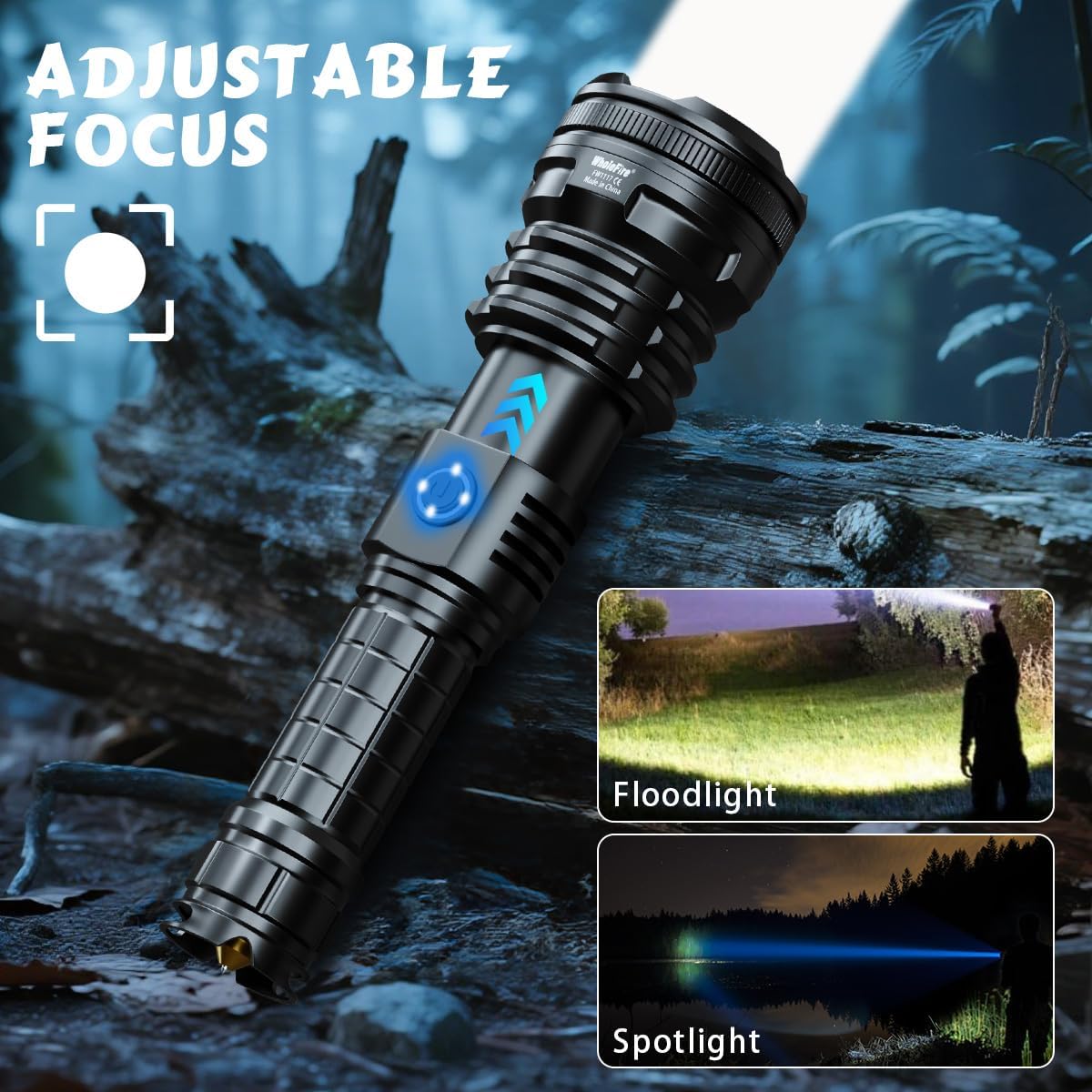
Image 5.2: Demonstration of the adjustable focus feature, allowing users to switch between a broad floodlight and a concentrated spotlight.
5.4 Battery Level Indicator
The power button features an integrated LED indicator that displays the current battery level. This allows you to monitor the remaining charge at a glance.
6. Charging
6.1 Charging the Flashlight
Connect the provided USB charging cable to the flashlight's input port and to a standard USB power source (e.g., wall adapter, computer USB port). The battery indicator will show charging status. A full charge can provide up to 8 hours of use in low mode.
6.2 Power Bank Function
The flashlight can also function as a power bank. Connect your external device (e.g., smartphone) to the flashlight's USB output port using its charging cable. The flashlight will then provide power to charge your device.

Image 6.1: The flashlight demonstrating its dual functionality: being charged via USB input and simultaneously charging a smartphone via USB output.

Image 6.2: Illustration of the flashlight's rechargeable features, including over-discharge, over-voltage, and over-charge protections, along with its long run time in low mode.
7. Maintenance
7.1 Cleaning
Wipe the flashlight with a soft, damp cloth to remove dirt or debris. Do not use abrasive cleaners or solvents.
7.2 Storage
Store the flashlight in a cool, dry place when not in use. If storing for extended periods, charge the battery every 3-6 months to maintain battery health.
7.3 Water Resistance
The flashlight has an IPX4 water resistance rating, meaning it is protected against splashing water from any direction. It is suitable for use in rainy conditions but should not be submerged in water.
8. Safety Information
- Do not look directly into the LED beam, as it can cause temporary vision impairment.
- Keep out of reach of children.
- Do not disassemble the flashlight, as this may void the warranty and cause damage.
- Use only the specified 18650 Lithium-ion batteries.
- Avoid exposing the flashlight to extreme temperatures or direct sunlight for prolonged periods.
- The tail cap features a safety hammer. Use this tool only in emergency situations for breaking glass. Exercise caution when handling.

Image 8.1: Illustration of the safety hammer feature integrated into the flashlight's tail cap, designed for emergency glass breaking.
9. Troubleshooting
| Problem | Possible Cause | Solution |
|---|---|---|
| Flashlight does not turn on. | Low battery; Incorrect battery installation; Loose connections. | Charge the battery; Check battery polarity; Ensure tail cap is tightened. |
| Light beam is dim. | Low battery. | Recharge the flashlight. |
| Cannot change modes. | Button malfunction; Low battery. | Ensure battery is charged; Contact customer support if issue persists. |
| Flashlight not charging. | Faulty USB cable; Power source issue; Charging port damage. | Try a different USB cable and power source; Ensure cable is fully inserted. |
10. Specifications
| Feature | Specification |
|---|---|
| Model Number | FG1217 |
| Brand | WholeFire |
| Light Source | XHP160 LED |
| Luminosity | Up to 90,000 Lumens |
| Lighting Modes | High, Medium, Low, Strobe, SOS |
| Battery Type | 2 x 18650 Lithium-ion (included) |
| Battery Capacity | 4800 mAh (integrated) |
| Voltage | 3.7 Volts |
| Charging | USB Input/Output (Power Bank Function) |
| Material | Aerospace Aluminum |
| Water Resistance | IPX4 |
| Dimensions (L x W x H) | 19.81 x 5.5 x 3.5 cm |
| Weight | 416 g |
11. Warranty and Support
For warranty information or technical support, please refer to the product packaging or contact your retailer. Keep your purchase receipt as proof of purchase.