
Introduction
This manual provides instructions for the INTECHING RC-1196 AV Receiver Remote Control. This remote is designed as a direct replacement for original Denon AV receiver remote controls, offering full functionality without the need for programming or pairing. It is compatible with the following Denon AV receiver models:
- Denon AVR-S500BT
- Denon AVR-S510BT
- Denon AVR-X510BT
- Denon AVR-X520BT
Simply install the required batteries, and the remote control will be ready for immediate use.
Setup
The INTECHING RC-1196 remote control requires two AAA batteries (not included) for operation. No programming or pairing is necessary.
- Locate the Battery Compartment: Turn the remote control over to find the battery compartment on the back.
- Open the Battery Cover: Press down on the latch and slide the battery cover downwards to open it.
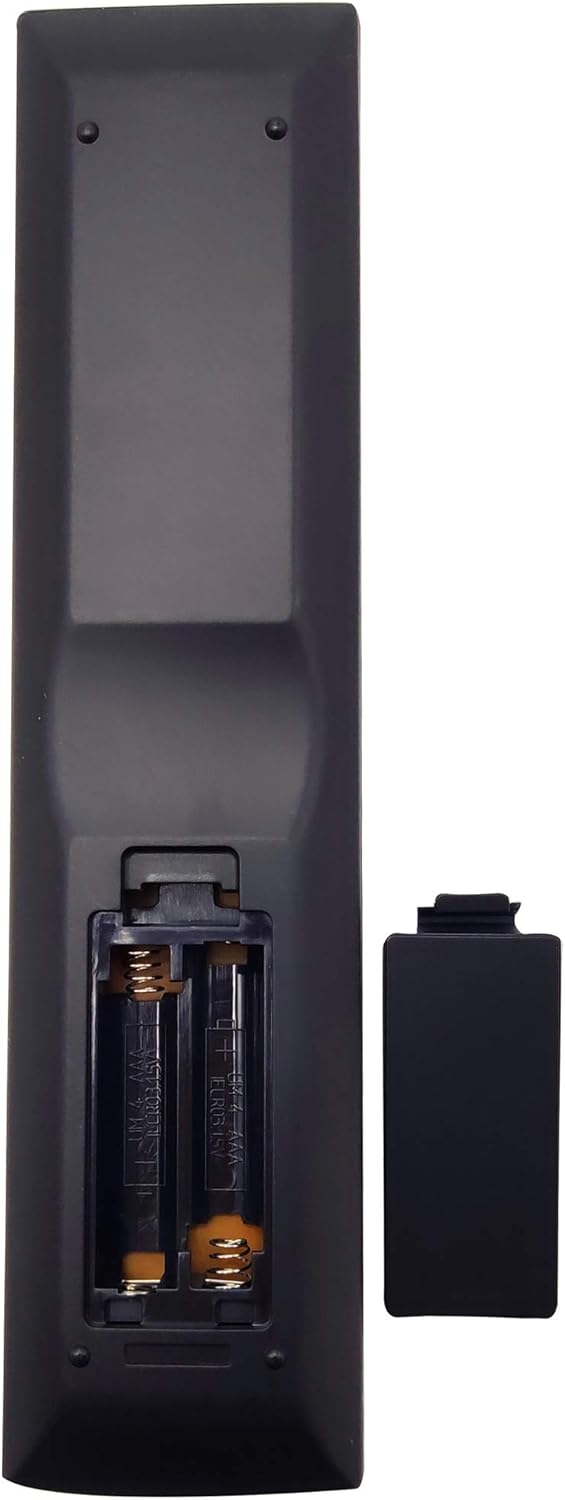
Image: Back of the remote control with the battery compartment open, ready for battery insertion.
- Insert Batteries: Insert two new AAA batteries into the compartment, ensuring the positive (+) and negative (-) terminals align correctly with the markings inside the compartment.
- Close the Battery Cover: Slide the battery cover back into place until it clicks securely.

Image: Back of the remote control with the battery compartment securely closed.
The remote control is now ready for use with your compatible Denon AV receiver.
Operating Instructions
This remote control provides full functionality for your compatible Denon AV receiver. Ensure there are no obstructions between the remote control and the AV receiver during operation.

Image: Front view of the RC-1196 remote control, displaying all control buttons.
Key functions include:
- POWER: Turns the AV receiver on or off.
- Input Selectors (e.g., CBL/SAT, DVD/Blu-ray, GAME, MEDIA PLAYER, USB, TV AUDIO, Bluetooth): Selects the desired input source.
- VOLUME +/-: Adjusts the master volume level.
- MUTE: Mutes or unmutes the audio output.
- Navigation Buttons (Up, Down, Left, Right, ENTER): Used for menu navigation and selection.
- BACK: Returns to the previous menu or screen.
- SETUP: Accesses the receiver's setup menu.
- INFO: Displays information about the current source or settings.
- SOUND MODE: Cycles through available sound modes.
- AUDIO DELAY: Adjusts audio delay settings.
- Playback Controls (Play, Pause, Stop, Skip Forward/Backward): Controls media playback.
- CH LEVEL RESTORER: Restores channel levels.
- SLEEP: Sets the sleep timer.
- SEARCH: Initiates search functions.
- TUNER Controls (AM, FM, MODE, MEMORY): Controls radio functions.
- QUICK SELECT (1-4): Allows quick access to pre-programmed settings.
Point the remote control directly at the AV receiver's infrared sensor for optimal response.
Maintenance
To ensure the longevity and proper functioning of your remote control, follow these maintenance guidelines:
- Cleaning: Wipe the remote control with a soft, dry cloth. For stubborn dirt, lightly dampen the cloth with water or a mild cleaning solution, then wipe dry immediately. Avoid abrasive cleaners or solvents.
- Battery Replacement: Replace batteries promptly when the remote's response becomes sluggish or it stops functioning. Always replace both batteries at the same time with new ones of the same type (AAA).
- Storage: If the remote control will not be used for an extended period, remove the batteries to prevent leakage and potential damage to the device.
- Protection: Keep the remote control away from direct sunlight, high temperatures, humidity, and liquids. Avoid dropping the remote or subjecting it to strong impacts.
Troubleshooting
If you experience issues with your remote control, refer to the following common problems and solutions:
| Problem | Possible Cause | Solution |
|---|---|---|
| Remote control does not work. | Dead or incorrectly inserted batteries. | Replace batteries with new AAA batteries, ensuring correct polarity (+/-). |
| Remote control works intermittently. | Weak batteries or obstruction. | Replace batteries. Ensure a clear line of sight between the remote and the AV receiver. |
| Specific functions do not respond. | Obstruction or incorrect input selected on receiver. | Ensure no physical obstruction. Verify the correct input source is selected on your AV receiver. |
| Remote control range is reduced. | Weak batteries or interference. | Replace batteries. Minimize sources of infrared interference (e.g., strong lights). |
If the issue persists after trying these solutions, please contact customer support.
Specifications
- Model Number: RC-1196
- Brand: INTECHING
- Compatible Devices: Denon AVR-S500BT, AVR-S510BT, AVR-X510BT, AVR-X520BT
- Power Source: 2 x AAA Batteries (not included)
- Product Dimensions: 8.27 x 1.97 x 0.79 inches
- Item Weight: 2.99 ounces
- Color: Black
- Special Feature: Ergonomic design
Warranty and Support
INTECHING provides the following warranty and support for the RC-1196 remote control:
- Warranty: A refund is available within 30 days from the order date. A replacement is available within 12 months from the order date.
- Customer Service: For any inquiries or assistance, please contact our customer support team. Messages are typically replied to within 24 hours.
For further information or to explore other products, please visit the INTECHING Store.
