
Technical Precision ORIGINAL DELUXE DESK LAMP VD01
Instruction Manual
Replacement Bulb for VERILUX Original Deluxe Desk Lamp VD01
Brand: Technical Precision | Model: ORIGINAL DELUXE DESK LAMP VD01 Replacement Bulb
Product Overview
This product is a high-quality replacement compact fluorescent lamp (CFL) designed specifically for the VERILUX Original Deluxe Desk Lamp VD01. It provides efficient and bright illumination, ensuring your desk lamp functions optimally.
- Direct replacement for VERILUX ORIGINAL DELUXE DESK LAMP VD01.
- Unit per sale: 1 bulb.

Image: Angled view of the Technical Precision replacement CFL bulb with four tubes and a 4-pin base, ready for installation.
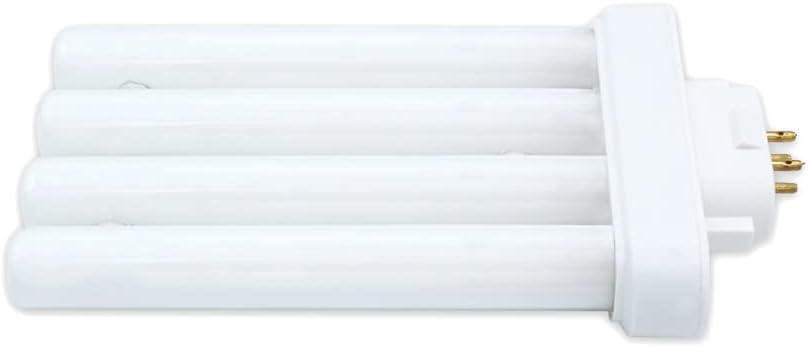
Image: Side view of the Technical Precision replacement CFL bulb, highlighting its compact shape and base connector.
Installation Guide (Setup)
Follow these steps carefully to replace the bulb in your VERILUX Original Deluxe Desk Lamp VD01:
- Safety First: Ensure the lamp is unplugged from the power outlet and has cooled down completely before handling the bulb.
- Access the Bulb: Depending on your lamp model, you may need to remove a protective cover or diffuser to access the existing bulb. Refer to your lamp's original manual if unsure.
- Remove Old Bulb: Grasp the old bulb firmly but gently. For 4-pin CFLs, pull straight out from the socket. Do not twist. If the bulb is broken, use gloves and carefully remove any remaining pieces.
- Insert New Bulb: Align the 4 pins of the new Technical Precision replacement bulb with the corresponding slots in the lamp's socket. Gently push the bulb straight into the socket until it is securely seated. Do not force it.
- Replace Cover: If you removed a protective cover or diffuser, reattach it securely.
- Test: Plug the lamp back into the power outlet and turn it on to ensure the new bulb is functioning correctly.
Operation
Once the Technical Precision replacement bulb is correctly installed in your VERILUX Original Deluxe Desk Lamp VD01, its operation is straightforward:
- Power On/Off: Use the lamp's integrated power switch (e.g., push button) to turn the light on or off.
- Warm-up Time: Like many CFLs, this bulb may require a brief warm-up period (a few seconds) to reach full brightness, especially in cooler environments.
Care and Maintenance
Proper care will extend the life of your replacement bulb and ensure optimal performance:
- Cleaning: To clean the bulb, ensure the lamp is unplugged and the bulb is cool. Gently wipe the glass tubes with a soft, dry, lint-free cloth. Do not use liquid cleaners or abrasive materials.
- Handling: Always handle the bulb by its plastic base, not the glass tubes, to avoid transferring oils from your skin, which can create hot spots and reduce bulb life.
- Storage: If storing a spare bulb, keep it in its original packaging in a cool, dry place to protect it from damage.
Troubleshooting
If you encounter issues with your replacement bulb, consider the following common solutions:
| Problem | Possible Cause | Solution |
|---|---|---|
| Bulb does not light up. | Lamp unplugged, loose connection, faulty lamp switch, or damaged bulb. | Ensure lamp is plugged in. Check if the bulb is securely seated in the socket. Test the lamp with another known working bulb if possible. If the bulb is visibly damaged, replace it. |
| Bulb flickers. | Loose connection, incompatible dimmer (CFLs are generally not dimmable unless specified), or bulb nearing end of life. | Check bulb connection. Ensure the lamp is not connected to a dimmer switch unless the bulb is explicitly rated for dimming. If flickering persists, the bulb may need replacement. |
| Light is dim. | Bulb not fully warmed up, or bulb nearing end of life. | Allow a few seconds for the bulb to reach full brightness. If it remains dim, consider replacing the bulb. |
Technical Specifications
| Specification | Detail |
|---|---|
| Brand | Technical Precision |
| Model Number | ORIGINAL DELUXE DESK LAMP VD01 (Replacement) |
| Wattage | 27.00 Watts |
| Specific Uses For Product | Lamp |
| Unit Count | 1.0 Count |
| Color Temperature | 6500 Kelvin |
| Number of Items | 1 |
| Material | Copper (for internal components/pins) |
| Connectivity Technology | Normal bulb (4-pin base) |
| Controller Type | Push Button (refers to lamp control) |
| Item Package Quantity | 1 |
| Light Source Wattage | 27 Watts |
| Control Method | App (refers to lamp control, if applicable) |
| Average Life | 10000 Hours |
| Bulb Length | 5.75 Inches |
| Batteries Included? | No |
| Batteries Required? | No |
| ASIN | B08HJLHSDQ |
| Date First Available | September 4, 2020 |
Safety Information
Please read and adhere to the following safety guidelines:
- Always disconnect power to the lamp before installing, removing, or cleaning the bulb.
- Allow the bulb to cool completely before handling. Hot bulbs can cause burns.
- Do not use this bulb with dimmer switches unless the lamp or bulb specifically states it is dimmable. Using a non-dimmable CFL with a dimmer can cause flickering, damage to the bulb, or fire hazards.
- Do not use in enclosed fixtures unless specified, as heat buildup can shorten bulb life.
- If the bulb breaks, ventilate the room and carefully clean up the broken glass and mercury-containing materials according to local guidelines. Avoid direct contact with skin.
- Keep out of reach of children and pets.
Disposal Information
This compact fluorescent lamp (CFL) contains a small amount of mercury and should be disposed of properly to protect the environment. Do not dispose of CFLs in regular household trash.
- Recycle: Many retailers and local waste management facilities offer recycling programs for CFLs. Check with your local authorities or visit Energy Star's website for recycling options in your area.
- Safe Handling: When transporting a used bulb for disposal, place it in its original packaging or a sealed plastic bag to prevent breakage.
Warranty and Support
For information regarding warranty coverage or customer support for your Technical Precision replacement bulb, please refer to the seller's information on the original purchase platform or contact Technical Precision directly through their official channels. Specific warranty details are not provided in this manual.