
Introduction
The Teyleten Robot ADUM3160 USB Isolator Module is designed to provide electrical isolation between a host computer's USB port and a connected USB device. This isolation protects against ground loops, voltage spikes, and noise, ensuring stable and reliable data transfer in sensitive environments. It supports USB 1.5 Mbps low-speed and 12 Mbps full-speed data rates.
Product Features
- Compatible with USB 2.0 (low-speed and full-speed devices).
- ADUM3160 isolation voltage: 2500V.
- Power module isolation voltage: 1500V.
- Supports USB control transfer, bulk transfer, interrupt transmission, and synchronous transmission.
- Power supply directly from the USB port of the PC host.
- Driver-free operation.
Setup and Installation
- Identify USB Ports: Locate an available USB port on your host computer (PC) and the USB cable from your peripheral device.
- Connect to Host: Plug the male USB-A connector of the ADUM3160 module into a USB port on your computer.
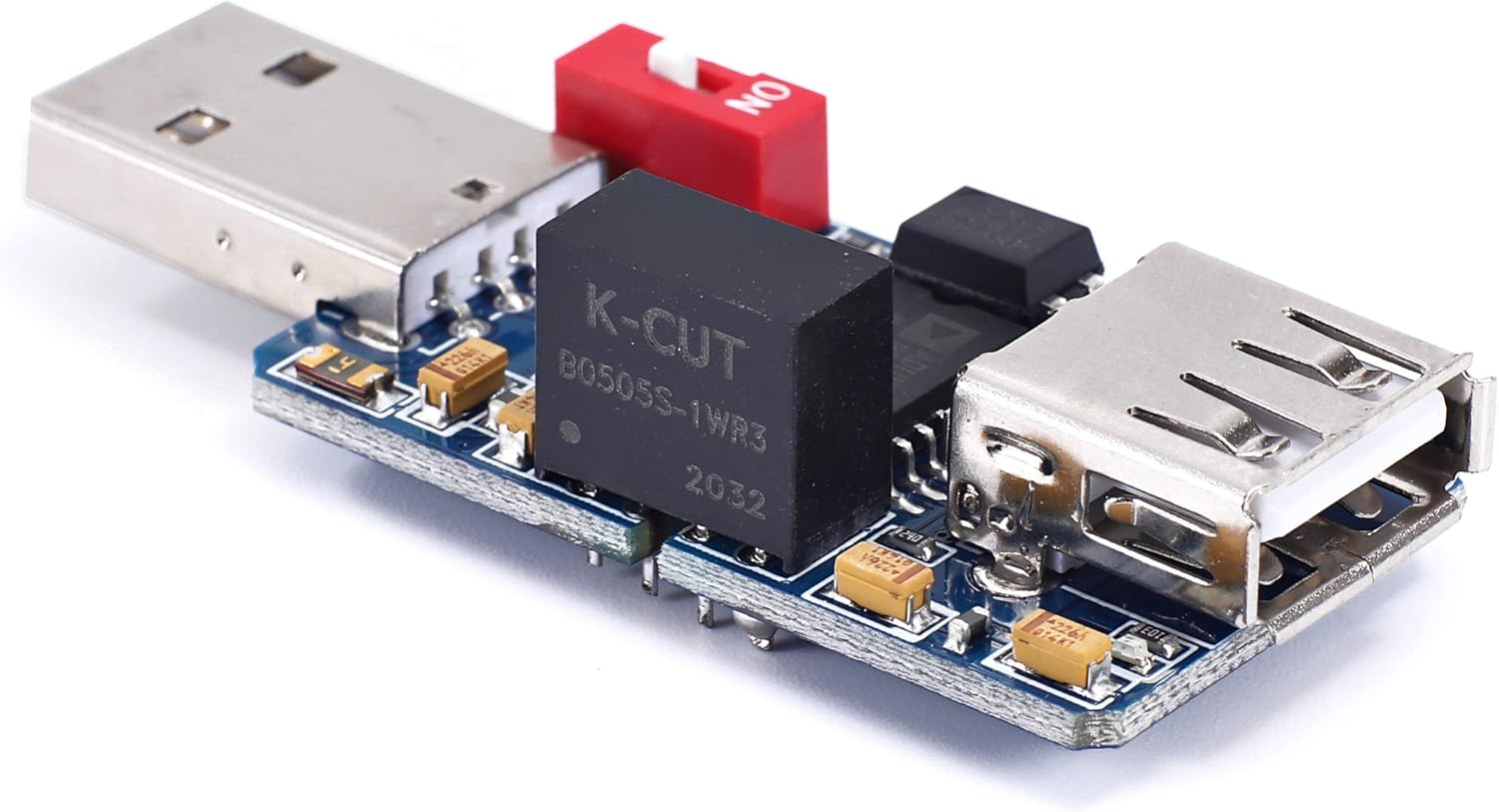
Image: The ADUM3160 module with its male USB-A connector ready to plug into a host computer.
- Connect Peripheral Device: Plug your USB peripheral device's cable into the female USB-A port on the ADUM3160 module.

Image: The ADUM3160 module with a USB device connected to its female USB-A port.
- Power Considerations: The module draws power from the host USB port. If your USB device requires more than 180mA operating current, you may need to use a USB Y-cable or an external powered USB hub to provide additional power to the device, as the isolator itself provides limited power.
- Speed Selection Switch: The module features a switch (often labeled "ON" or with numerical positions) to select between full-speed (12 Mbps) and low-speed (1.5 Mbps) modes.

Image: A close-up view of the ADUM3160 chip and the red switch for speed selection. Ensure the switch is set correctly for your device.
- Set the switch to the "ON" position (or position '1') for full-speed devices.
- Set the switch to the "OFF" position (or position '0') for low-speed devices.
Note: The module does not support pure high-speed (USB 2.0 High-Speed, 480 Mbps) devices.
Operating Instructions
Once connected, the ADUM3160 module operates transparently. No special drivers are required. The module isolates the electrical connection while allowing USB data to pass through.
Compatible Devices:
- Full-speed devices: USB flash drives, digital cameras, card readers, mobile hard disks, USB hubs, AVRJTAG, AVRISP, S-Lab, J-Link, FET430UIF, PICKIT2, XDS100, LPC cc-link, ICD2, USB serial ports (FT232, CP2102, PL2303, CH341 chips).
- Low-speed devices: Keyboards, mice, USBASP, USBHID equipment, USBCDC equipment.
Note: The module has been tested and does not support USB wireless network cards. It is not compatible with pure high-speed USB 2.0 devices.
Maintenance
The Teyleten Robot ADUM3160 USB Isolator Module is a low-maintenance device. Keep it clean and dry. Avoid exposing it to extreme temperatures or humidity. Do not attempt to open the module, as this may damage the internal components and void any potential warranty.
For protection, consider wrapping the exposed circuit board with non-conductive material like electrical tape or placing it in a small enclosure, especially in environments where it might come into contact with other components or conductive surfaces.

Image: The underside of the ADUM3160 module, showing the circuit board. Handle with care to prevent damage.
Troubleshooting
- Device Not Recognized:
- Ensure the USB device is compatible with low-speed or full-speed USB 2.0. High-speed devices are not supported.
- Verify the speed selection switch on the module is set correctly for your device (ON for full-speed, OFF for low-speed).
- Check if the USB device requires more than 180mA of power. If so, use a powered USB hub or a USB Y-cable to supply additional power.
- Try connecting the isolator to the computer first, then plug the device into the isolator.
- Test the USB device directly with the computer to confirm it functions without the isolator.
- Ensure all connections are secure.
- Intermittent Connection or Data Errors:
- Confirm the USB device is not a high-speed device.
- Check for adequate power supply to the connected device, especially if it has high power requirements.
- Ensure the operating environment temperature is within the specified range (-40℃ to 85℃).
- Verify the switch setting matches the device's speed.
- No Isolation Effect / Noise Still Present:
- Ensure the module is correctly installed between the host and the peripheral.
- Confirm the noise source is indeed electrical interference transmitted via the USB connection. Some noise may originate from other sources.
- The module isolates the data lines and power lines. If the noise is from a different path (e.g., ground loop through audio cables), additional isolation for those paths may be required.
Specifications
| Model | PEKZ-01 |
| USB Compatibility | USB 2.0 (Low-speed 1.5 Mbps, Full-speed 12 Mbps) |
| Isolation Chip | ADUM3160 |
| ADUM3160 Isolation Voltage | 2500V |
| Power Module Isolation Voltage | 1500V |
| Power Supply | From host USB port |
| Maximum Output Current | Approximately 180mA (for connected device) |
| Operating Environment Temperature | -40℃ to 85℃ |
| Dimensions | Not specified in source data, typical compact USB dongle size. |
| Weight | 0.352 ounces (approximately 10 grams) |
Warranty Information
Specific warranty details for the Teyleten Robot ADUM3160 USB Isolator Module are typically provided at the point of purchase or on the manufacturer's official website. Please refer to your purchase documentation or contact Teyleten Robot customer support for current warranty terms and conditions.
Support and Contact
For technical assistance, troubleshooting, or further inquiries regarding your Teyleten Robot ADUM3160 USB Isolator Module, please visit the official Teyleten Robot store or contact their customer support channels. You can often find support resources, FAQs, and contact information on their website.
Online Store: Teyleten Robot Amazon Store