
1. Introduction
The FoodSaver Multi-Use Food Preservation System is designed to keep your food fresh up to 5 times longer compared to traditional storage methods, and helps prevent freezer burn. This system combines a heat sealer and a retractable handheld vacuum sealer, offering versatile food preservation options for your freezer, refrigerator, and pantry.
2. Safety Information
Please read all instructions carefully before using the appliance. Keep this manual for future reference. Always ensure the appliance is unplugged when not in use or before cleaning. Do not immerse the appliance in water or other liquids. Keep hands clear of the sealing strip during operation as it becomes hot. Use only FoodSaver brand bags and accessories for optimal performance and safety.
3. Package Contents
- FoodSaver Multi-Use Vacuum Sealing and Food Preservation System (VS-3180)
- One 11"x 8' Vacuum Seal Roll
- Six 1-Quart Vacuum Seal Bags
- Five 1-Gallon Vacuum Seal Bags
- Six 1-Quart Vacuum Zipper Bags
- Five 1-Gallon Vacuum Zipper Bags
- Accessory Hose
4. Product Overview
The FoodSaver VS-3180 features a sleek design with intuitive controls for various sealing needs. It includes a built-in roll storage and cutter for convenience.

Figure 1: Top view of the FoodSaver VS-3180 Vacuum Sealer.

Figure 2: Angled view highlighting the compact design.

Figure 3: Top view with the lid open, showing the bag roll storage and cutter bar.
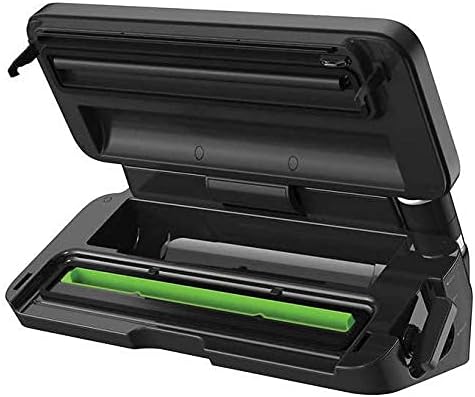
Figure 4: Closer view of the open unit, detailing the sealing strip and vacuum channel.
5. Setup
5.1 Installing the Bag Roll
- Open the lid of the FoodSaver unit.
- Place the vacuum seal roll into the designated roll storage compartment.
- Pull out enough material to create a bag of your desired length.
5.2 Creating a Custom-Sized Bag
To create a bag, you will need to seal one end of the roll material. This unit features a built-in cutter for convenience.
- Pull the bag material over the sealing strip.
- Close the lid and press down firmly on the handle until it locks into place.
- Press the 'Seal Only' button. The unit will heat and seal the end of the bag.
- Once the sealing process is complete, open the lid and remove the newly formed bag.
- Use the integrated cutter bar to cut the bag from the roll, ensuring a straight edge.
Video 1: Demonstration of cutting and sealing a custom-sized bag from a roll.
6. Operating Instructions
6.1 Vacuum Sealing Dry Foods
For dry items like nuts, grains, or dehydrated fruits, use the 'Dry' setting.
- Place your dry food item into a pre-made or custom-sized vacuum seal bag, leaving at least 3 inches of space from the top.
- Ensure the open end of the bag is clean and dry.
- Place the open end of the bag into the vacuum channel.
- Close the lid and press down firmly on the handle until it locks.
- Select the 'Dry' mode.
- Press the 'Vacuum & Seal' button. The unit will automatically remove air and then seal the bag.
- Once complete, open the lid and remove your sealed food.
Video 2: Step-by-step guide on vacuum sealing dry food items.
6.2 Vacuum Sealing Moist Foods
For moist items like raw meats, marinated foods, or cooked dishes, use the 'Moist' setting.
- Place your moist food item into a vacuum seal bag, leaving sufficient space at the top.
- Ensure the open end of the bag is clean and dry. For very moist foods, you may pre-freeze them or place a paper towel near the seal area to absorb excess liquid.
- Place the open end of the bag into the vacuum channel.
- Close the lid and press down firmly on the handle until it locks.
- Select the 'Moist' mode.
- Press the 'Vacuum & Seal' button. The unit will automatically remove air and then seal the bag.
- Once complete, open the lid and remove your sealed food.
Video 3: Demonstration of vacuum sealing moist food items, such as chicken.
6.3 Using the Handheld Sealer Accessory
The retractable handheld sealer is ideal for FoodSaver zipper bags and canisters.
- Attach the accessory hose to the port on the side of the unit.
- Insert the other end of the hose into the designated port on your FoodSaver zipper bag or canister.
- Select the 'Vacuum' mode for handheld sealing.
- Press the 'Handheld' button. The unit will begin to remove air.
- The vacuum process will stop automatically when optimal vacuum is achieved.
Video 4: Overview of the handheld vacuum sealing function for various containers.
6.4 Specialized Settings
- Sous Vide: Creates a strong, consistent seal suitable for sous vide cooking.
- Pulse: Allows manual control over the vacuum process, ideal for delicate foods to prevent crushing.
- Marinate: Rapidly marinates food in minutes by opening the pores of the food under vacuum.
7. Maintenance and Cleaning
Regular cleaning ensures optimal performance and extends the life of your FoodSaver unit.
7.1 Cleaning the Drip Tray
The removable drip tray collects any overflow liquids during the vacuum sealing process, especially with moist foods.
- Ensure the unit is unplugged and cooled.
- Open the lid and carefully remove the green drip tray.
- Wash the drip tray with warm, soapy water. Rinse thoroughly and dry completely before reinserting.
Video 5: Guide to cleaning the removable drip tray for hygiene and maintenance.
7.2 General Cleaning
Wipe down the exterior of the unit with a damp cloth. Do not use abrasive cleaners or immerse the unit in water.
8. Troubleshooting
If your FoodSaver unit is not performing as expected, try these common troubleshooting steps:
- No Vacuum: Ensure the lid is fully closed and the handle is locked. Check that the bag is properly placed in the vacuum channel and that the sealing gaskets are clean and free of debris.
- Poor Seal: Verify that the bag material is flat and free of wrinkles in the sealing area. Ensure the sealing strip is clean. For moist foods, use the 'Moist' setting or pre-freeze the food.
- Unit Not Turning On: Check that the power cord is securely plugged into a working electrical outlet.
9. Specifications
| Feature | Specification |
|---|---|
| Brand | FoodSaver (by Sunbeam) |
| Model | VS-3180 |
| Material | Stainless Steel |
| Color | Black, Silver |
| Product Dimensions | 18"L x 11"W x 8.9"H |
| Item Weight | 8 Pounds |
| Power Source | HandHeld (for accessory) |
| Operation Mode | Manual (button controls) |
| Wattage | 110 watts |
| Voltage | 110 Volts |
| UPC | 033413001197 |
10. Warranty Information
The FoodSaver Multi-Use Vacuum Sealing and Food Preservation System comes with a 5-year guarantee, ensuring quality and reliability. Please refer to the product packaging or contact customer support for full warranty details.
11. Customer Support
For any questions, concerns, or support needs, please contact us:
- Email: support@liwunon.com
- Scan the QR code on the product for a quick start guide and troubleshooting videos.


