
1. Introduction
The GINTOOYUN RCA to VGA Adapter is designed to convert analog video signals (RCA composite, S-Video) and existing VGA signals into a VGA output. This allows devices such as VCD players, DVD players, cameras, and set-top boxes to be connected to a VGA monitor or display.
Key features include:
- Supports multiple input types: S-VIDEO, RCA VIDEO, and VGA.
- Output resolution support from 600x800 up to 1920x1080, compatible with both CRT and LCD monitors.
- Incorporates scanning frequency enhancement technology, allowing refresh rates between 60Hz-75Hz for flicker-free images.
- Features 3D image noise reduction for clearer and more stable picture quality.
- Designed for plug-and-play operation, requiring no complex setup.
2. Package Contents
Please verify that all items listed below are included in your package:
- 1 x GINTOOYUN RCA to VGA Adapter (Video to VGA Converter)
- 1 x 5V Power Adapter
- 1 x VGA Male to Male Cable
- 1 x RCA Composite Video Cable
- 1 x S-Video Cable
- 1 x User Manual

Figure 2.1: Included Accessories
This image displays the GINTOOYUN RCA to VGA Adapter along with its accompanying cables (S-Video, RCA composite, VGA) and power adapter, ensuring all necessary components for operation are present.
3. Product Overview
3.1. Device Layout

Figure 3.1: Top View of the Converter
This image provides a top-down view of the GINTOOYUN RCA to VGA Adapter, highlighting the control panel with various buttons for signal selection and image adjustments.
3.2. Ports and Connectors

Figure 3.2: Rear Panel Connections
This image illustrates the rear panel of the converter, detailing the input ports for RCA composite video (yellow), S-Video, and the VGA output port (blue).
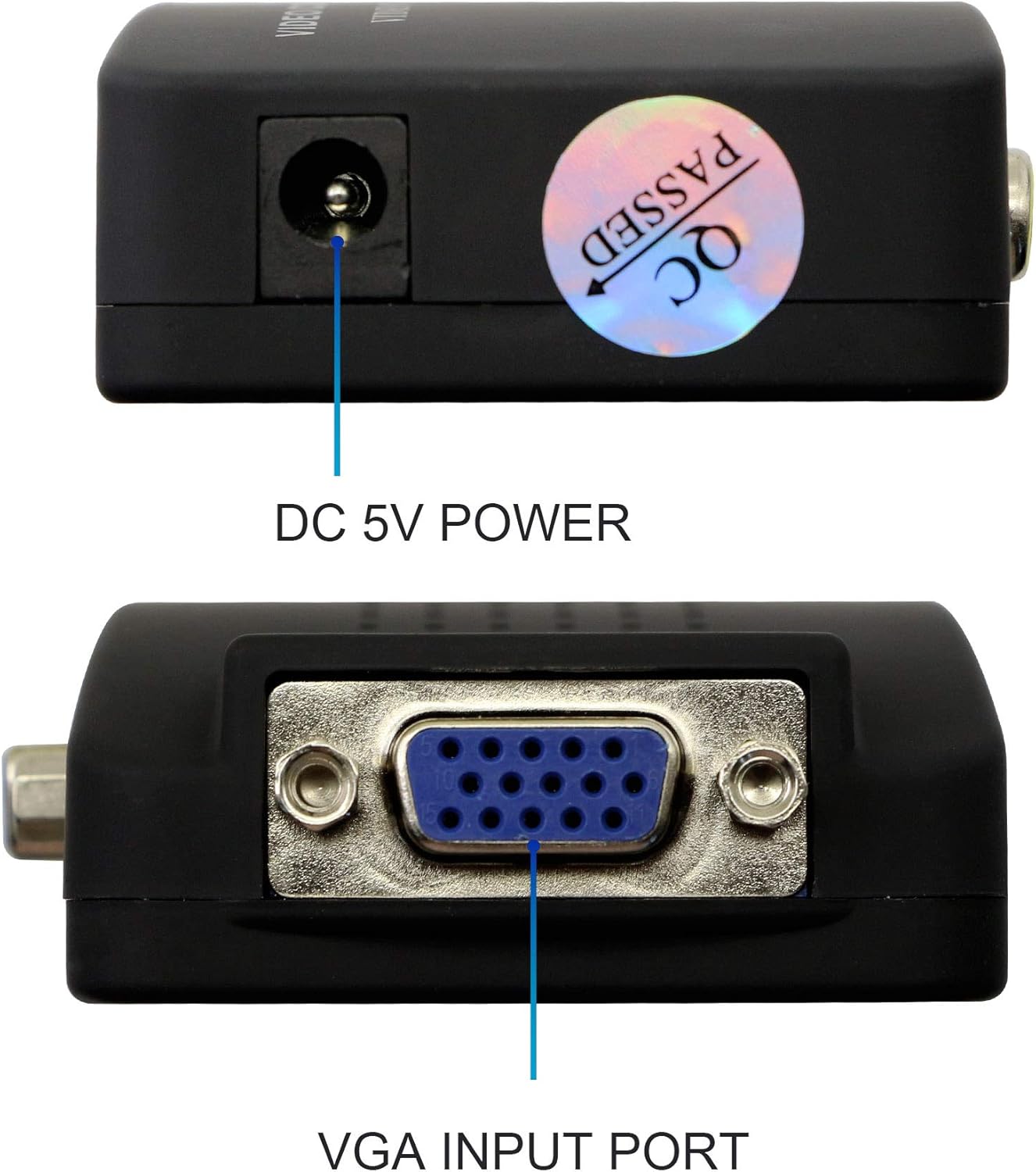
Figure 3.3: Side Panel Connections
This image shows the side panel, featuring the DC 5V power input jack and an additional VGA input port, allowing for direct VGA source connection.
3.3. Control Buttons

Figure 3.4: Control Panel Buttons
This image provides a detailed view of the control buttons on the converter, each labeled with its specific function for signal selection and image adjustment.
- AV/SV/PC: Selects the input signal channel (AV, S-Video, or VGA).
- PIP: Picture-in-Picture function for adjusting image size (zoom in/out) or position.
- RESET: Resets the display resolution to default settings.
- MODE: Changes the image resolution and refresh rate.
- MENU: Accesses the menu to adjust image brightness, contrast, chroma, and hue (available in AV or S-Video modes).
- P.P: Switches between different image display modes (Standard, Custom, Bright, Soft).
4. Setup and Connection
Follow these steps to connect your GINTOOYUN RCA to VGA Adapter:
- Connect Input Source: Connect your video source (e.g., DVD player, VCD player, camera, set-top box, computer) to the appropriate input port on the converter. Use an RCA composite cable for VIDEO IN, an S-Video cable for SVIDEO IN, or a VGA cable for VGA IN.
- Connect Output Display: Connect the VGA OUT port of the converter to the VGA input of your monitor or display using the provided VGA male-to-male cable.
- Connect Power: Plug the 5V power adapter into the DC 5V power port on the converter, then connect the adapter to a power outlet.
- Power On: Turn on your video source, the converter, and your display.

Figure 4.1: Supported Resolutions
This image demonstrates the adapter's capability to support various display resolutions, ranging from 600P to 1080P, ensuring compatibility with different monitors.

Figure 4.2: Connection Diagram
This diagram visually guides users on how to connect various input devices like DVD players, set-top boxes, computers, and laptops to the converter, and then to output displays such as monitors or projectors.
Important Note on Resolution: If connecting a computer, it is recommended to set the computer's resolution to 800x600 with a 60Hz refresh rate for initial setup. High-resolution desktop computer outputs may not be supported by all connected displays.
5. Operating Instructions
Once connected and powered on, use the control buttons on the converter to manage your display settings:
- AV/SV/PC Button: Press this button to cycle through the available input sources: AV (RCA composite), S-Video, and PC (VGA). Select the input corresponding to your connected device.
- MODE Button: Use this button to change the output resolution and refresh rate to best suit your display. The converter supports resolutions from 600x800 up to 1920x1080 and refresh rates between 60Hz-75Hz.
- MENU Button: Press MENU to access the on-screen display (OSD) menu. Within the OSD, you can adjust image parameters such as brightness, contrast, chroma, and hue. These adjustments are primarily effective when using AV or S-Video input modes.
- P.P Button: This button allows you to switch between predefined image display modes, such as Standard, Custom, Bright, or Soft, to optimize picture quality for different content.
- PIP Button: If your display supports Picture-in-Picture, this button can be used to adjust the size (zoom in/out) or position of the secondary image.
- RESET Button: If you encounter display issues or an unsupported resolution, press the RESET button to revert the converter's resolution settings to a default, compatible state.
6. Troubleshooting
If you experience issues with your GINTOOYUN RCA to VGA Adapter, please refer to the following common problems and solutions:
No Display or Black Screen
- Check Connections: Ensure all connecting cables (input video, VGA output, and power) are securely and correctly plugged into their respective ports. Verify that the output terminal and input terminal are not connected in reverse.
- Power Supply: Confirm that the 5V power adapter is properly connected to the converter and a working power outlet.
- Input Selection: Use the AV/SV/PC button to ensure the correct input source is selected on the converter.
- Resolution Compatibility: If connecting a computer, ensure its output resolution is compatible with your display and the converter. Try setting the computer's resolution to 800x600 at 60Hz. Some displays may not support very high resolutions from a desktop computer when routed through the converter. If the screen cannot be displayed, press the RESET button on the converter to revert to a default resolution.
Poor Image Quality (Flickering, Noise)
- Cable Quality: Ensure you are using high-quality video cables. Damaged or low-quality cables can introduce signal interference.
- Resolution/Refresh Rate: Experiment with different resolutions and refresh rates using the MODE button to find the optimal setting for your display.
- Image Adjustments: Use the MENU button to fine-tune brightness, contrast, chroma, and hue, especially for AV and S-Video inputs.
7. Specifications
| Model Number | TD-AVTOVGA |
| Input Ports | 1 x VGA IN, 1 x RCA (VIDEO IN), 1 x S-VIDEO IN |
| Output Port | 1 x VGA OUT |
| Power Input | DC 5V 1A |
| Supported Resolutions | 600x800 to 1920x1080 |
| Refresh Rate | 60Hz - 75Hz |
| Color | Black |
| Item Weight | 12 ounces (approximately 340 grams) |
| Package Dimensions | 6.42 x 5 x 1.93 inches (approximately 16.3 x 12.7 x 4.9 cm) |

Figure 7.1: Product Dimensions
This image provides a visual representation of the physical dimensions of the GINTOOYUN RCA to VGA Adapter, indicating its length, width, and height in millimeters.
8. Maintenance
To ensure the longevity and optimal performance of your GINTOOYUN RCA to VGA Adapter, please follow these maintenance guidelines:
- Cleaning: Use a soft, dry cloth to clean the exterior of the device. Do not use liquid cleaners or aerosols, as they may damage the internal components.
- Storage: Store the adapter in a cool, dry place away from direct sunlight and extreme temperatures.
- Handling: Avoid dropping the device or subjecting it to strong impacts. Handle cables by the connectors, not by the wire, to prevent damage.
- Ventilation: Ensure the device has adequate ventilation and is not covered, to prevent overheating.
9. Warranty and Support
Information regarding product warranty and customer support details is not provided in the available product data. Please refer to the retailer or manufacturer's official website for specific warranty terms and contact information for support.