
JESSPOW 18500 Rechargeable Batteries
JESSPOW 18500 Rechargeable Li-ion Battery Instruction Manual
Model: 18500 Rechargeable Batteries
Introduction
Thank you for choosing JESSPOW 18500 Rechargeable Li-ion Batteries. These high-capacity 1600mAh, 3.7V button-top batteries are designed for various electronic devices, offering reliable and environmentally friendly power. Please read this manual carefully to ensure safe and optimal use of your batteries.

Image: Four JESSPOW 18500 rechargeable batteries, each labeled with "JESSPOW IMR 18500 1600mAh 3.7V Li-ion", are shown alongside a small solar garden light, illustrating a common application.
Safety Information and Warnings
Lithium-ion batteries require careful handling. Adhere to the following safety guidelines to prevent damage, injury, or fire:
- Do not disassemble, puncture, or modify the battery.
- Do not expose batteries to water, fire, or extreme temperatures (above 60°C / 140°F or below -20°C / -4°F).
- Avoid short-circuiting the battery terminals.
- Use only chargers specifically designed for Li-ion batteries.
- Keep batteries away from children and pets.
- If a battery shows signs of damage, leakage, or swelling, discontinue use immediately and dispose of it properly.
- Do not mix new and old batteries, or batteries of different types/brands.

Image: A diagram highlighting the key attributes of JESSPOW batteries, including durability, power, rigorous testing, environmental friendliness, and a guarantee of no leakage, emphasizing product safety and quality.
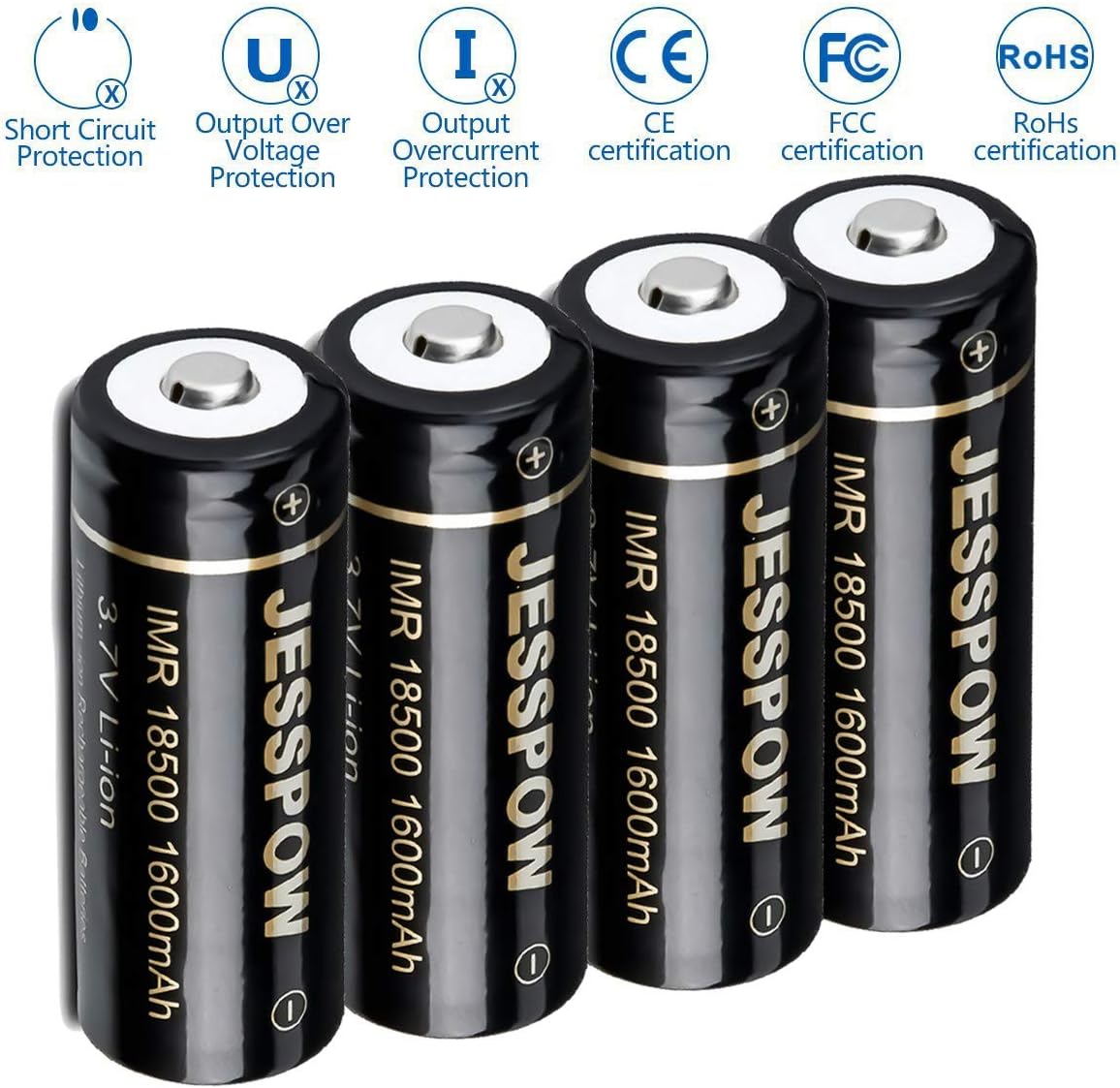
Image: An illustration displaying the safety certifications and protection mechanisms integrated into JESSPOW batteries, such as short circuit protection, over-voltage protection, overcurrent protection, and compliance with CE, FCC, and RoHS standards.
Setup and Compatibility
Battery Identification
These are 18500 batteries. It is crucial to verify that your device is compatible with 18500 batteries. These batteries are not 18650 batteries and are shorter in length. They cannot be used in devices requiring 18650 batteries due to size differences.

Image: A visual comparison between an 18650 battery and an 18500 battery, clearly showing that the 18500 battery is shorter, emphasizing the importance of checking device compatibility.
Initial Charging
Before first use, it is recommended to fully charge the batteries using a compatible Li-ion battery charger. Ensure the charger is designed for 3.7V Li-ion cells.
Insertion into Device
Insert the battery into your device according to the polarity markings (+ and -). The button top of the battery typically corresponds to the positive (+) terminal.

Image: A close-up of a hand carefully inserting a JESSPOW 18500 battery into the designated slot of a solar garden light, demonstrating correct battery placement.
Operating Instructions
JESSPOW 18500 batteries are suitable for a range of devices that require 3.7V Li-ion 18500 cells. Common applications include:
- LED Flashlights
- Solar Garden Lights
- Security System Panels
- Landscape Lighting
- Other compatible electronic devices requiring 18500 Li-ion batteries.

Image: A JESSPOW 18500 battery is depicted in a garden environment, highlighting its use in solar lawn lights, demonstrating a practical application.

Image: An infographic displaying various icons that represent the universal range of use for JESSPOW batteries, such as rangefinders, smoke sensors, flashlights, game machines, computer mice, and cameras.
Maintenance and Storage
Charging
Always use a dedicated Li-ion battery charger. Avoid overcharging or deep discharging, as this can reduce battery lifespan. Remove batteries from the charger once fully charged.
Storage
For long-term storage, store batteries in a cool, dry place, ideally at around 50% charge. Avoid storing them fully charged or fully discharged. Keep them in a protective case to prevent short circuits.
Disposal
These batteries are rechargeable and designed for multiple uses. When they reach the end of their life, dispose of them responsibly at a local battery recycling facility. Do not dispose of them in household waste.
Troubleshooting
- Battery not charging:
- Ensure the charger is compatible with Li-ion 18500 batteries and is functioning correctly.
- Check for proper battery insertion and contact with charger terminals.
- Inspect the battery for any visible damage.
- Battery not powering device:
- Verify that the device requires 18500 batteries and not 18650 or other sizes.
- Check battery polarity in the device.
- Ensure the battery is sufficiently charged.
- Test with another known-good battery if available.
- Reduced runtime:
- Battery capacity naturally degrades over many charge cycles.
- Ensure the battery is fully charged before use.
- Extreme temperatures can affect battery performance.
Specifications
| Feature | Specification |
|---|---|
| Model | IMR 18500 Rechargeable Li-ion Battery |
| Capacity | 1600mAh |
| Voltage | 3.7V |
| Amp Limit | 16.5A |
| Type | Button Top |
| Cell Composition | Lithium Ion |
| Recommended Uses | LED Flashlights, Solar Garden Lights, Security Systems, Landscape Lighting |

Image: A detailed view of a JESSPOW IMR 18500 battery, clearly displaying its 1600mAh capacity and 3.7V voltage rating.
Warranty and Support
JESSPOW is committed to customer satisfaction. If you encounter any issues with your rechargeable batteries or are not satisfied with your purchase, please contact our customer service. We offer a full refund or free replacement for eligible concerns.
For support, please refer to the contact information provided with your product packaging or visit the official JESSPOW website.
Related Documents - 18500 Rechargeable Batteries
 |
Mini Stepp 1-2-3 Instruction Manual - Halo Design Copenhagen Instruction manual for the Halo Design Mini Stepp 1-2-3 portable lamp, detailing its 3-step dimming system, USB-C charging, usage instructions, and specifications. |
 |
Ambition S2 Tattoo Battery User Manual Comprehensive user manual for the Ambition S2 wireless tattoo battery, including technical specifications, features, and usage instructions. |
 |
Uwell Caliburn G5 Lite User Manual - Instructions and Specifications Comprehensive user manual for the Uwell Caliburn G5 Lite pod system, covering product introduction, specifications, quick start guide, detailed instructions, precautions, and troubleshooting. |
 |
Filter X35 Wireless Tattoo Machine User Guide Comprehensive user guide and specifications for the Filter X35 Wireless Tattoo Machine, including operating instructions, warranty details, and safety information. |
 |
DQFART Wireless Tattoo Machine User Manual User manual and operating instructions for the DQFART wireless tattoo machine, including voltage adjustment, mode switching, and safety protection features. |
 |
OXVA ONEO User Manual: Features, Specifications, and Instructions Comprehensive user manual for the OXVA ONEO vaping device, detailing product structure, specifications, operating instructions, juice filling, and warranty information. |
Ask a question about this manual
Ask about setup, troubleshooting, compatibility, parts, safety, or missing instructions. Manuals+ will review the question and use this page’s manual context to help answer it.