
1. Introduction
This manual provides essential information for the proper setup, operation, and maintenance of your MONSIATUG replacement remote control. This remote is designed to function as a direct replacement for specific Denon AV receiver models without requiring any programming. Please read this manual thoroughly before use to ensure optimal performance and longevity of your remote control.
2. Setup
2.1 Battery Installation
The remote control requires two (2) AAA batteries (not included). Follow these steps to install the batteries:
- Locate the battery compartment on the back of the remote control.
- Slide the battery cover downwards to open it.
- Insert two AAA batteries, ensuring the positive (+) and negative (-) terminals align correctly with the markings inside the compartment.
- Slide the battery cover back into place until it clicks securely.
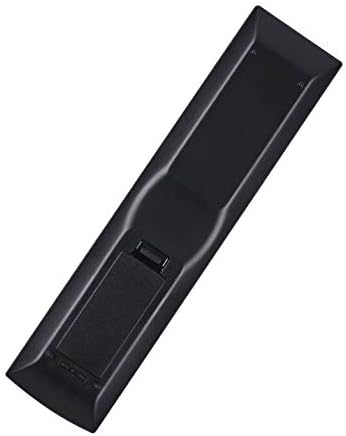
Image Description: This image displays the back of the MONSIATUG replacement remote control, highlighting the battery compartment cover. The cover is located on the lower half of the remote's back, designed to slide open for battery insertion.
3. Operating Instructions
3.1 First Use
Once batteries are correctly installed, the remote control is ready for immediate use. No programming or pairing is required for this replacement unit.
3.2 Pointing the Remote
For optimal signal transmission, ensure the remote control is pointed directly at the infrared (IR) sensor on your Denon AV receiver. Obstructions between the remote and the receiver can interfere with the signal.
3.3 Button Functions
The buttons on this replacement remote are designed to replicate the functions of your original Denon AV receiver remote. Refer to your Denon AV receiver's original user manual for specific button functionalities and advanced operations if needed.
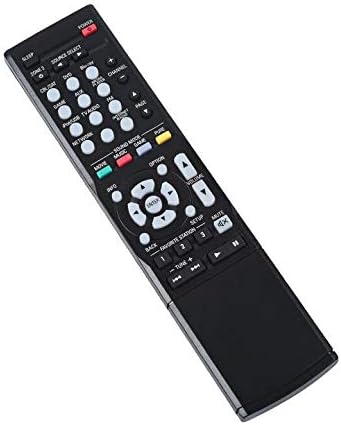
Image Description: This image shows the front of the MONSIATUG replacement remote control. It features a standard layout with power, source select, volume, channel, and navigation buttons, along with various function keys for controlling a Denon AV receiver.
4. Maintenance
4.1 Cleaning
To clean the remote control, gently wipe it with a soft, dry cloth. Do not use liquid cleaners, solvents, or abrasive materials, as these can damage the surface or internal electronic components.
4.2 Battery Replacement
Replace batteries when the remote's response becomes sluggish or stops working entirely. Always replace both batteries simultaneously with new AAA batteries. If the remote will not be used for an extended period, remove the batteries to prevent potential leakage and damage.
5. Troubleshooting
5.1 Remote Not Responding
- Check Battery Orientation: Ensure the AAA batteries are inserted correctly, matching the positive (+) and negative (-) terminals with the markings inside the compartment.
- Replace Batteries: Install fresh AAA batteries. Old or depleted batteries are a common cause of remote control malfunction.
- Clear Line of Sight: Make sure there are no physical obstructions (e.g., furniture, plants) between the remote control and the AV receiver's IR sensor.
- Proximity: Ensure you are within the maximum operating range of the remote (up to 10 meters).
5.2 Specific Functions Not Working
- Verify Compatibility: Confirm that your Denon AV receiver model is explicitly listed as compatible with this replacement remote control.
- Refer to Receiver Manual: Some advanced functions or specific settings might require adjustments directly on the AV receiver itself, rather than solely through the remote.
6. Specifications
| Feature | Detail |
|---|---|
| Brand | MONSIATUG |
| Model Name/Number | MX-SB-139 |
| Compatible Devices | Denon AV Receivers (AVR-X2400H, AVR-X3400H, AVR-X3000, AVR-E300, AVR-X4400H, AVR-X6300H) |
| Connectivity Technology | Infrared (IR) |
| Number of Batteries Required | 2 |
| Battery Type | AAA |
| Maximum Range | 10 Meters |
| Controller Type | Button Control |
| Special Feature | Ergonomic design |
| Color | Black |
7. Warranty Information
This MONSIATUG replacement remote control comes with a 30-day warranty from the date of purchase. This warranty covers manufacturing defects under normal use. Please retain your proof of purchase for any warranty claims. The warranty does not cover damage caused by misuse, accidents, unauthorized modifications, or battery leakage.
8. Customer Support
For further assistance, technical support, or inquiries regarding your MONSIATUG replacement remote control, please contact your retailer or refer to the customer support information provided with your original purchase. Our team is available to help resolve any issues you may encounter.