
1. Introduction and Safety Information
This manual provides essential information for the safe installation, operation, and maintenance of your SINGLEHOMIE 36 Inch Induction Cooktop, Model IXFD007US. Please read all instructions carefully before using the appliance and retain this manual for future reference.
1.1 Important Safety Instructions
- Electrical Safety: Ensure the cooktop is installed by a qualified electrician in accordance with local electrical codes. The appliance requires a 240V power supply. Do not use extension cords or adapters.
- Cookware: Only use induction-compatible cookware with a magnetic base. Non-compatible cookware will not heat.
- Surface Heat: The cooktop surface will become hot from residual heat after use. Avoid touching the surface until the residual heat indicator turns off.
- Child Safety: Activate the child safety lock to prevent accidental operation by children.
- Ventilation: Ensure adequate ventilation around the cooktop as specified in the installation section. Blocked ventilation can lead to overheating.
- Cleaning: Disconnect power before cleaning. Allow the cooktop to cool completely.
- Liquid Spills: If liquids spill on the control panel, wipe them immediately. A wet control panel may not respond correctly or may trigger error codes.
2. Product Overview
The SINGLEHOMIE 36 Inch Induction Cooktop features five independent cooking zones, each with 9 power levels and a boost function, controlled by a sensor touch interface.
2.1 Cooktop Layout

Image: Top view of the SINGLEHOMIE 36 Inch Induction Cooktop, showing the five induction cooking zones and the integrated touch control panel.
2.2 Control Panel Functions

Image: Detailed diagram of the cooktop's touch control panel, illustrating the function of each button and slider.
- Zone Select Key: Used to select a specific cooking zone for adjustment.
- Boost Control Key / Keep Warm Key: Activates the boost function for rapid heating or the keep warm function.
- Timer Key / Pause Key: Sets the cooking timer or pauses current cooking operations.
- Child Lock Key: Engages or disengages the child safety lock.
- ON/OFF Key: Powers the cooktop on or off.
- Power/Timer Slider Regulating Key: Adjusts power levels or timer settings by sliding a finger across the bar.
2.3 Key Features

Image: Visual representation of the cooktop's main features, including electromagnetic wave heating, auto-shutoff, 9 power levels, residual heat indicator, 1-99 minute timer, keep warm function, child lock, and pan detection.
- 5 Boost Burners: Provides extra power for faster heating.
- 9 Power Levels: Offers precise temperature control for various cooking needs.
- Sensor Touch Control: Intuitive and easy-to-clean control interface.
- Child Safety Lock: Prevents unintended operation.
- 1-99 Minutes Timer: Allows for timed cooking.
- Pan Detection: Automatically detects suitable cookware and prevents operation without a pan.
- Residual Heat Indicator: Alerts when a cooking zone is still hot after use.
- Auto-Shutoff: Safety feature that turns off the cooktop after a period of inactivity or if overheating is detected.
3. Setup and Installation
Proper installation is crucial for the safe and efficient operation of your induction cooktop. It must be installed by a qualified professional.
3.1 Product Dimensions and Cutout

Image: Technical drawing detailing the overall product dimensions (37.7"W x 24"D x 4.5"H) and the required countertop cutout dimensions (approximately 35.43"W x 20.47"D). It also indicates the wattage for each of the five heating zones.
- Overall Product Dimensions: Approximately 37.7 inches (Width) x 24 inches (Depth) x 4.5 inches (Height).
- Countertop Cutout Dimensions: Refer to the diagram for precise measurements, typically around 35.43 inches (Width) x 20.47 inches (Depth). Ensure sufficient clearance around the cooktop for ventilation.
3.2 Electrical Connection
- Voltage: 240 Volts.
- Total Wattage: 9300 Watts (maximum).
- Wiring: The cooktop requires a dedicated circuit. Consult a qualified electrician to ensure proper wiring and grounding according to local electrical codes.
4. Operating Instructions
Familiarize yourself with the control panel before operating the cooktop.
4.1 Powering On/Off
- Press the ON/OFF Key to turn on the cooktop. The display will show '0' for each zone.
- To turn off, press the ON/OFF Key again.
4.2 Selecting a Cooking Zone and Adjusting Power
- Place an induction-compatible pan on the desired cooking zone.
- Press the corresponding Zone Select Key for the desired zone.
- Slide your finger along the Power/Timer Slider Regulating Key to select a power level from 1 to 9.
4.3 Boost Function
The boost function provides maximum power to a selected zone for rapid heating.
- Select a cooking zone.
- Press the Boost Control Key. The display will show 'P' (Power Boost).
- The boost function will operate for a limited time, then automatically revert to a lower power setting to prevent overheating.
4.4 Timer Function
The timer can be set for individual zones or as a general minute minder.
- For a specific zone: Select the cooking zone, then press the Timer Key. Use the Power/Timer Slider to set the desired time (1-99 minutes). The zone will turn off automatically when the timer expires.
- As a minute minder: With the cooktop on but no zone selected, press the Timer Key. Set the time. An alarm will sound when the timer expires, but the cooktop will not turn off.
4.5 Child Safety Lock
To prevent accidental operation:
- To activate: With the cooktop on or off, press and hold the Child Lock Key for a few seconds until 'Loc' appears on the display. All controls will be locked.
- To deactivate: Press and hold the Child Lock Key again until 'Loc' disappears.
4.6 Keep Warm Function
After selecting a cooking zone, press the Keep Warm Key (often integrated with the Boost key) to maintain food at a warm temperature.
5. Maintenance and Cleaning
Regular cleaning and proper maintenance will ensure the longevity and optimal performance of your cooktop.
5.1 Cleaning the Ceramic Surface
- Ensure the cooktop is turned off and completely cool before cleaning. The residual heat indicator ('H') must be off.
- Wipe the surface with a damp cloth and a small amount of mild dish soap.
- For stubborn stains, use a ceramic cooktop cleaner and a non-abrasive pad.
- Rinse with a clean, damp cloth and dry thoroughly to prevent water spots.
- Do not use abrasive cleaners, scouring pads, or harsh chemicals, as these can scratch or damage the ceramic surface.
5.2 Control Panel Care
- Keep the control panel dry. If liquids spill on it, wipe them immediately to prevent malfunction or error codes.
- Avoid placing objects on the control panel during operation, as this may trigger unintended functions or errors.
6. Troubleshooting
This section addresses common issues you might encounter. For problems not listed here, contact customer support.
| Problem | Possible Cause | Solution |
|---|---|---|
| Cooktop does not turn on. | No power supply; Child lock activated; Power button not held long enough. | Check circuit breaker; Deactivate child lock; Press and hold ON/OFF key for a few seconds. |
| Cooking zone not heating. | Non-induction compatible cookware; Pan not centered; Pan too small/large; No pan detected. | Use induction-compatible cookware (magnetic base); Center pan; Use pan within recommended diameter (14-23cm). |
| Cooktop turns off unexpectedly or displays error code. | Overheating; Liquid on control panel; Pan removed; Internal fault. | Allow cooktop to cool; Wipe control panel dry; Replace pan; If problem persists, contact support. |
| Unusual noise during operation. | Normal operation of induction technology (fan, pan vibration). | This is typically normal. Ensure cooktop ventilation is not blocked. |
| Control panel unresponsive. | Liquid on panel; Child lock activated. | Wipe panel dry; Deactivate child lock. |
6.1 Cookware Compatibility
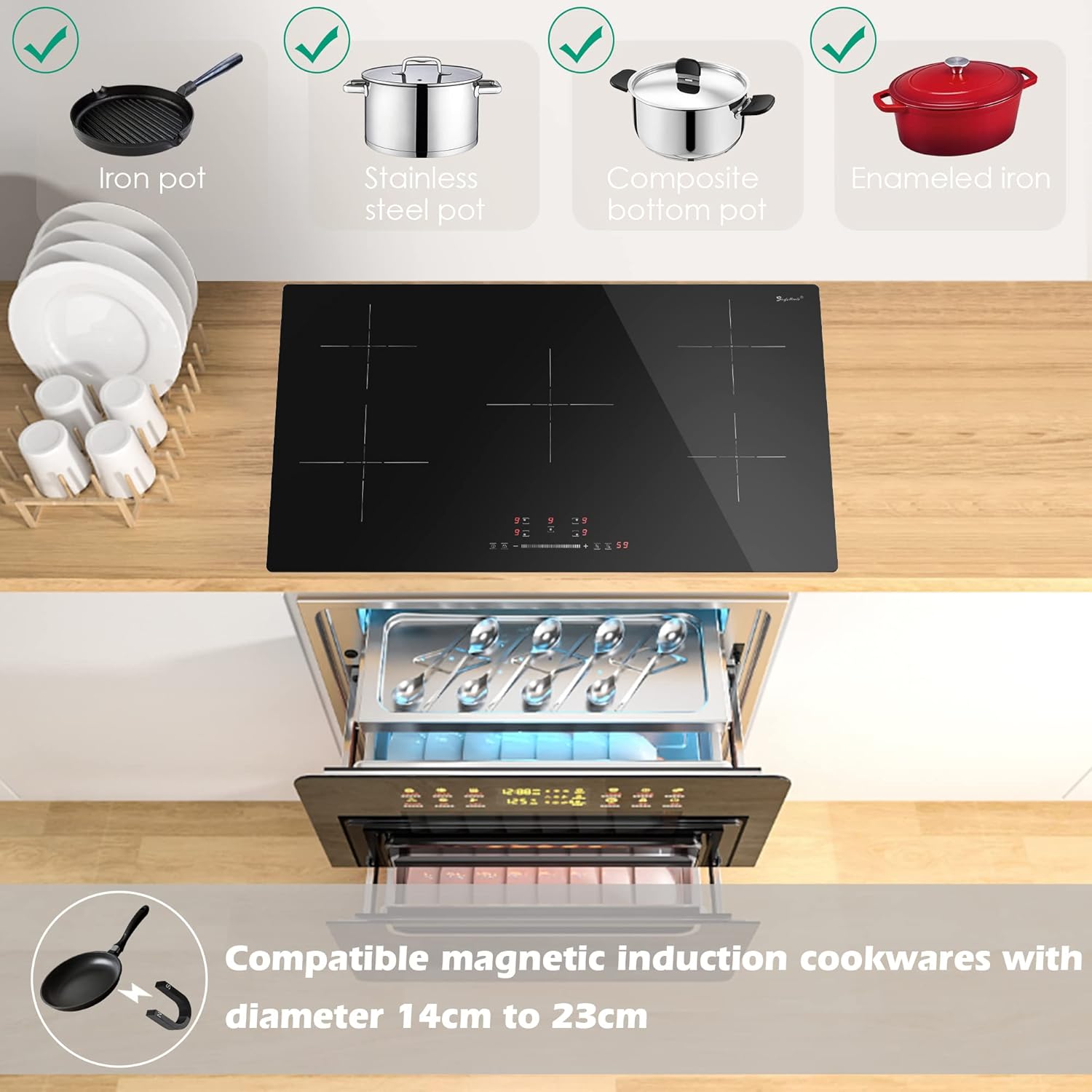
Image: Illustration of cookware types compatible with induction technology, including iron, stainless steel, composite bottom, and enameled iron pots. It also specifies that compatible cookware should have a diameter between 14cm and 23cm.
For optimal performance, use cookware specifically designed for induction cooking. These typically have a flat, magnetic base. To test compatibility, hold a magnet to the bottom of your pot or pan; if it sticks, the cookware is likely induction-compatible.
7. Specifications
| Feature | Detail |
|---|---|
| Brand | SINGLEHOMIE |
| Model Number | IXFD007US |
| Installation Type | Built-In |
| Burner Type | Induction |
| Heating Elements | 5 |
| Power Levels | 9 |
| Voltage | 240 Volts |
| Total Wattage | 9300 Watts |
| Material | Glass Ceramic |
| Product Dimensions (W x D x H) | 37.7" x 24" x 4.5" |
| Item Weight | 39.3 pounds |
| Special Features | Child Safety Lock, 1-99 Minutes Timer, Boost Function, Keep Warm, Pan Detection, Residual Heat Indicator, Auto-Shutoff |
8. Warranty and Support
For information regarding warranty coverage, technical support, or service requests, please refer to the documentation included with your product packaging or visit the official SINGLEHOMIE website. Specific warranty terms and conditions may vary by region and purchase date.