
W WINBRIDGE S619UHF
WinBridge Wireless Voice Amplifier S619UHF User Manual
Model: S619UHF | Brand: W WINBRIDGE
1. Product Overview
The WinBridge S619UHF Wireless Voice Amplifier is a compact and powerful portable PA system designed to enhance vocal clarity and projection. It is an essential tool for professionals who need to address groups, such as teachers, tour guides, coaches, and public speakers. This device ensures your voice is heard clearly and loudly, even in challenging environments, reducing vocal strain.
The system includes a main speaker unit and a wireless microphone headset, offering freedom of movement. Its versatile connectivity options allow for audio playback from various sources, making it a comprehensive solution for diverse amplification needs.

Figure 1: WinBridge S619UHF Voice Amplifier and Wireless Headset Microphone
2. Package Contents
Upon opening your WinBridge S619UHF package, please verify that all the following items are included:
- 1x Speaker unit
- 1x UHF wireless microphone headset
- 1x DC 5V charger
- 1x Charging cable (USB-A to Micro-USB)
- 1x User Manual
- 1x WinBridge brochure
- 1x Adjustable shoulder strap/lanyard
For a visual guide to the unboxing and contents, please refer to the official product video below:
Video 1: Unboxing and overview of the WinBridge S619UHF Voice Amplifier and its components.
3. Key Product Features
- Powerful Voice Amplification: Projects excellent sound voice at a very good distance with 16W high output power.
- Wireless Microphone: Includes an updated U8 wireless headset microphone for hands-free operation. The microphone can be split into headset and mini handheld models.
- Long Battery Life: Built-in 2200mAh rechargeable lithium polymer battery provides 6 to 8 hours of continuous use for the speaker unit. The wireless microphone supports 4 to 5 hours of working time after a full charge.
- Multiple Playback Modes: Supports Bluetooth connectivity, AUX input, USB drive playback, and TF card playback for versatile audio options.
- Compact and Portable: With dimensions of 4 x 3.5 x 1.67 inches and a weight of 7.5 oz, it is easy to carry. An adjustable shoulder strap is included for convenient portability.
- Clear Sound Quality: Delivers original, clear, and strong sound, ensuring effective communication.

Figure 2: Speaker unit with various input options.

Figure 3: Key power and battery specifications.
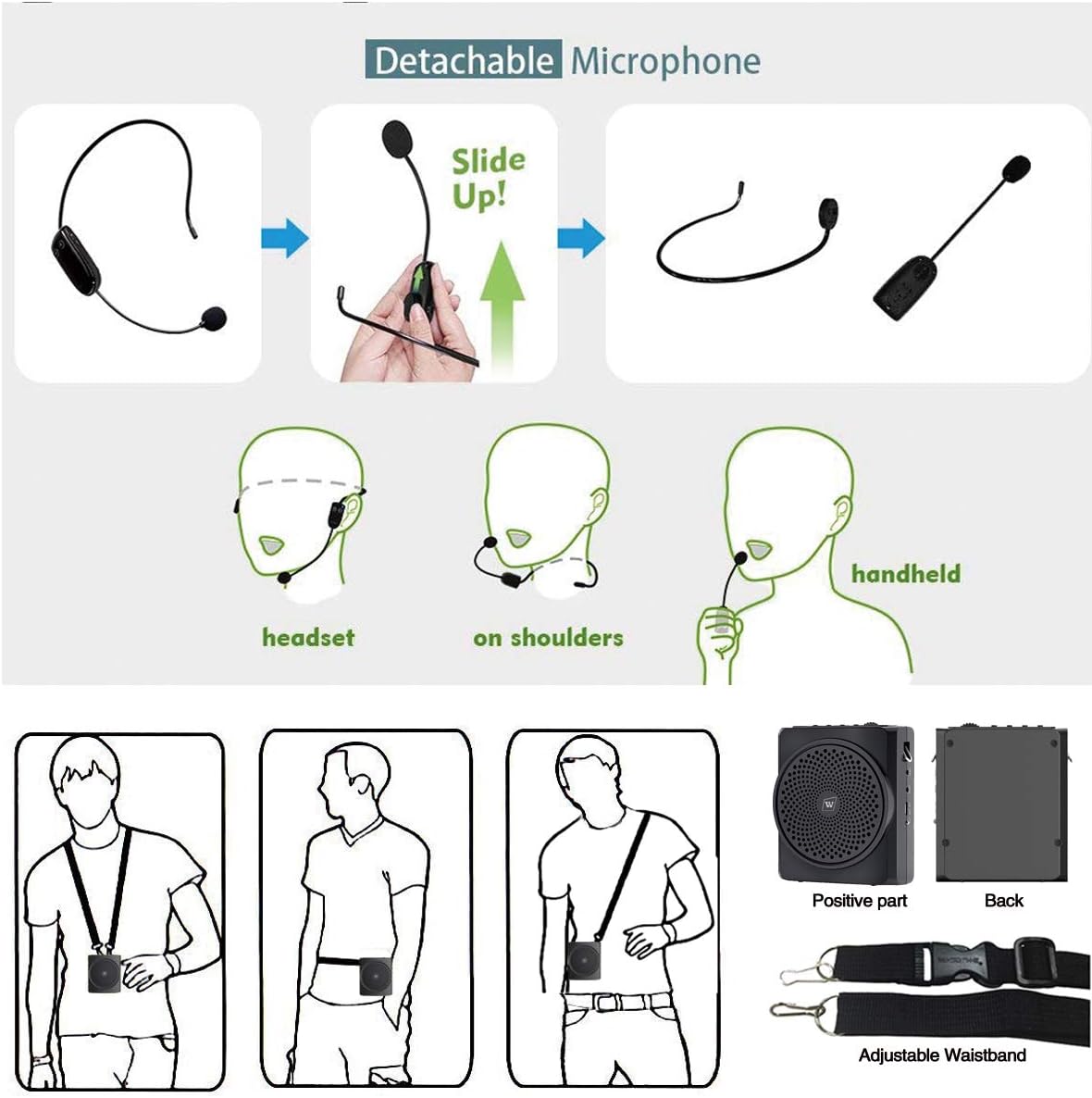
Figure 4: Microphone versatility and wearing options.
4. Setup Guide
Follow these steps to set up your WinBridge S619UHF Voice Amplifier for first use:
- Charge the Devices: Before initial use, fully charge both the speaker unit and the wireless microphone headset. Connect the charging cable to the DC 5V port on the speaker and the micro-USB port on the microphone, then plug the USB-A end into a compatible charger. The indicator lights will show charging status.
- Assemble the Microphone: If the microphone is detached from the headset band, slide it up into the designated slot on the headset until it clicks securely into place.
- Connect the Microphone: Plug the 3.5mm jack of the wireless microphone headset into the 'MIC' input port on the speaker unit.
- Power On: Slide the 'ON/OFF' switch on the speaker unit to the 'ON' position. Power on the wireless microphone headset as well.
- Pairing (Automatic): The wireless microphone and speaker unit are designed to pair automatically upon power-on. A successful connection will be indicated by a stable blue light on the microphone and a green light on the speaker.
- Adjust Volume: Use the '+' and '-' buttons on the speaker unit to adjust the master volume to a comfortable level. You can also adjust the microphone volume directly on the microphone unit.

Figure 5: Detailed view of the speaker unit's control panel and ports.
5. Operating Instructions
5.1 Voice Amplification
Once the microphone and speaker are paired, speak into the microphone. The speaker will amplify your voice. Ensure the microphone is positioned close to your mouth for optimal sound pickup.
5.2 Audio Playback
The S619UHF supports various audio input methods:
- Bluetooth Mode: Turn on the speaker and activate Bluetooth on your device (e.g., smartphone, tablet). Search for 'S619UHF' in your device's Bluetooth settings and pair. The speaker will indicate successful pairing.
- AUX Mode: Connect an external audio device (e.g., MP3 player, computer) to the 'AUX' input port on the speaker using a 3.5mm audio cable.
- USB Drive Playback: Insert a USB flash drive containing MP3 audio files into the 'USB' port. The speaker will automatically detect and play the audio files.
- TF Card Playback: Insert a TF (MicroSD) card containing MP3 audio files into the 'TF' card slot. The speaker will automatically detect and play the audio files.
Use the control buttons on the speaker unit (play/pause, next/previous track) to manage audio playback.
5.3 Wearing Options
The portable design of the S619UHF offers multiple ways to wear and position the amplifier:
- Shoulder/Neck Strap: Attach the adjustable shoulder strap to the loops on the speaker unit and wear it around your neck or over your shoulder.
- Waistband: Use the adjustable waistband to secure the speaker around your waist.
- Desktop Placement: Place the speaker unit on a desk or flat surface for stationary use.
6. Maintenance
To ensure the longevity and optimal performance of your WinBridge Voice Amplifier, follow these maintenance guidelines:
- Regular Charging: Even if not in regular use, it is recommended to charge the speaker and microphone batteries periodically (e.g., once every 1-2 months) to prevent deep discharge and extend battery life.
- Cleaning: Use a soft, dry cloth to clean the exterior of the speaker and microphone. Avoid using abrasive cleaners or solvents.
- Storage: Store the device in a cool, dry place away from direct sunlight, extreme temperatures, and high humidity.
- Handle with Care: Avoid dropping the device or subjecting it to strong impacts, which can damage internal components.
7. Troubleshooting
If you encounter issues with your WinBridge S619UHF Voice Amplifier, refer to the following common problems and solutions:
| Problem | Possible Cause | Solution |
|---|---|---|
| No power/Device won't turn on | Low battery; Power switch off; Faulty charger/cable | Ensure device is fully charged. Check power switch. Try a different charging cable or adapter. |
| Microphone is quiet or no sound | Microphone volume too low; Microphone not paired; Microphone too far from mouth; Faulty microphone | Increase microphone volume. Re-pair microphone. Position microphone closer to mouth. Test with another microphone if available. |
| Feedback/Squealing sound | Microphone too close to speaker; Volume too high; Microphone pointing at speaker | Increase distance between microphone and speaker. Lower the volume. Adjust microphone direction away from the speaker. |
| Bluetooth not connecting | Device not in pairing mode; Already connected to another device; Interference | Ensure speaker is in Bluetooth pairing mode. Disconnect from other devices. Move away from other wireless devices. |
8. Product Specifications
| Feature | Specification |
|---|---|
| Model Number | S619UHF |
| Output Wattage | 16 Watts |
| Power Source | Battery Powered (1 Lithium Polymer battery required) |
| Battery Capacity | 2200mAh (Speaker) |
| Speaker Run Time | 6 to 8 hours (single charge) |
| Microphone Run Time | 4 to 5 hours (fully charged) |
| Connectivity Technology | Bluetooth, USB, AUX |
| Connector Type | Aux |
| Color | Black |
| Product Dimensions (L x W x H) | 4 x 3.5 x 1.67 inches (approximate, based on feature bullets) |
| Item Weight | 7.5 ounces (approximate, based on feature bullets) |
| UPC | 705333646337 |
9. Warranty and Support
For any product issues, technical assistance, or warranty inquiries, please contact WinBridge customer support directly.
Customer Support Hotline: +1(833)966-2881
WinBridge is committed to providing quality products and excellent customer service. Your satisfaction is their priority.
Ask a question about this manual
Ask about setup, troubleshooting, compatibility, parts, safety, or missing instructions. Manuals+ will review the question and use this page’s manual context to help answer it.