
PROVISION ISR DAI+280IP5S36
PROVISION ISR 8MP IP PoE Camera User Manual
Model: DAI+280IP5S36
Product Overview
The PROVISION ISR DAI+280IP5S36 is an 8MP IP PoE Dome/Turret Camera designed for high-definition security surveillance in both indoor and outdoor environments. This camera offers advanced features such as infrared night vision, IP67 waterproof protection, and smart motion detection, making it a robust solution for various security needs.

Image: Front view of the PROVISION ISR 8MP IP PoE Dome Camera, showing its white housing and dark dome lens.
Key Features
- High-Resolution Outdoor IP Camera: 8MP resolution for crystal-clear surveillance and detailed images. Supports Power over Ethernet (PoE) for simplified installation.
- Advanced Night Vision & IP67 Waterproof: Features IR 15m night vision for clear imaging in low light and IP67 rating for protection against harsh weather conditions.
- Seamless Integration with NVR Systems: Compatible with various Network Video Recorder (NVR) setups, supporting RTSP IP camera PoE and network camera configurations.
- Smart Motion Detection & Remote Access: Provides instant alerts with AI motion detection and allows live footage viewing via the IP camera web interface. Supports multiple camera configurations.
- Efficient Storage & H.265 Compression: Utilizes H.265+ technology for optimized storage while maintaining superior video quality.
What's in the Box
Upon opening the package, please verify that all the following components are included:
- Camera Body (PROVISION ISR DAI+280IP5S36)
- Instruction Manual
Note: Additional mounting hardware or power adapters may be required depending on your specific installation scenario and are sold separately unless specified.
Setup and Installation
Mounting the Camera
The DAI+280IP5S36 camera is designed for ceiling mount installation. Ensure the mounting surface is strong enough to support the camera's weight (approximately 1.6 pounds or 0.73 kg).
- Choose a suitable location for optimal surveillance coverage, considering the 94-degree viewing angle.
- Use the provided mounting template (if applicable, refer to the physical manual) to mark drilling points for the screw-in installation.
- Drill pilot holes and secure the camera base to the mounting surface using appropriate screws.
- Adjust the camera's 3-axis mechanism to achieve the desired viewing angle.

Image: Diagram illustrating the 3-axis adjustment mechanism of the camera, allowing for 360-degree rotation and 90-degree tilt for flexible positioning.
Connectivity and Power
This camera supports Power over Ethernet (PoE) for simplified installation, allowing both power and data transmission over a single Ethernet cable. It also has options for separate power and audio input.
- PoE Connection: Connect an Ethernet cable from a PoE-enabled NVR or PoE switch to the camera's RJ-45 port. This will provide both power and network connectivity.
- Separate Power: If PoE is not used, connect a 12V DC power adapter (not included) to the camera's power input port. The camera consumes approximately 6 watts.
- Audio Input: Connect an external microphone (not included) to the audio input port if audio recording is desired.

Image: Technical drawing showing the camera's dimensions (116.0mm width, 90.8mm height) and a diagram of its connection ports: Power In, RJ-45 (+PoE), and Audio In.
Once connected, the camera will power on and attempt to obtain an IP address from your network. Refer to your NVR or network configuration guide for initial setup and IP address assignment.
Operating the Camera
NVR Integration and Remote Access
The PROVISION ISR DAI+280IP5S36 camera is designed for seamless integration with compatible NVR systems. It supports standard protocols like ONVIF for broad compatibility.
- Adding to NVR: Follow your NVR's instructions to add a new IP camera. The camera's IP address can typically be discovered automatically by the NVR or manually configured.
- Remote Viewing: Access live footage and recorded video via the NVR's mobile application (Android compatible) or through the camera's web interface on a PC. Ensure your network is configured for remote access (e.g., port forwarding, P2P cloud service).
Video Features and Settings
- 8MP Resolution: The camera captures video at 8-megapixel resolution, providing high detail.
- Night Vision: The infrared (IR) illuminators provide clear black-and-white video up to 15 meters (approximately 49 feet) in total darkness.
- H.265+ Compression: This advanced video compression technology reduces file sizes significantly, optimizing storage space and bandwidth usage without compromising video quality.
- Smart Motion Detection: Configure motion detection zones and sensitivity through the NVR or camera's web interface. The camera can detect human movement and trigger alerts.
- WDR (Wide Dynamic Range): Improves image quality in scenes with both very bright and very dark areas.
- 3D-DNR (Digital Noise Reduction): Reduces image noise, especially in low-light conditions, for clearer video.
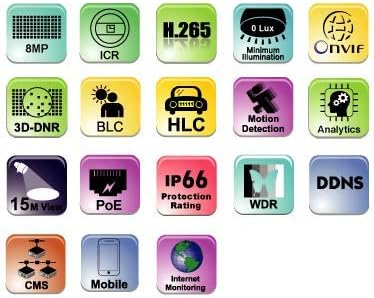
Image: A grid of icons representing various features of the PROVISION ISR camera, including 8MP resolution, H.265 compression, 0 Lux minimum illumination, ONVIF compatibility, 3D-DNR, BLC, HLC, Motion Detection, Analytics, 15M View (night vision), PoE, IP66 Protection Rating, WDR, DDNS, CMS, Mobile access, and Internet Monitoring.
Maintenance
Regular maintenance helps ensure the longevity and optimal performance of your PROVISION ISR camera.
- Cleaning: Periodically clean the camera lens and housing with a soft, damp cloth. Avoid abrasive cleaners or solvents that could damage the surface.
- Weather Protection: The camera has an IP67 (or IP66 as per specifications) international protection rating, meaning it is protected against dust ingress and powerful water jets. While designed for outdoor use, avoid directing high-pressure water streams directly at the camera.
- Firmware Updates: Check the PROVISION ISR official website or your NVR manufacturer's website for any available firmware updates. Keeping the firmware updated can improve performance, add features, and enhance security.
- Cable Inspection: Periodically inspect all cables (Ethernet, power, audio) for any signs of wear, damage, or corrosion, especially for outdoor installations.
Troubleshooting
If you encounter issues with your camera, refer to the following common troubleshooting steps:
- No Image/Offline:
- Verify power supply to the camera (PoE or separate adapter).
- Check Ethernet cable connection at both the camera and NVR/switch.
- Ensure the camera's IP address is correct and not conflicting with other devices on the network.
- Restart the camera and NVR.
- Poor Image Quality:
- Clean the camera lens.
- Check network bandwidth; insufficient bandwidth can cause choppy or low-quality video.
- Adjust camera settings (e.g., resolution, bitrate, WDR) via the web interface or NVR.
- Night Vision Issues:
- Ensure there are no obstructions blocking the IR illuminators.
- Check if the IR cut filter is switching correctly (you might hear a click when light conditions change).
- Motion Detection Not Working:
- Verify motion detection settings and sensitivity in the NVR or camera's web interface.
- Ensure motion detection zones are correctly configured.
For more complex issues, consult the detailed troubleshooting section in your NVR's manual or contact PROVISION ISR technical support.
Specifications
| Feature | Detail |
|---|---|
| Model Name | IP Security Camera |
| Item Model Number | DAI+280IP5S36 |
| Brand | PROVISION ISR |
| Indoor/Outdoor Usage | Outdoor, Indoor |
| Video Capture Resolution | 8MP |
| Effective Video Resolution | 8 Megapixels |
| Connectivity Technology | Wired (Ethernet) |
| Power Source | Corded Electric (PoE supported) |
| Wattage | 6 watts |
| Night Vision Range | 15 Meters |
| Viewing Angle | 94 Degrees |
| International Protection Rating | IP66 (Note: Description states IP67, specifications state IP66. Refer to product packaging for definitive rating.) |
| Form Factor | Dome |
| Mounting Type | Ceiling Mount |
| Item Dimensions (L x W x H) | 5.12 x 5.12 x 5.12 inches (13 x 13 x 13 cm) |
| Item Weight | 1.6 pounds (0.73 kg) |
| Compatible Devices | NVR, Smartphone |
| Controller Type | NVR, Android |
| Special Features | HD Resolution, Night Vision, Weather Proof, Vandal Proof |
| Video Capture Format | MJPEG (Note: H.265+ is also supported for compression) |
Warranty and Support
For warranty information, please refer to the warranty card included with your product or visit the official PROVISION ISR website. Keep your purchase receipt as proof of purchase.
For technical support, product inquiries, or further assistance, please contact PROVISION ISR customer service or visit their official support channels. You can also visit the PROVISION ISR Store on Amazon for more product information and resources.
Ask a question about this manual
Ask about setup, troubleshooting, compatibility, parts, safety, or missing instructions. Manuals+ will review the question and use this page’s manual context to help answer it.