
Bosch SMI2ITS33E
Bosch SMI2ITS33E Serie 2 Dishwasher User Manual
Model: SMI2ITS33E | Brand: Bosch
1. Introduction
This manual provides essential information for the safe and efficient operation, installation, and maintenance of your Bosch SMI2ITS33E Serie 2 built-in dishwasher. This appliance is designed for seamless integration into your kitchen, offering advanced features such as Home Connect for remote control and diagnostics, a Washing Assistant, and a Favorite Program function. It also includes the AquaStop system for enhanced safety against water leaks.

Figure 1.1: Front view of the Bosch SMI2ITS33E Serie 2 built-in dishwasher, showing its sleek design and integrated control panel.
2. Safety Information
Always read and follow all safety instructions before using the appliance to prevent personal injury or property damage. Keep this manual for future reference.
- Electrical Safety: Ensure the appliance is properly grounded. Do not use extension cords. Disconnect power before servicing.
- Water Safety: The AquaStop system provides protection against water damage. However, always check hoses for leaks periodically.
- Child Safety: Keep children away from the appliance during operation. Detergents are corrosive; keep them out of reach of children.
- Proper Use: Only use the dishwasher for its intended purpose. Do not place flammable materials in the dishwasher.
3. Setup and Installation
The Bosch SMI2ITS33E is a built-in dishwasher designed for integration into your kitchen cabinetry. Proper installation is crucial for optimal performance and safety. This product does not include the front panel, which must be supplied separately to match your kitchen design.

Figure 3.1: Illustration of the dishwasher being installed as a built-in unit, highlighting that the decorative front panel is not included.
3.1 Dimensions and Placement
Refer to the dimension diagram for precise measurements required for installation. Ensure adequate space for ventilation and access to water and electrical connections.
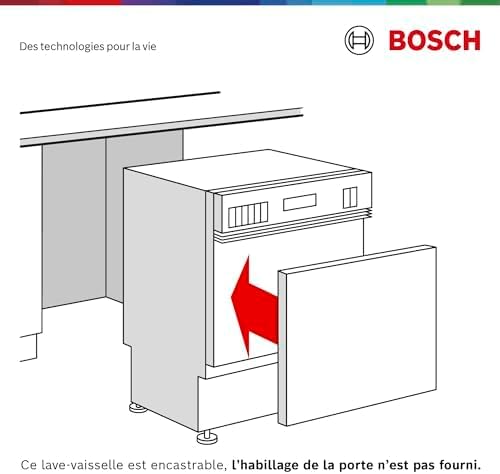
Figure 3.2: Detailed technical drawing indicating the precise dimensions (in mm) for installing the dishwasher into a standard kitchen cabinet opening.
3.2 AquaStop System
Your dishwasher is equipped with the AquaStop system, which provides protection against water leaks. This system is designed to prevent flooding by detecting leaks and automatically shutting off the water supply.

Figure 3.3: The AquaStop device, a key safety feature that prevents water leaks by monitoring the water supply and automatically shutting it off if a leak is detected.
3.3 Home Connect Setup
To utilize the smart features of your dishwasher, download the Home Connect app on your smartphone or tablet. Follow the in-app instructions to connect your appliance to your home Wi-Fi network. This enables remote control, access to digital instruction manuals, and useful usage tips.
4. Operating Instructions
Familiarize yourself with the control panel and available programs to achieve optimal cleaning results.

Figure 4.1: The semi-integrated control panel of the dishwasher, showing program selection buttons, a digital timer, and status indicators.
4.1 Loading the Dishwasher
The dishwasher has a capacity for 12 place settings. Load dishes carefully to ensure water can reach all surfaces. Place larger items in the lower basket and delicate items in the upper basket.

Figure 4.2: Interior view of the dishwasher, illustrating the spacious and adjustable racks designed to accommodate various types of dishes and cutlery.
4.2 Program Selection
Select the appropriate program based on the type and soil level of your dishes. Available programs include:
- Eco Program: Energy-efficient program for normally soiled dishes.
- Auto Programs: Automatically adjusts water consumption and temperature based on soil level.
- Intensive Program: For heavily soiled pots and pans.
- Favorite Program: Customize and save your preferred wash cycle settings via the Home Connect app.
- Programme Download: Download additional programs through the Home Connect app to suit specific needs.
4.3 Washing Assistant
The Home Connect app features a Washing Assistant. By answering a few simple questions, the app will suggest the most suitable program for your current load, optimizing cleaning results and resource consumption.
5. Maintenance and Cleaning
Regular maintenance ensures the longevity and efficiency of your dishwasher.
- Filter Cleaning: Regularly clean the filter system to prevent blockages and ensure effective cleaning.
- Spray Arms: Check and clean the spray arm nozzles to ensure water distribution is not impeded.
- Interior Cleaning: Use a dishwasher cleaner periodically to remove grease and limescale buildup.
- Exterior Cleaning: Wipe down the exterior with a soft, damp cloth. For stainless steel surfaces, use a specialized cleaner.
6. Troubleshooting
Before contacting service, consult this section for common issues and their solutions.
| Problem | Possible Cause | Solution |
|---|---|---|
| Dishes not clean | Improper loading, clogged spray arms, insufficient detergent, dirty filters. | Reload dishes correctly, clean spray arms, add more detergent, clean filters. |
| Water not draining | Clogged drain hose or filter, drain pump issue. | Check and clear drain hose/filter. If problem persists, contact service. |
| Dishwasher not starting | Door not closed properly, power supply issue, program not selected. | Ensure door is latched, check power, select a program and press start. |
| Unusual noises | Items obstructing spray arms, foreign objects in pump. | Rearrange dishes, check for and remove foreign objects. |
7. Specifications
Key technical specifications for the Bosch SMI2ITS33E dishwasher:
- Brand: Bosch
- Model: SMI2ITS33E
- Installation Type: Built-in
- Capacity: 12 Place Settings
- Noise Level: 48 dB
- Energy Efficiency Class: E (New European Energy Label)
- Material: Stainless Steel (Interior)
- Control Type: Semi-Integrated
- Special Features: Home Connect, AquaStop, EcoDosage, Favorite Program, Remote Diagnostics

Figure 7.1: The EU Energy Label for the SMI2ITS33E, detailing its energy consumption, water consumption, noise level, and capacity. For more details, scan the QR code or visit EPREL Database.
8. Warranty and Support
Bosch provides comprehensive support for your appliance.
- Remote Diagnostics: With your consent, Bosch technical assistance can remotely access your dishwasher to check its status, provide advice, and schedule a home visit if necessary.
- Contact Support: For warranty claims, technical assistance, or spare parts, please refer to the contact information provided in your purchase documentation or visit the official Bosch website.