1. Introduction
Thank you for purchasing the Billboard BB2728 Portable Bluetooth Speaker. This manual provides essential information for the safe and efficient operation of your device. Please read these instructions carefully before use and retain them for future reference.
2. Product Overview
2.1 Key Features
- True Wireless Sound (TWS) System for stereo pairing with a second BB2728 speaker.
- Enhanced Bass for a rich audio experience.
- Dynamic LED Lights for visual ambiance.
- Multiple Connectivity Options: Bluetooth, USB, Micro SD card, and AUX input.
- Integrated FM Radio.
- IPX4 Water-Resistant rating, suitable for outdoor use.
- Built-in rechargeable Lithium-Ion battery for portable use.
2.2 Package Contents
- Billboard BB2728 Portable Bluetooth Speaker
- USB Charging Cable
- Instruction Manual

Figure 1: Billboard BB2728 Speaker in Retail Packaging. This image shows the speaker enclosed in its box, highlighting the product's presentation as received.
2.3 Parts and Controls

Figure 2: Front View of the BB2728 Speaker. This image displays the speaker's front panel, including the main speaker grille, LED light, and the control buttons located at the top.
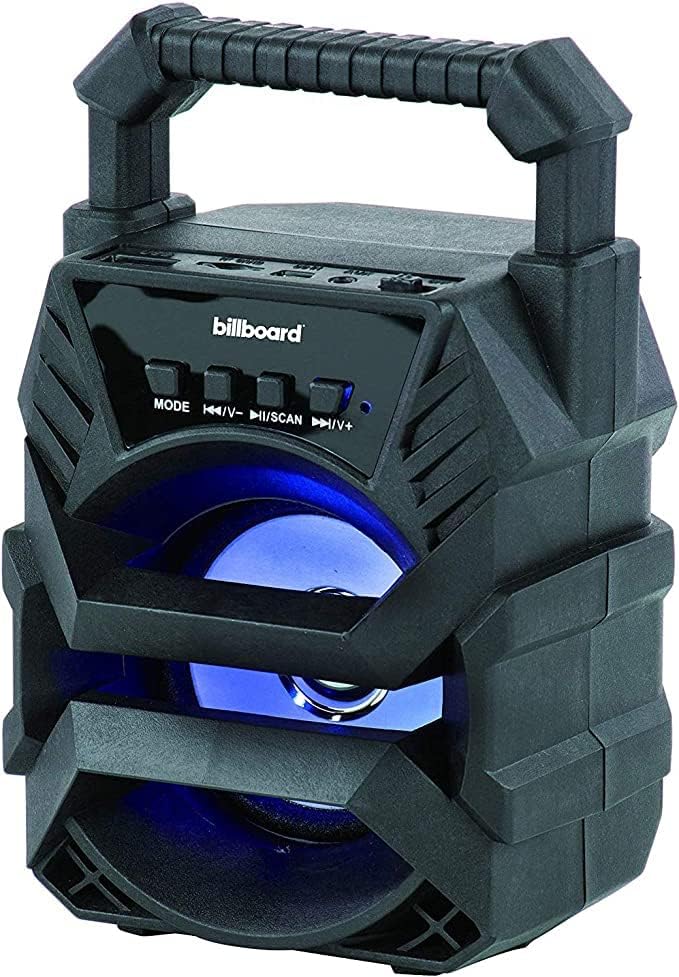
Figure 3: Angled View of the BB2728 Speaker. This image provides a perspective of the speaker's side, showcasing the integrated carrying handle and the various input ports (USB, Micro SD, AUX) typically located on the rear or side panel.
The control panel typically includes:
- MODE Button: Switches between Bluetooth, FM Radio, AUX, USB, and Micro SD modes.
- Previous Track / Volume Down Button (◀◀ / V-): Short press for previous track, long press to decrease volume.
- Play/Pause / Scan Button (►► / SCAN): Short press to play/pause, long press to initiate FM radio scan.
- Next Track / Volume Up Button (▶▶ / V+): Short press for next track, long press to increase volume.
- Power Button: Turns the speaker on or off.
- Charging Port: For connecting the USB charging cable.
- USB Port: For USB drive playback.
- Micro SD Card Slot: For Micro SD card playback.
- AUX Input: For connecting external audio devices via a 3.5mm audio cable.
3. Setup
3.1 Initial Charging
Before first use, fully charge the speaker for approximately 3-4 hours.
- Connect the small end of the USB charging cable to the speaker's charging port.
- Connect the larger end of the USB charging cable to a USB power adapter (not included) or a computer's USB port.
- The charging indicator light will illuminate during charging and turn off or change color when fully charged.
3.2 Powering On/Off
- To power on, press and hold the Power button until you hear an audible indication.
- To power off, press and hold the Power button again until the speaker shuts down.
3.3 Bluetooth Pairing
- Ensure the speaker is powered on and in Bluetooth mode (indicated by a flashing blue LED). If not, press the MODE button to switch to Bluetooth mode.
- On your mobile device (smartphone, tablet, etc.), enable Bluetooth and search for available devices.
- Select "BB2728" from the list of devices.
- Once paired, the speaker will emit an audible confirmation, and the blue LED will stop flashing and remain solid.
3.4 True Wireless Stereo (TWS) Pairing (Optional)
To achieve a stereo sound experience, you can pair two BB2728 speakers together.
- Ensure both BB2728 speakers are powered on and in Bluetooth mode, but not yet connected to any device.
- On one of the speakers, press and hold the MODE button for a few seconds until you hear a pairing tone. This speaker will become the primary unit.
- The two speakers will automatically connect to each other. Once connected, you will hear a confirmation tone.
- Now, connect your mobile device to the primary speaker via Bluetooth as described in section 3.3. Both speakers will play audio in stereo.
4. Operating Instructions
4.1 Bluetooth Mode
After successful pairing (Section 3.3), audio from your connected device will play through the speaker. Use your device or the speaker's controls to manage playback.
- Short press ►► to play/pause.
- Short press ◀◀ / V- for previous track.
- Short press ▶▶ / V+ for next track.
- Long press ◀◀ / V- to decrease volume.
- Long press ▶▶ / V+ to increase volume.
4.2 USB / Micro SD Card Playback
- Insert a USB drive or Micro SD card (with MP3 audio files) into the respective port/slot.
- The speaker will automatically switch to USB or Micro SD mode and begin playing. If not, press the MODE button to select the correct mode.
- Use the track and volume controls as described in Bluetooth mode.
4.3 AUX Input
- Connect one end of a 3.5mm audio cable (not included) to the speaker's AUX input port.
- Connect the other end to the audio output jack of your external device (e.g., MP3 player, computer).
- Press the MODE button until the speaker is in AUX mode.
- Control playback and volume primarily from your external device.
4.4 FM Radio
- Press the MODE button to switch to FM Radio mode.
- Long press the ►► / SCAN button to automatically scan and save available FM stations. The speaker will cycle through frequencies and store them.
- Short press ◀◀ / V- or ▶▶ / V+ to navigate between saved stations.
- Long press ◀◀ / V- or ▶▶ / V+ to adjust volume.
4.5 LED Light Control
The LED lights typically activate automatically when the speaker is on. Some models may allow toggling the lights on/off or changing patterns by a short press of the Power button or a dedicated light button (if present).
5. Maintenance
5.1 Cleaning
- Wipe the speaker with a soft, dry cloth.
- Do not use harsh chemicals, cleaning solvents, or strong detergents.
5.2 Storage
- Store the speaker in a cool, dry place away from extreme temperatures and direct sunlight.
- If storing for an extended period, charge the battery periodically to maintain its lifespan.
5.3 Battery Care
- Avoid fully discharging the battery frequently.
- Do not expose the battery to excessive heat or fire.
- If the battery appears damaged or swollen, discontinue use immediately.
5.4 Water Resistance (IPX4)
The BB2728 speaker is IPX4 water-resistant, meaning it is protected against splashing water from any direction. It is not designed to be submerged in water. Do not expose it to heavy rain or immerse it in liquids.
6. Troubleshooting
| Problem | Possible Cause | Solution |
|---|---|---|
| Speaker does not power on. | Battery is depleted. | Charge the speaker fully. |
| Cannot pair via Bluetooth. | Speaker is not in pairing mode or too far from device. | Ensure speaker is in Bluetooth mode (flashing LED). Move device closer. Forget speaker from device's Bluetooth list and re-pair. |
| No sound. | Volume too low, incorrect mode, or device not playing. | Increase speaker and device volume. Ensure correct mode (Bluetooth, AUX, USB, SD). Check if audio is playing on the source device. |
| FM radio reception is poor. | Weak signal. | Move the speaker to a different location. The charging cable can sometimes act as an antenna; try connecting it. |
| TWS pairing fails. | Speakers already connected to a device or not in TWS pairing mode. | Ensure both speakers are disconnected from any device. Follow TWS pairing steps carefully (Section 3.4). |
7. Specifications
| Feature | Detail |
|---|---|
| Model | BB2728 |
| Brand | Billboard |
| Connectivity Technology | Bluetooth, USB, AUX |
| Special Features | Bass Boost, USB Port, LED Lights, TWS Pairing, FM Radio, Micro SD Card Slot |
| Audio Output Mode | Stereo |
| Speaker Size | 3 inches |
| Battery Type | Built-in Rechargeable Lithium-Ion |
| Water Resistance Rating | IPX4 |
| Material | Plastic |
| Dimensions (L x W x H) | 23.2 x 16.2 x 10.5 cm (approximate) |
| Weight | 473 g (approximate) |
| UPC | 680988247286 |
| Compatible Devices | Phones, Smartphones, Tablets |
| Power Source | Battery Powered |
8. Warranty and Support
This product is covered by a limited warranty. For specific warranty terms, conditions, and duration, please refer to the warranty card included with your purchase or contact Billboard customer support. Keep your proof of purchase for warranty claims.
For technical support or further assistance, please visit the official Billboard website or contact their customer service department using the contact information provided on their packaging or website.


