
KUNGIX BX13
KUNGIX BX13 Bluetooth 5.0 Wireless Earbuds User Manual
Model: BX13
1. Introduction
Thank you for choosing KUNGIX BX13 Bluetooth 5.0 Wireless Earbuds. This manual provides detailed instructions on how to set up, operate, and maintain your earbuds. Featuring advanced Bluetooth 5.0 technology, IPX7 waterproofing, a 2500mAh charging case, and up to 72 hours of playtime, these earbuds are designed for a superior audio experience.
2. Important Safety Information
- Do not disassemble or modify the earbuds or charging case.
- Keep the device away from extreme temperatures, humidity, and corrosive materials.
- Avoid prolonged exposure to loud volumes to prevent hearing damage.
- Do not use the earbuds while driving or in situations where you need to be aware of your surroundings.
- Keep out of reach of children and pets.
- Dispose of the product responsibly according to local regulations.
3. Package Contents
Please check the package for the following items:
- KUNGIX BX13 Wireless Earbuds (Left & Right)
- 2500mAh Charging Case
- USB Charging Cable
- Ear Tips (S, M, L sizes)
- User Manual
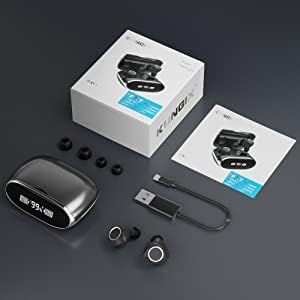
Image: KUNGIX BX13 Earbuds Package Contents. This image displays the charging case, two earbuds, a USB charging cable, three pairs of ear tips in different sizes, and the user manual, all neatly arranged.
4. Product Overview
Familiarize yourself with the components of your KUNGIX BX13 earbuds and charging case.

Image: KUNGIX BX13 Wireless Earbuds and Charging Case. This image shows the two black earbuds with blue LED indicators and a sleek, metallic grey charging case with a digital LED display showing battery percentage.
Earbud Components:
- Touch Control Area: For managing music, calls, and voice assistant.
- LED Indicator: Displays pairing status and battery.
- Microphone: For calls and voice commands.
- Charging Contacts: For charging inside the case.
Charging Case Components:
- LED Digital Display: Shows remaining battery percentage of the charging case and charging status of individual earbuds.
- USB Charging Port: For charging the case.
5. Setup
5.1 Initial Charging
Before first use, fully charge the charging case and earbuds.
- Connect the USB charging cable to the charging port on the case and to a USB power adapter (not included) or computer USB port.
- The LED digital display on the charging case will show the battery percentage.
- Place the earbuds into the charging case. They will automatically begin charging. The LED indicators on the earbuds will light up, and the case display will show their charging status.
- Once fully charged, the LED indicators on the earbuds will turn off, and the case display will show 100%.

Image: KUNGIX BX13 Earbuds Charging and Playtime Information. This graphic illustrates the charging case with earbuds inside, connected to a phone for charging, and highlights 4 hours of music playback, 3 hours of calling, and 1 hour of charging time for the earbuds, with the 2500mAh case providing extended playtime.
5.2 Bluetooth Pairing
Pair your earbuds with your device for the first time.
- Open the charging case and take out both earbuds. They will automatically power on and enter pairing mode (LED indicators will flash).
- Enable Bluetooth on your smartphone or other device.
- Search for "BX13" in the list of available Bluetooth devices and select it to connect.
- Once connected, the earbud LED indicators will stop flashing, and a voice prompt will confirm the connection.
- After initial pairing, the earbuds will automatically connect to the last paired device when taken out of the case.

Image: KUNGIX BX13 Earbuds Automatic Pairing Process. This image shows a smartphone's Bluetooth settings screen with "BX13" listed as a discoverable device, alongside the earbuds, illustrating the simple pairing procedure.
6. Operating Instructions
The KUNGIX BX13 earbuds feature smart touch controls for easy operation.

Image: KUNGIX BX13 Earbuds Smart Touch Controls Diagram. This diagram illustrates various touch gestures on the earbud for functions like activating voice assistant (2s), power on/off (5s), volume control (1x), rejecting calls (2x), answering/ending calls (1x), play/pause (2x), and next/previous track (3x).
| Function | Action |
|---|---|
| Power On | Take earbuds out of charging case (Automatic) or long press touch area for 5 seconds. |
| Power Off | Place earbuds back into charging case (Automatic) or long press touch area for 5 seconds. |
| Play/Pause Music | Double tap (2X) on either earbud. |
| Next Track | Triple tap (3X) on the Right earbud. |
| Previous Track | Triple tap (3X) on the Left earbud. |
| Volume Up | Single tap (1X) on the Right earbud. |
| Volume Down | Single tap (1X) on the Left earbud. |
| Answer/End Call | Single tap (1X) on either earbud. |
| Reject Call | Double tap (2X) on either earbud. |
| Activate Voice Assistant | Long press (2S) on either earbud. |
7. Maintenance
7.1 Cleaning
- Use a soft, dry, lint-free cloth to clean the earbuds and charging case.
- Do not use harsh chemicals, cleaning solvents, or strong detergents.
- Regularly clean the charging contacts on both the earbuds and the case to ensure proper charging.
7.2 Water Resistance (IPX7)
The earbuds are IPX7 waterproof, meaning they can resist sweat and rain. They are suitable for sports and outdoor activities.
- Do not submerge the earbuds in water for extended periods.
- The charging case is not waterproof. Keep it dry.
- Ensure earbuds are dry before placing them back into the charging case to prevent damage.

Image: KUNGIX BX13 Earbuds IPX7 Waterproof Feature. This image shows two earbuds on a wet surface with water droplets, demonstrating their resistance to sweat, accidental splashes, and light rain.
7.3 Storage
When not in use, store the earbuds in their charging case to protect them and keep them charged.
7.4 Ear Tip Replacement
Select the ear tips that provide the best fit and comfort for optimal sound quality and secure placement. Gently pull off the existing ear tip and push on the desired size.

Image: KUNGIX BX13 Earbuds Ergonomic Design and Ear Tip Sizes. This image shows a person wearing the earbuds, highlighting the ergonomic design and mentioning the availability of 3 ear tip sizes (S, M, L) for a comfortable and secure fit.
8. Troubleshooting
If you encounter any issues, please refer to the following common problems and solutions:
| Problem | Solution |
|---|---|
| Earbuds not pairing with device. |
|
| Only one earbud is working. |
|
| No sound or poor sound quality. |
|
| Charging case not charging. |
|
9. Specifications
| Model Name | BX13 |
| Bluetooth Version | 5.0 |
| Wireless Range | Up to 10 meters (33 feet) |
| Charging Case Battery Capacity | 2500mAh |
| Earbud Battery Composition | Lithium-ion |
| Total Playtime (with charging case) | Up to 72 hours |
| Music Playtime (single charge) | Up to 4 hours |
| Talk Time (single charge) | Up to 3 hours |
| Earbud Charging Time | Approx. 1 hour |
| Water Resistance Rating | IPX7 (Earbuds only) |
| Microphone | Built-in with CVC 8.0 Noise Reduction |
| Speaker Driver Size | 7mm |
| Charging Port | USB |
| Compatible Devices | Smartphones, tablets, laptops, desktop computers, smart speakers |
| Approx. Total Package Weight | 179 Grams |
| Color | Black |
10. Warranty and Support
KUNGIX provides a 30-day money-back guarantee and a 1-year warranty for this product.
If you encounter any issues or have questions regarding your KUNGIX BX13 earbuds, please contact our customer support team. You can typically reach us through the buyer center on the platform where you purchased the product or via the support email provided with your purchase documentation.
We are committed to providing the best customer service to ensure your satisfaction.
Ask a question about this manual
Ask about setup, troubleshooting, compatibility, parts, safety, or missing instructions. Manuals+ will review the question and use this page’s manual context to help answer it.