
Introduction
This manual provides comprehensive instructions for the safe and efficient operation of your AGPTEK HT-420 Rechargeable Electric Air Pump. Designed for convenience and portability, this pump can both inflate and deflate various items, including air mattresses, inflatable pools, and other recreational inflatables. Please read this manual thoroughly before use and retain it for future reference.
The AGPTEK HT-420 features a built-in rechargeable battery and multiple charging options, making it ideal for both indoor and outdoor use.
Safety Instructions
- Do not use this air pump for inflating high-pressure products such as vehicle tires, basketballs, or balloons. This pump is designed for low-pressure, high-volume inflatables.
- Do not operate the pump continuously for more than 10 minutes to prevent overheating. Allow the pump to cool down for at least 15 minutes after 10 minutes of continuous use.
- Do not expose the pump to rain or moisture. Store the pump indoors in a dry environment.
- Keep the pump away from children and pets. This is not a toy.
- Ensure the air inlet and outlet are clear of obstructions during operation.
- Use only the provided charging cable and adapters.
- If the pump shows any signs of damage, discontinue use immediately and contact customer support.
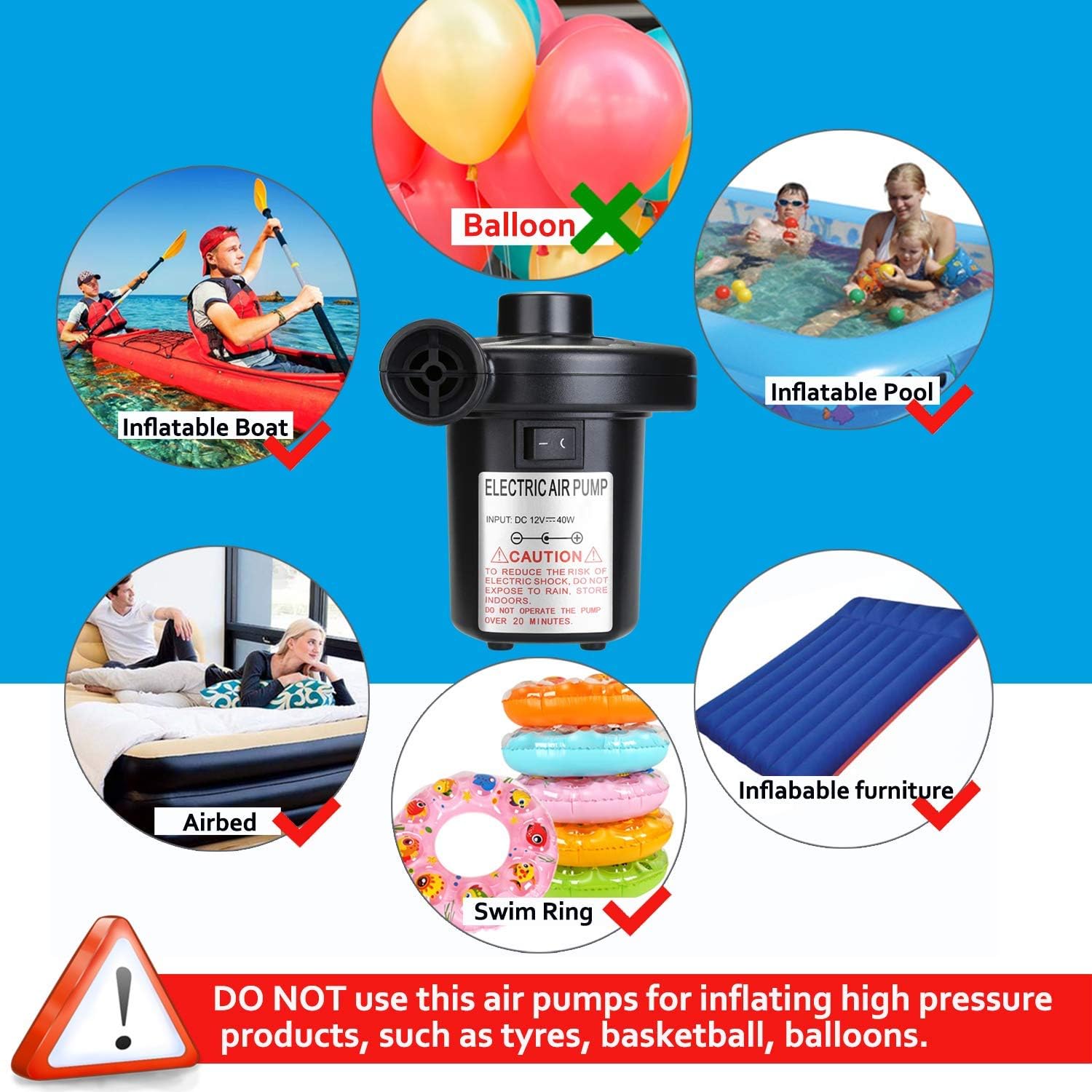
Image: The AGPTEK Electric Air Pump is suitable for inflatable boats, pools, airbeds, and swim rings. It is not designed for balloons or high-pressure items.
Package Contents
Verify that all items are present in your package:
- 1 x AGPTEK HT-420 Rechargeable Electric Air Pump
- 3 x Nozzles (S, M, L sizes)
- 1 x USB Charging Cable
- 1 x Car Power Adapter (12V DC)
- 1 x Home Power Adapter (110V AC)
- 1 x Storage Bag

Image: Contents of the AGPTEK Electric Air Pump package, including the pump, various nozzles, and power adapters.
Specifications
| Model | HT-420 |
| Pressure | 0.44 PSI |
| Airflow | 250 L/min |
| Power Supply | USB Charging Cable (5V USB port) / Car Charger (12V DC) / Home Adapter (110V AC) |
| Noise Level | <85dB |
| Dimensions (L x W x H) | 4.48" x 3.89" x 4.48" |
| Weight | 414g (14.6 ounces) |
| Battery | Built-in 4000mAh Li-ion rechargeable battery |
| Charging Time | Approximately 4 hours |
| Working Time (fully charged) | Up to 25 minutes (Note: Do not operate continuously for more than 10 minutes) |

Image: Detailed view of the AGPTEK Electric Air Pump, showing its dimensions, inflate port, and deflate port.
Setup
1. Charging the Air Pump
Before initial use, fully charge the air pump. The built-in 4000mAh Li-ion battery provides cordless operation.
- Connect the provided USB charging cable to the pump's USB port.
- Connect the other end of the USB cable to a power source:
- Home Charging: Use the included home power adapter and plug it into a standard wall outlet.
- Car Charging: Use the included car power adapter and plug it into your vehicle's 12V DC outlet.
- Power Bank: Connect to a portable power bank for charging on the go.
- The indicator lights on the pump will show the charging status and battery level. A full charge typically takes about 4 hours.

Image: The AGPTEK Electric Air Pump supports multiple charging methods, including home outlets, car chargers, and power banks.

Image: Close-up of the AGPTEK HT-420 pump showing the USB charging port and battery indicator lights.
2. Selecting the Correct Nozzle
The pump comes with three different nozzle sizes to fit various inflatable valves:
- S Size: Ideal for small inflation port toys, such as swimming rings.
- M Size: Ideal for airbeds, inflatable pools, or seats, and for extracting air from vacuum compression bags.
- L Size: Ideal for inflating air mattresses, larger inflatable pools, or boats.
Choose the nozzle that best fits the valve of the item you intend to inflate or deflate.

Image: The AGPTEK HT-420 pump includes three nozzle sizes (S, M, L) for versatile use with different inflatables.
Operating Instructions
1. Inflating an Item
- Select the appropriate nozzle and firmly attach it to the inflate port (the side outlet) of the air pump.
- Insert the nozzle securely into the inflation valve of the item you wish to inflate.
- Press the ON/OFF switch to turn on the pump.
- Once the item is inflated to the desired firmness, press the ON/OFF switch again to turn off the pump.
- Remove the nozzle from the item and the pump.
2. Deflating an Item
- Select the appropriate nozzle and firmly attach it to the deflate port (the top outlet) of the air pump.
- Insert the nozzle securely into the deflation valve of the item you wish to deflate.
- Press the ON/OFF switch to turn on the pump. The pump will begin to suck air out of the item.
- Once the item is deflated, press the ON/OFF switch again to turn off the pump.
- Remove the nozzle from the item and the pump.

Image: Illustration of the inflation and deflation functions, along with the ON/OFF switch of the AGPTEK Electric Air Pump.

Image: The AGPTEK rechargeable air pump being used to inflate an airbed and an inflatable pool, demonstrating its cordless convenience.
Maintenance
- Cleaning: Wipe the exterior of the pump with a soft, dry cloth. Do not use abrasive cleaners or immerse the pump in water.
- Storage: Store the pump and its accessories in the provided storage bag in a cool, dry, indoor location, away from direct sunlight and moisture.
- Battery Care: If the pump will not be used for an extended period, charge it fully every 3-6 months to maintain battery health.
Troubleshooting
| Problem | Possible Cause | Solution |
|---|---|---|
| Pump does not turn on. | Low battery or no power. | Charge the pump fully using the provided USB cable and adapter. Ensure the power source is active. |
| Pump is not inflating/deflating effectively. | Incorrect nozzle size or loose connection. Obstruction in air path. | Ensure the correct nozzle is selected and firmly attached to the pump and the item's valve. Check for any blockages in the nozzle or pump ports. |
| Pump overheats during operation. | Continuous operation for too long. | Turn off the pump immediately and allow it to cool down for at least 15 minutes before resuming use. Avoid continuous operation for more than 10 minutes. |
| Battery indicator lights are not working. | Pump is off or battery is completely drained. | Ensure the pump is turned on or connected to a charger. If completely drained, it may take a few minutes for the lights to appear. |
Warranty and Support
AGPTEK products are designed for reliability and performance. For any questions, concerns, or technical support regarding your AGPTEK HT-420 Rechargeable Electric Air Pump, please contact our customer service team.
Customer Email: cs@agptek.com
Please have your product model number (HT-420) and purchase information ready when contacting support.