
1. Introduction
The XBSLJ Vibration Plate Fitness Machine is designed to provide an effective full-body workout and massage experience. Utilizing proven swing-motion technology, this machine stimulates muscle cells throughout the body, making it ideal for adaptable, low-impact exercise. Regular use can help improve circulation and muscle tone.
This manual provides essential information for the safe and efficient operation of your vibration plate. Please read it thoroughly before first use and keep it for future reference.
2. Safety Information
To ensure safe operation and prevent injury, please observe the following safety precautions:
- Consult your physician before starting any new exercise program, especially if you have pre-existing medical conditions.
- Keep children and pets away from the machine during operation.
- Ensure the machine is placed on a stable, level surface.
- Do not use the machine if you are pregnant, have a pacemaker, or suffer from severe heart conditions, acute thrombosis, or acute hernia.
- Caution: Do not put your fingers or other objects in the gaps of the machine to avoid danger.
- Always hold onto a stable support if you feel unsteady during use.
- Unplug the machine from the power outlet when not in use or before cleaning.
3. Package Contents
Carefully unpack your XBSLJ Vibration Plate and check that all items are present and in good condition. The package should include:
- XBSLJ Vibration Plate Fitness Machine
- Remote Control
- Power Cable
- Resistance Bands (2)

Image 1: Overview of the XBSLJ Vibration Plate and its accessories, including the remote control, power cable, and two resistance bands.
4. Setup
4.1 Placement
Place the vibration plate on a firm, level surface. Ensure there is enough clear space around the machine for safe operation and movement.
4.2 Power Connection
- Locate the power input port and main power switch at the rear of the machine.
- Connect the power cable to the machine and then plug it into a suitable wall outlet.
- Ensure the main power switch is in the OFF position before plugging in.

Image 2: The rear of the vibration plate, highlighting the main power switch and the power cable input port.
4.3 Attaching Resistance Bands
The included resistance bands can be attached to the designated points on the side of the vibration plate for upper body workouts.
- Locate the metal attachment points on each side of the vibration plate.
- Clip the carabiner of each resistance band securely onto these attachment points.

Image 3: A close-up view showing how the resistance band's carabiner clips onto the metal attachment point on the side of the vibration plate.
5. Operating Instructions
5.1 Powering On and Off
- Flip the main power switch at the rear of the machine to the ON position.
- Press the Switch button (power symbol) on the control panel or remote control to turn the machine on.
- To turn off, press the Switch button again, then flip the main power switch to OFF.
5.2 Control Panel and Remote Control
The machine can be operated using the integrated control panel or the included remote control. Both feature similar functions:
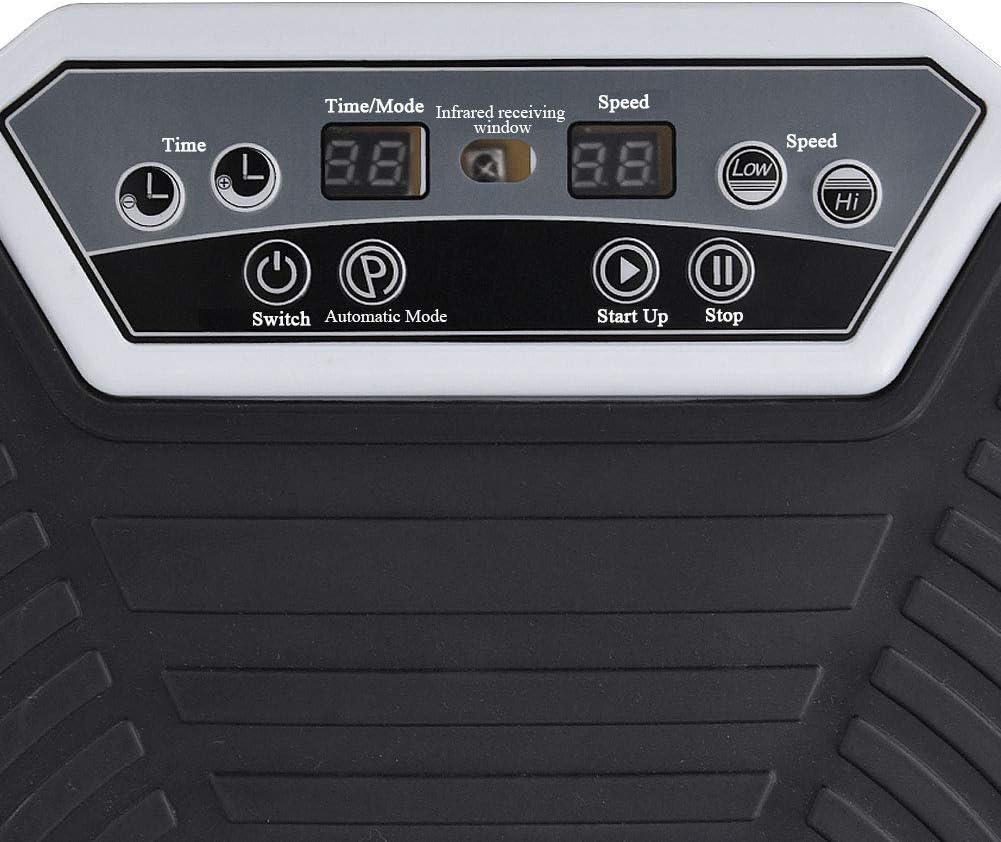
Image 4: Detailed view of the control panel, showing buttons for Time/Mode, Speed, Switch, Automatic Mode, Start Up, Stop, and speed indicators.
- Time/Mode: Adjusts the workout duration or cycles through different pre-set programs.
- Speed: Increases or decreases the vibration intensity. The display shows the current speed level.
- Automatic Mode (P): Activates pre-programmed workout routines.
- Start Up (Play symbol): Begins the vibration.
- Stop (Pause symbol): Pauses or stops the vibration.
- Low/Hi Speed Indicators: Show the current speed range.
5.3 Adjusting Intensity and Programs
Use the Speed buttons on the control panel or remote to increase or decrease the vibration intensity. The digital display will show the current speed level. Press the Time/Mode button to select desired workout duration or to cycle through various automatic programs (P1, P2, etc.).
5.4 Bluetooth Functionality
The vibration plate is equipped with Bluetooth for music playback. To connect:
- Ensure the vibration plate is powered on.
- Activate Bluetooth on your mobile phone or other audio device.
- Search for available Bluetooth devices and select the one corresponding to your vibration plate (e.g., "XBSLJ Fitness").
- Once connected, you can play music through the machine's speakers.
5.5 Using Resistance Bands
Once attached, the resistance bands can be used to incorporate upper body exercises while standing or performing other movements on the vibration plate. This provides a more comprehensive full-body workout.

Image 5: The vibration plate with resistance bands fully attached, demonstrating how they extend upwards for user grip during exercise.
6. Maintenance
6.1 Cleaning
To clean the vibration plate:
- Ensure the machine is unplugged from the power outlet.
- Wipe the surface with a soft, damp cloth.
- Do not use abrasive cleaners, solvents, or harsh chemicals, as these may damage the finish.
- Avoid spraying water directly onto the machine.
6.2 Storage
When not in use, store the vibration plate in a cool, dry place, away from direct sunlight and extreme temperatures. Ensure the power cable is neatly coiled to prevent damage.
7. Troubleshooting
If you encounter any issues with your XBSLJ Vibration Plate, please refer to the following common problems and solutions:
- Machine does not power on:
- Check if the power cable is securely plugged into both the machine and the wall outlet.
- Ensure the main power switch at the rear of the machine is in the ON position.
- Verify the wall outlet is functional by plugging in another device.
- Remote control is not working:
- Replace the batteries in the remote control.
- Ensure there are no obstructions between the remote and the machine's infrared receiver window.
- Unusual noise during operation:
- Stop the machine and check for any loose parts or foreign objects underneath or around the plate.
- Ensure the machine is on a flat, stable surface.
- Bluetooth connection issues:
- Ensure Bluetooth is enabled on your device and the vibration plate.
- Try unpairing and re-pairing the device.
- Move your audio device closer to the vibration plate.
If the problem persists after attempting these solutions, please contact customer support.
8. Specifications
- Brand: XBSLJ
- Model: Vibration Plate
- ASIN: B08GFQPZZX
- Control Type: Remote
- Manufacturer: XBSLJ
- First Available Date: August 24, 2020
8.1 Dimensions
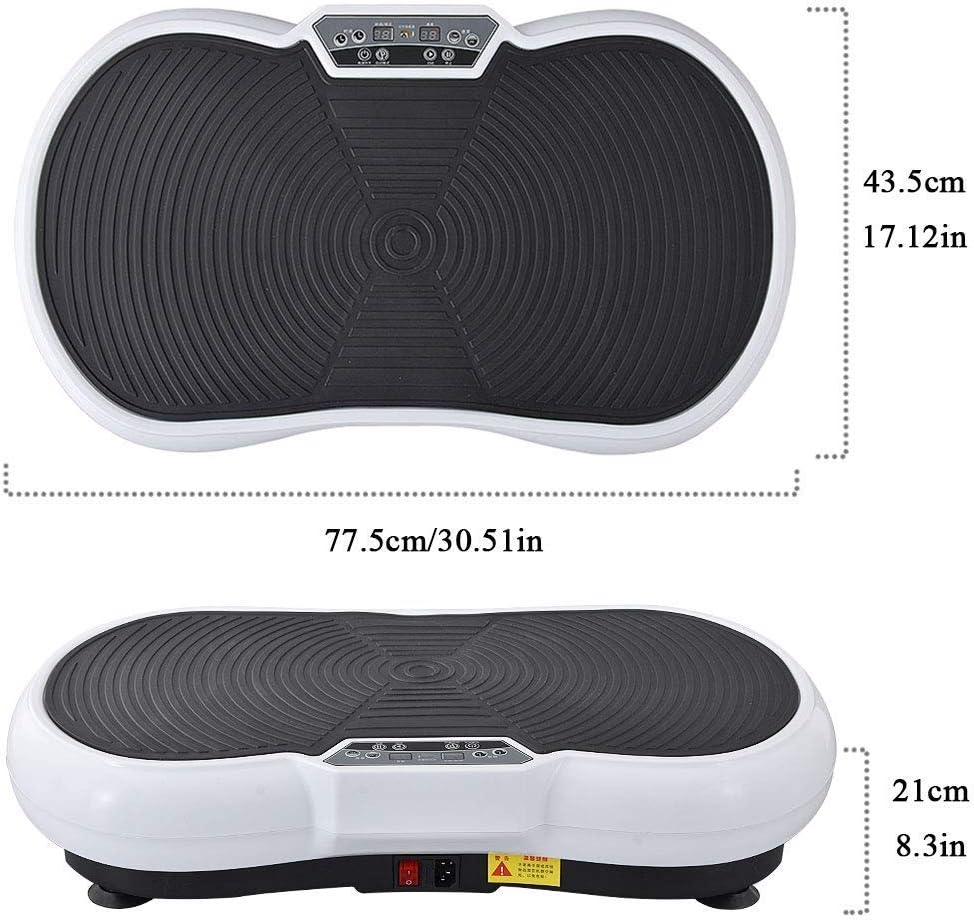
Image 6: Diagram showing the approximate dimensions of the vibration plate: 77.5 cm (30.51 in) in length, 43.5 cm (17.12 in) in width, and 21 cm (8.3 in) in height.