
1. Introduction
This manual provides essential instructions for the proper setup, operation, and maintenance of your Leggett Adjustables 30 Series Wired Remote Control. This remote is designed as a genuine replacement for specific Leggett and Platt Brio or Swing Line 30 Series adjustable bed models.
It is crucial to verify compatibility before use. The original versions of these remotes have been updated to a new black design with six white buttons and a curly cord, as depicted in this manual. While the appearance may differ from older remotes, the functionality remains consistent.
2. Compatibility Verification
This remote control is model-specific. To ensure proper function, it is imperative that the buttons and overall layout of this remote match your original remote control. This remote is compatible with Leggett and Platt Brio or Swing Line 30 Series adjustable beds.
Important: Please compare your existing remote with the images provided below to confirm all buttons and features align before attempting to connect or operate.
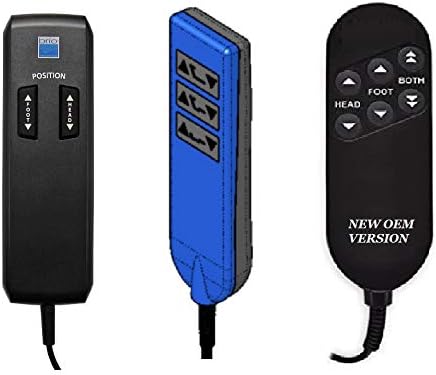
Figure 1: Various remote control designs. Ensure your original remote's button layout matches one of these, particularly the 'NEW OEM VERSION' if replacing an older model.

Figure 2: Close-up of current and previous generation wired remote controls. The new black version features six white buttons and a curly cord.
3. Setup
The Leggett Adjustables 30 Series remote control is a wired unit, meaning it connects directly to your adjustable bed base. No wireless pairing or battery installation is required.
- Locate the Connection Port: Identify the remote control connection port on your adjustable bed base. This port is typically located on the side or underside of the bed frame. Consult your adjustable bed's original manual if you have difficulty locating it.
- Connect the Remote: Carefully insert the remote control's connector cable into the designated port on the bed base. Ensure the connection is firm and secure. Do not force the connector.
- Test Functionality: Once connected, test the remote by pressing the 'Head Up' or 'Foot Up' buttons to confirm the bed responds.
4. Operating Instructions
The remote control features intuitive buttons for adjusting your adjustable bed's position. The exact button labels may vary slightly depending on the specific remote version, but the core functions remain consistent.
- Head Up/Down: Press and hold the 'HEAD UP' button to raise the head section of the bed. Press and hold the 'HEAD DOWN' button to lower it.
- Foot Up/Down: Press and hold the 'FOOT UP' button to raise the foot section of the bed. Press and hold the 'FOOT DOWN' button to lower it.
- Both (if applicable): Some remotes may feature a 'BOTH' button or similar. Pressing this button may allow simultaneous adjustment of both head and foot sections, or return the bed to a flat position. Refer to your specific remote's markings.
- Position (if applicable): Some remotes may have a 'POSITION' button or pre-set position buttons. These buttons allow for quick adjustment to a favorite or flat position.
Release the button once the desired position is achieved.
5. Maintenance
Proper care will extend the life of your remote control.
- Cleaning: Wipe the remote surface with a soft, dry, or slightly damp cloth. Do not use abrasive cleaners, solvents, or excessive moisture, as these can damage the electronics.
- Cable Care: Avoid kinking, twisting, or placing heavy objects on the remote's curly cord. Ensure the cord is not caught in moving parts of the bed.
- Storage: When not in use, place the remote in a safe location where it will not be dropped or damaged. Many adjustable beds include a remote holder or pocket.
6. Troubleshooting
If you experience issues with your remote control, try the following steps:
- Remote Not Responding:
- Ensure the remote control cable is securely plugged into the bed base.
- Check if the bed base has power. Verify that the power cord for the adjustable bed is securely plugged into a working electrical outlet.
- Inspect the remote control cable for any visible damage (cuts, kinks).
- Bed Not Moving:
- Confirm that no objects are obstructing the bed's movement.
- If the bed has an emergency stop feature, ensure it is not activated.
- Intermittent Functionality:
- Unplug the bed base from the power outlet for 30 seconds, then plug it back in. This can sometimes reset the system.
If these steps do not resolve the issue, contact customer support for further assistance.
7. Specifications
| Brand | Leggett Adjustables |
| Model | 30 Series |
| Item Model Number | 30 Series - 7427019874225 |
| Connectivity Technology | Wired (Infrared) |
| Special Feature | Ergonomic design |
| Max Number of Supported Devices | 1 (per remote) |
| Compatible Devices | Leggett and Platt Brio or Swing Line 30 Series Adjustable Beds |
8. Warranty Information
Specific warranty details for this replacement remote control may vary depending on the retailer and date of purchase. Please retain your proof of purchase for any warranty claims.
For detailed warranty information, refer to the documentation provided at the time of purchase or contact the seller directly.
9. Support
If you require further assistance or have questions not covered in this manual, please contact the seller or manufacturer's customer support.
- Seller Contact: Refer to your purchase records for seller contact information.
- Manufacturer: Leggett Adjustables