
1. Introduction
The LaMotte DC1500 DBD Liquid Chlorine Colorimeter is a precision instrument designed for accurate measurement of chlorine levels in water samples. This manual provides essential information for the proper setup, operation, maintenance, and troubleshooting of your DC1500 colorimeter to ensure reliable performance and longevity.
Please read this manual thoroughly before operating the device. Keep this manual for future reference.
2. Safety Information
- Always handle the colorimeter and reagents with care.
- Do not immerse the colorimeter in water or other liquids.
- Use only LaMotte approved reagents and accessories with the DC1500.
- Dispose of chemical reagents and waste according to local environmental regulations.
- Keep the device away from direct sunlight, extreme temperatures, and corrosive environments.
- Do not attempt to open or repair the device yourself. Refer to qualified service personnel.
3. Package Contents
Verify that all components are present and undamaged upon unpacking:
- LaMotte DC1500 Colorimeter Unit
- Black Carrying Case
- Water Sample Bottle
- Six (6) Sample Vials
- DPD Liquid Reagents (for 140 tests)
- Instruction Guide (this manual)
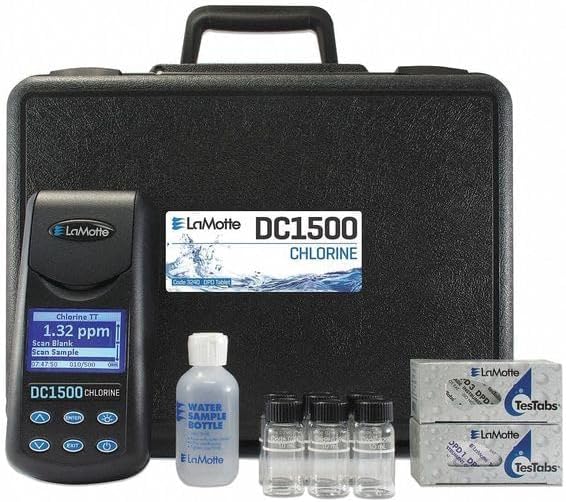
The image displays the complete LaMotte DC1500 kit. On the left is the DC1500 colorimeter unit with a digital display showing 'Chlorine TT 1.32 ppm'. The unit has several buttons for navigation and operation. Behind the unit is a black, hard-shell carrying case with a handle. In front of the case, to the right of the colorimeter, are a clear water sample bottle labeled 'WATER SAMPLE BOTTLE' and three small clear sample vials with black caps. To the far right, two boxes of LaMotte DPD TestTabs reagents are visible, labeled '03 DPD' and 'DPD 1 DP'.
4. Setup
- Unpack the Device: Carefully remove the DC1500 colorimeter and all accessories from the carrying case.
- Power On: Press the ON/OFF button to power on the unit. The display should illuminate.
- Initial Check: Ensure the display shows the main measurement screen, typically indicating 'Chlorine TT' and a reading, or 'Scan Blank' / 'Scan Sample' prompts.
5. Operating Instructions
Follow these steps for accurate chlorine measurement:
- Prepare Sample Vials: Ensure sample vials are clean and free of scratches or residue.
- Fill Blank Vial: Fill one sample vial with 10 mL of deionized or distilled water (the blank). Cap the vial.
- Insert Blank: Place the blank vial into the sample chamber of the DC1500 colorimeter. Ensure it is properly seated.
- Scan Blank: Press the SCAN BLANK button (or follow the on-screen prompt). The device will take a reading of the blank.
- Prepare Sample: Remove the blank vial. Fill a second clean sample vial with 10 mL of the water sample to be tested.
- Add Reagent: Add the appropriate DPD liquid reagents to the sample vial as per the reagent instructions (e.g., 5 drops of DPD 1 and 5 drops of DPD 3 for total chlorine, or specific drops for free chlorine). Cap the vial and gently invert to mix.
- Wait for Color Development: Allow the recommended reaction time for color development (typically 1-2 minutes). Refer to the reagent instructions for precise timing.
- Insert Sample: Place the prepared sample vial into the sample chamber of the DC1500 colorimeter.
- Scan Sample: Press the SCAN SAMPLE button (or follow the on-screen prompt). The device will display the chlorine concentration in ppm (parts per million).
- Record Reading: Note down the displayed result.
- Clean Up: Remove the sample vial and dispose of the sample and reagents properly. Clean all vials immediately after use.
6. Maintenance
- Cleaning the Unit: Wipe the exterior of the colorimeter with a soft, damp cloth. Do not use abrasive cleaners or solvents. Ensure the sample chamber is clean and dry before and after each use.
- Cleaning Sample Vials: Thoroughly rinse sample vials with deionized water after each use. For stubborn residues, use a mild detergent and a brush, then rinse thoroughly. Air dry or wipe with a lint-free cloth.
- Storage: Store the DC1500 colorimeter and reagents in their original carrying case in a cool, dry place, away from direct sunlight and extreme temperatures.
- Reagent Storage: Store DPD liquid reagents according to their specific instructions, typically in a cool, dark place to maintain their efficacy. Check expiration dates regularly.
7. Troubleshooting
| Problem | Possible Cause | Solution |
|---|---|---|
| Inaccurate Readings | Dirty or scratched sample vials; expired or contaminated reagents; improper sample preparation; incorrect blanking. | Clean or replace vials; use fresh reagents; ensure proper mixing and reaction time; re-blank the instrument. |
| Display Error Message | Vial not properly seated; instrument malfunction. | Ensure vial is fully inserted; power cycle the unit. If error persists, contact LaMotte support. |
| No Power | Unit not powered on; internal battery depleted (if applicable); power adapter issue (if applicable). | Ensure the ON/OFF button is pressed firmly. If the unit has an internal rechargeable battery, ensure it is charged. If an external power adapter is used, ensure it is securely connected and the outlet is functional. |
8. Specifications
| Attribute | Detail |
|---|---|
| Model | DC1500 |
| Part Number | 3240-LI |
| Measurement Parameter | Chlorine (Free and Total) |
| Range | 0 to 4.0 ppm |
| Accuracy | +/-2 Percent Full Scale |
| Resolution | 0.01 ppm |
| Item Weight | 7 pounds |
| Product Dimensions | 17 x 15 x 8 inches |
| Included Components | Unit, Instruction Guide |
| Manufacturer | LaMotte |
9. Warranty and Support
For information regarding the warranty period and terms for your LaMotte DC1500 Colorimeter, please refer to the warranty card included with your product or visit the official LaMotte website. Warranty details may vary by region and purchase date.
If you require technical assistance, troubleshooting beyond this manual, or need to arrange for service, please contact LaMotte Customer Support:
- Website: www.lamotte.com
- Contact Information: Refer to the 'Contact Us' section on the LaMotte website for phone numbers and email addresses specific to your region.
10. Disposal Information
When the LaMotte DC1500 Colorimeter reaches the end of its operational life, it should not be disposed of with general household waste. This product contains electronic components and should be recycled according to local regulations for electronic waste (e-waste). Contact your local authorities or waste disposal service for information on recycling options available in your area.
Dispose of all chemical reagents and used sample solutions in accordance with local environmental regulations and safety guidelines.