
1. Introduction
This instruction manual provides detailed guidance for assembling your Metal Earth Fascinations Premium Series International Space Station (ISS) 3D Metal Model Kit, Model ICX140. This kit is designed for hobbyists aged 14 and up, offering a challenging yet rewarding building experience. The finished model is a highly detailed replica of the International Space Station.

Image 1.1: The fully assembled Metal Earth International Space Station model.
2. Safety Information
Warning: This kit contains small parts and sharp edges. Use caution, especially when handling with young children. Not suitable for children under 14 years due to small parts and sharp components.
3. Package Contents
Your Metal Earth International Space Station kit includes:
- 3 metal sheets with pre-cut parts
- Illustrated instructions

Image 3.1: Front view of the product packaging.

Image 3.2: Illustration showing the metal sheets before assembly and the completed International Space Station model.
4. Tools Required
While no glue or solder is needed for assembly, the following tools are highly recommended for optimal results and ease of construction:
- Clippers: For safely detaching parts from the metal sheets.
- Tweezers: Essential for bending and twisting the small connection tabs.
- Needle-nose pliers: Useful for precise bending and shaping of parts.
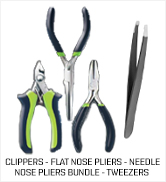
Image 4.1: Recommended tools for assembly, including clippers, flat-nose pliers, needle-nose pliers, and tweezers.
5. Assembly Instructions
Follow the detailed, illustrated instructions provided in your kit. The general assembly process involves detaching parts, bending and folding them, and connecting them using tabs and slots. No glue is required.
General Assembly Steps:
- Prepare the Parts: Carefully clip each part from the metal sheets. Use clippers to avoid bending or damaging the parts.
- Bend and Fold: Many parts require bending or folding along etched lines. Use tweezers or needle-nose pliers for precision.
- Connect Parts: Insert tabs into corresponding slots.
- Secure Connections: Twist the tabs to secure the connection. Refer to the instruction diagrams for the correct twist direction (90 degrees or 180 degrees).

Image 5.1: Demonstrating how to clip parts from the metal sheet using a specialized tool.

Image 5.2: A metal piece being carefully bent along its etched lines.

Image 5.3: Close-up view of a tab being inserted into a slot for connection.

Image 5.4: A tab twisted to secure two metal components together.
Detailed Instructions and 360 View:
For a comprehensive, zoomable PDF of the instruction sheet and a 360-degree view of the model, please visit the official Metal Earth website:
Metal Earth ICX140 Instructions & 360 View

Image 5.5: A section of the official instruction sheet, detailing initial assembly steps and tool recommendations.
6. Product Specifications
| Feature | Detail |
|---|---|
| Brand | Metal Earth |
| Model Name | International Space Station |
| Model Number | ICX140 |
| Series | Premium Series |
| Material | Steel |
| Number of Pieces | 209 |
| Assembled Dimensions (L x W x H) | 7.75 x 5.76 x 4.53 inches |
| Recommended Age | 14 years and up |
| UPC | 032309014327 |
| Manufacturer | Fascinations |
7. Official Product Video
Watch an official video demonstrating the assembly process and showcasing the detail of Metal Earth models. While this video features a different model (a tank), it illustrates the general techniques and quality you can expect when assembling your International Space Station model.
Video 7.1: An official Metal Earth video demonstrating the assembly process for a metal model kit. This video showcases the general steps of detaching, bending, and connecting parts, providing a visual guide to the techniques used for all Metal Earth models, including the International Space Station.
8. Warranty and Support
Warranty Information:
Specific warranty details are not provided in the product information. For any warranty-related inquiries, please contact the manufacturer directly.
Customer Support:
For additional support, frequently asked questions, or to explore other Metal Earth models, please visit the official Metal Earth website: