
Introduction
Thank you for purchasing the Byron Statics Portable CD Boombox. This device offers versatile audio playback options, including a top-loading CD player, AM/FM radio, and an Aux-in port for external devices. Designed for portability and ease of use, this manual provides detailed instructions to help you operate and maintain your boombox effectively.
Safety Information
- Power Source: Use only the specified AC power cord (AC 120V-60Hz) or 6 x 1.5V 'C' size batteries.
- Water and Moisture: Do not expose the unit to rain, moisture, or immerse it in water.
- Heat Sources: Keep the unit away from heat sources such as radiators, heat registers, stoves, or other apparatus that produce heat.
- Ventilation: Ensure proper ventilation. Do not block any ventilation openings.
- Cleaning: Unplug the unit from the power outlet before cleaning. Use a soft, dry cloth.
- Servicing: Do not attempt to service this product yourself. Refer all servicing to qualified service personnel.
- CD Player: Never look directly into the laser beam.
Product Overview
Familiarize yourself with the various parts and controls of your boombox.

Figure 1: Front and Top View of the Boombox with Labeled Controls
- CD Door: Access for loading/unloading CDs.
- Function Switch: Selects between CD/AUX IN, OFF, and RADIO modes.
- Volume Control: Adjusts the audio output level.
- FM Antenna: Extendable antenna for FM radio reception.
- Band Switch (AM/FM): Selects between AM and FM radio bands.
- Tuning Control: Fine-tunes radio frequencies.
- Carry Handle: For easy portability.
- CD Control Buttons: Repeat, Skip On/Down, Program, Stop, Play/Pause.
- LED Display: Shows track number for CD or radio frequency.
- Power Indicator: Illuminates when the unit is powered on.
- Aux-in Jack: For connecting external audio devices.
- AC Power Input: For connecting the AC power cord.
- Battery Compartment: Located on the bottom for 'C' size batteries.
Setup
Powering the Unit
Your boombox can be powered by either AC power or batteries.
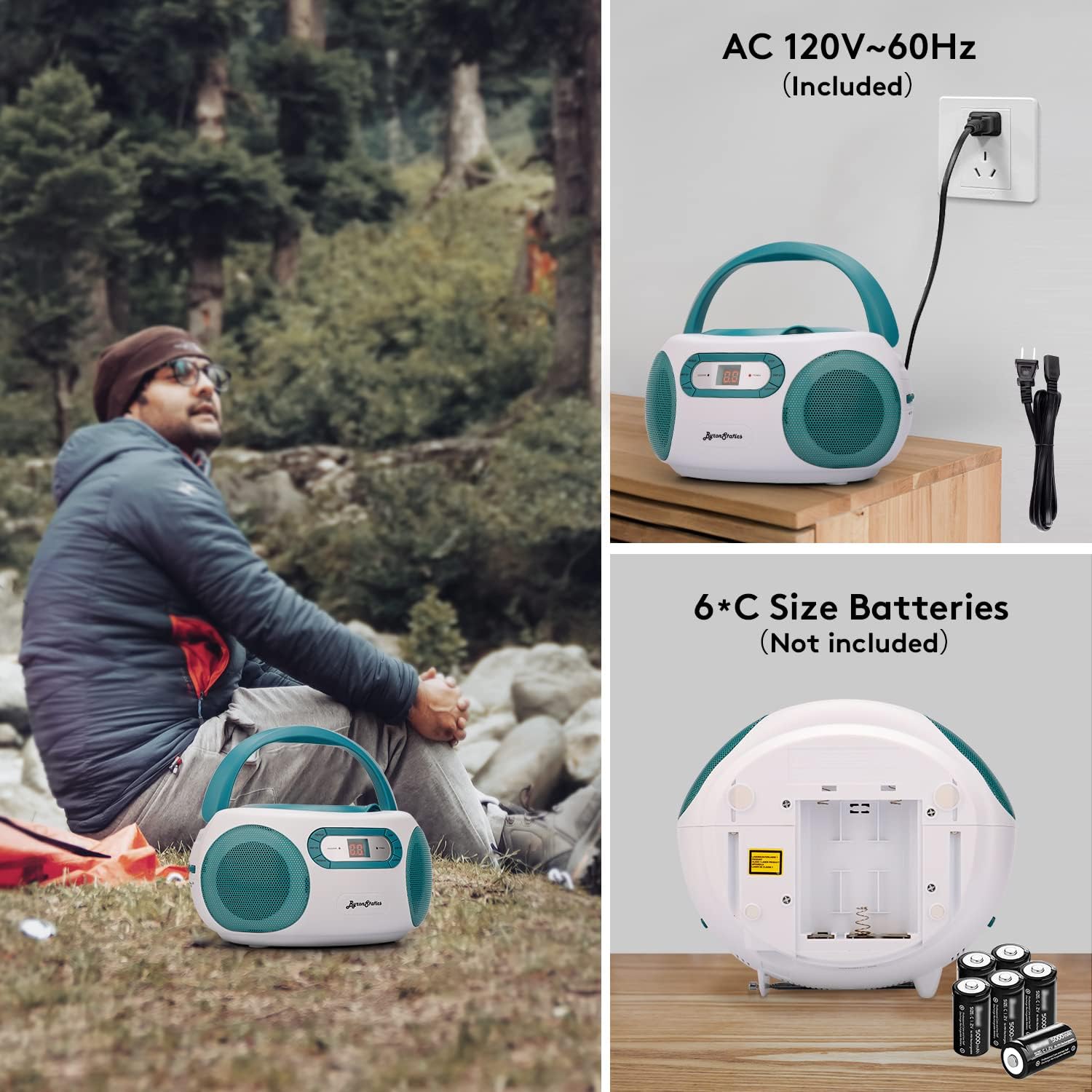
Figure 2: AC Power Connection and Battery Installation
AC Power Operation
- Ensure the Function Switch is in the "OFF" position.
- Connect the supplied AC power cord to the AC power input jack on the back of the unit.
- Plug the other end of the AC power cord into a standard AC 120V-60Hz wall outlet.
Battery Operation
- Ensure the Function Switch is in the "OFF" position.
- Open the battery compartment cover located on the bottom of the unit.
- Insert 6 x 1.5V 'C' size batteries (not included), observing the correct polarity (+/-) as indicated inside the compartment.
- Close the battery compartment cover securely.
- Note: Disconnect the AC power cord when operating on batteries.
Operating Instructions
CD Player Operation

Figure 3: Loading a CD into the Top-Loading Compartment
- Set the Function Switch to the "CD/AUX IN" position.
- Open the CD door by gently lifting it.
- Place a CD (CD, CD-R, or CD-RW) onto the center spindle with the label side facing up.
- Close the CD door firmly until it clicks.
- The CD player will begin reading the disc, and the total number of tracks will appear on the LED display.
- Press the PLAY/PAUSE button to start playback. The track number will be displayed.
- To pause playback, press the PLAY/PAUSE button. Press it again to resume.
- To skip to the next track, press the SKIP UP button.
- To go back to the beginning of the current track or to the previous track, press the SKIP DOWN button.
- To stop playback, press the STOP button.
- Repeat Function: Press the REPEAT button once to repeat the current track. Press it again to repeat the entire disc. Press a third time to cancel repeat mode.
- Program Function: To program tracks for playback, press the PROGRAM button while the CD is stopped. The "PROGRAM" indicator will flash. Use the SKIP UP/DOWN buttons to select your desired track, then press PROGRAM again to confirm. Repeat for up to 20 tracks. Press PLAY/PAUSE to start programmed playback.
AM/FM Radio Operation

Figure 4: Using the AM/FM Radio with Extended Antenna
- Set the Function Switch to the "RADIO" position.
- Slide the Band Switch to select either "AM" or "FM".
- For FM reception, fully extend the telescopic FM antenna. For AM reception, the unit has a built-in antenna, so no external adjustment is needed.
- Rotate the TUNING control knob to select your desired radio station. The frequency will be displayed on the LED screen.
- Adjust the VOLUME control to your preferred listening level.
Aux-in Operation
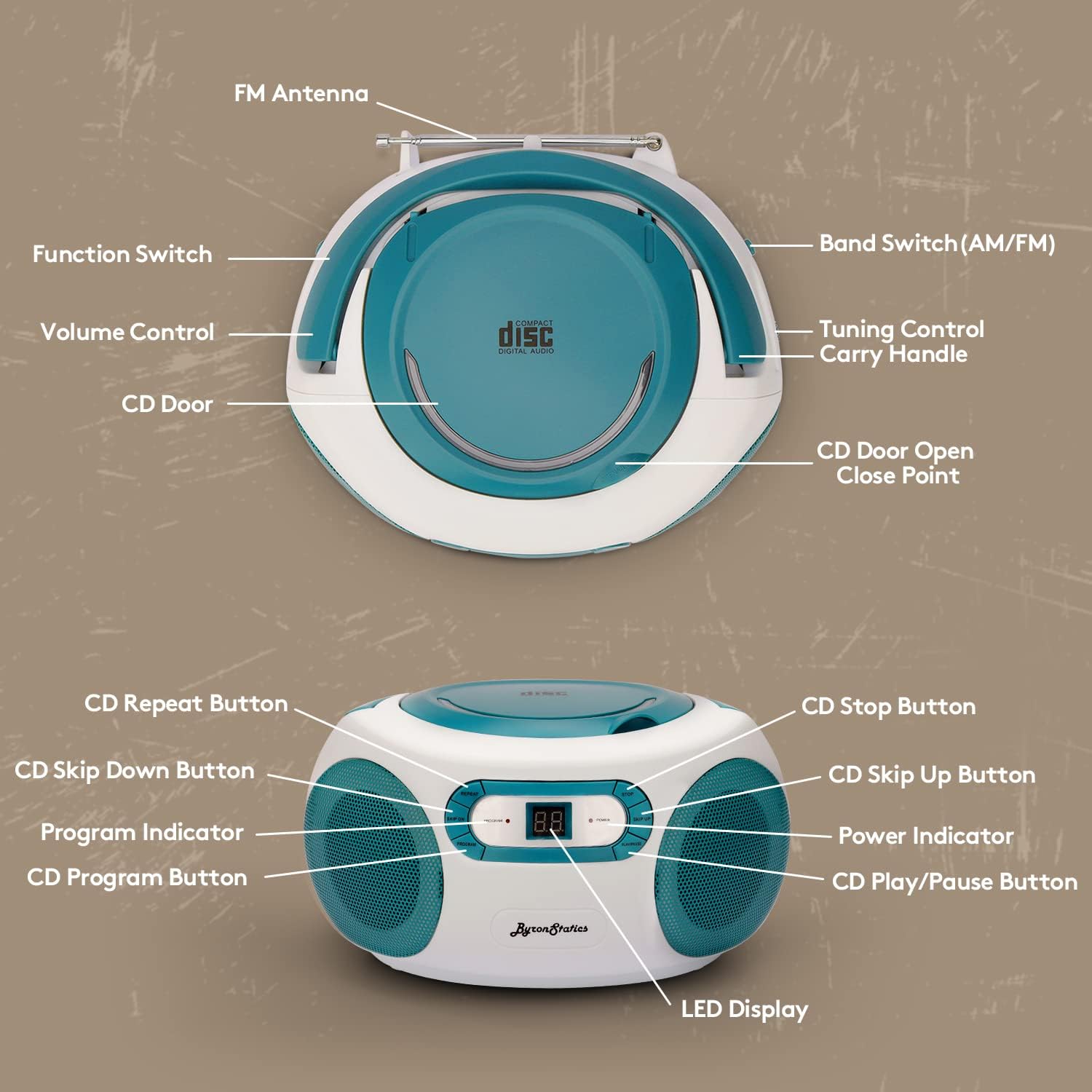
Figure 5: Connecting an External Device via Aux-in
- Set the Function Switch to the "CD/AUX IN" position.
- Connect one end of a 3.5mm audio cable (not included) to the Aux-in jack on the boombox.
- Connect the other end of the audio cable to the headphone jack or audio output of your external audio device (e.g., smartphone, tablet, MP3 player).
- Start playback on your external device.
- Adjust the volume using the VOLUME control on the boombox and/or your external device.
Maintenance
- Cleaning the Unit: Wipe the exterior of the unit with a soft, damp cloth. Do not use abrasive cleaners or solvents.
- CD Lens Care: If the CD player experiences reading errors, clean the lens with a commercially available CD lens cleaner.
- Battery Replacement: If using batteries, replace all six 'C' size batteries when the sound becomes distorted or the unit stops functioning. Do not mix old and new batteries.
- Storage: When not in use for extended periods, remove batteries and store the unit in a cool, dry place.
Troubleshooting
| Problem | Possible Cause | Solution |
|---|---|---|
| No power | AC cord not connected; Batteries depleted or incorrectly inserted. | Check AC cord connection; Replace batteries or ensure correct polarity. |
| CD not playing / Skipping | CD dirty or scratched; CD inserted incorrectly; CD door not closed; Function switch not in CD mode. | Clean or replace CD; Insert CD label-side up; Close CD door firmly; Set Function Switch to CD/AUX IN. |
| Poor radio reception | FM antenna not extended; Weak signal; Interference. | Fully extend FM antenna; Reposition the unit; Try tuning to a stronger station. |
| No sound from Aux-in | Aux cable not connected; Volume too low; External device not playing. | Ensure Aux cable is fully inserted; Increase volume on boombox and external device; Start playback on external device. |
Specifications
- Model: KBB-250
- Power Source: AC 120V-60Hz or 6 x 1.5V 'C' size batteries (not included)
- CD Player: Top-loading, compatible with CD, CD-R, CD-RW
- Radio Frequencies: AM 520-1710KHz; FM 76-108MHz
- Speakers: 1W RMS x 2 Stereo Speakers
- Connectivity: Aux-in Jack (3.5mm)
- Display: LCD Display
- Product Dimensions: 8.3 x 7.68 x 4.73 inches
- Item Weight: 3.47 pounds
Warranty and Support
For customer service, warranty information, or technical support, please refer to the contact details provided with your product packaging or visit the official BYRONSTATICS website. Our support team is available to assist you with any questions or issues you may encounter.


