
1. Introduction
This manual provides essential information for setting up, operating, maintaining, and troubleshooting your Samsung Galaxy A71 smartphone. Please read this manual thoroughly to ensure proper use and to maximize the device's capabilities.
The Samsung Galaxy A71 (Model A715F) features a 6.7-inch Super AMOLED Plus display, a 64MP Quad Camera system, a 4500 mAh battery with 25W fast charging, and runs on Android 10.0 with One UI 2. It is an international model designed for GSM carriers.
2. Device Layout
Familiarize yourself with the physical components of your Galaxy A71.

Image 2.1: Front view of the Samsung Galaxy A71, showing the display and front camera.
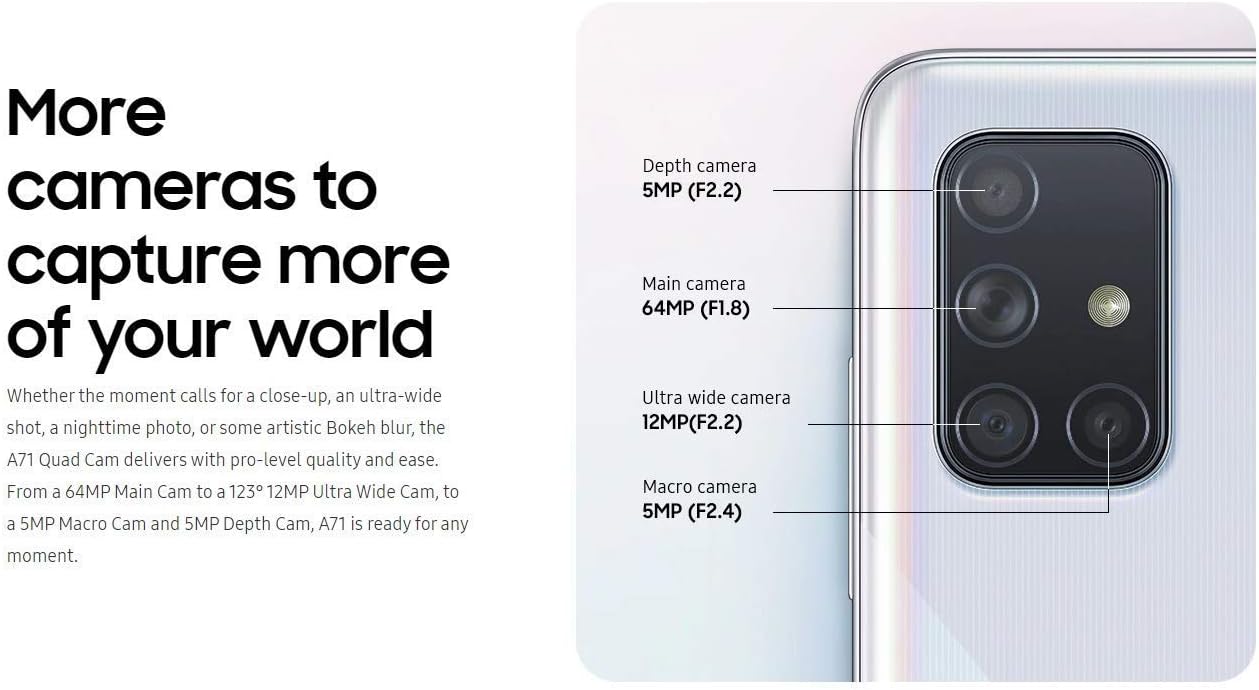
Image 2.2: Back view of the Samsung Galaxy A71, highlighting the quad camera module and Samsung branding.
3. Setup
3.1. Inserting the SIM Card
The Galaxy A71 uses a single Nano-SIM card. Ensure the device is powered off before inserting or removing the SIM card.
- Locate the SIM card tray on the side of the device.
- Insert the ejection pin into the hole on the SIM card tray to open it.
- Place the Nano-SIM card into the tray with the gold contacts facing down.
- Gently push the tray back into the slot until it is flush with the device.
3.2. Initial Power On and Setup
- Press and hold the Power key until the Samsung logo appears.
- Follow the on-screen prompts to select your language, connect to a Wi-Fi network, and set up your Google account.
3.3. Fingerprint Sensor Setup
The Galaxy A71 features an in-display optical fingerprint sensor for secure unlocking.
- Navigate to Settings > Biometrics and security > Fingerprints.
- Follow the on-screen instructions to register your fingerprint. You will be prompted to lift and press your finger multiple times on the designated area of the screen.
- Ensure your finger is clean and dry for accurate recognition.

Image 3.1: Illustration of the in-display fingerprint sensor for unlocking the device.
4. Operating Your Device
4.1. Display and Navigation
The 6.7-inch Super AMOLED Plus display offers vibrant colors and deep blacks. Navigate the interface using touch gestures, including tap, swipe, pinch-to-zoom, and long press.
4.2. Camera Usage
The Galaxy A71 is equipped with a versatile quad-camera system on the rear and a high-resolution front camera.
- Rear Camera: 64 MP (F1.8) Main, 12 MP (F2.2) Ultra Wide, 5 MP (F2.4) Macro, 5 MP (F2.2) Depth.
- Front Camera: 32 MP (F2.2).
To open the camera, tap the Camera icon on the home screen or double-press the Power key. Select different modes like Photo, Video, Pro, Panorama, Food, Night, Macro, and Live Focus from the camera interface.

Image 4.1: Detailed view of the Galaxy A71's quad camera system, indicating the function of each lens.
4.3. Battery and Charging
The device is powered by a 4500 mAh battery and supports 25W Super Fast Charging.
- Use the included 25W fast charger for optimal charging speeds.
- To charge, connect the USB-C cable to the phone's charging port and the adapter to a power outlet.
- Avoid using damaged chargers or cables, as this can harm the device and void the warranty.

Image 4.2: Information on the 4500mAh battery and 25W Super Fast Charging capability.
4.4. Storage and Memory
The Galaxy A71 comes with 128GB of internal storage and 6GB of RAM. Storage can be expanded up to 512GB using a MicroSD card (sold separately).
4.5. Connectivity
The device supports various connectivity options:
- Cellular: GSM, HSDPA, and 4G LTE bands (refer to specifications for detailed band information).
- Wi-Fi: Connect to wireless networks for internet access.
- Bluetooth: For connecting to wireless accessories.
- USB-C: For charging and data transfer.
- Audio Jack: 3.5mm port for wired headphones.
5. Maintenance
5.1. Battery Care
- Avoid extreme temperatures, as they can degrade battery life.
- Do not leave the device charging for extended periods after it reaches 100%.
- For long-term storage, charge the battery to around 50% and power off the device.
5.2. Software Updates
Regularly check for and install software updates to ensure optimal performance, security, and access to new features. Go to Settings > Software update > Download and install.
5.3. Cleaning Your Device
- Use a soft, lint-free cloth to clean the screen and body.
- Avoid harsh chemicals, abrasive materials, or excessive moisture.
- For stubborn smudges, lightly dampen the cloth with distilled water.
6. Troubleshooting
6.1. Device Not Powering On
- Ensure the battery is charged. Connect the charger and wait a few minutes before attempting to power on.
- Press and hold the Power key for at least 10 seconds to perform a forced restart.
6.2. Network Connectivity Issues
- Verify that your SIM card is correctly inserted and activated with a compatible GSM carrier.
- Check your network settings: Settings > Connections > Mobile networks.
- Restart the device.
- Note: This is an international model and may not be compatible with all carriers, especially CDMA networks like Verizon, Sprint, or Boost in the US.
6.3. Fingerprint Sensor Not Working
- Ensure your finger and the screen are clean and dry.
- Re-register your fingerprint if issues persist.
- Ensure you are pressing firmly on the correct area of the screen.
7. Specifications
| Model Name | Galaxy A71 |
| Model Number | A715F |
| Display | 6.7 inches Super AMOLED Plus, FHD+ (1080 x 2400 pixels) |
| Processor | Qualcomm SDM730 Snapdragon 730 (8 nm), Octa-core (2x2.2 GHz + 6x1.8 GHz) |
| RAM | 6 GB |
| Internal Storage | 128 GB |
| Expandable Storage | MicroSD (up to 512 GB) |
| Rear Camera | 64 MP (F1.8) Main + 12 MP (F2.2) Ultra Wide + 5 MP (F2.4) Macro + 5 MP (F2.2) Depth |
| Front Camera | 32 MP (F2.2) |
| Battery Capacity | 4500 mAh |
| Charging | 25W Super Fast Charging |
| Operating System | Android 10.0, One UI 2 |
| SIM Type | Single Nano-SIM |
| Connectivity | 4G LTE, Wi-Fi, Bluetooth, GPS, USB-C |
| Audio Jack | 3.5 mm |
| Dimensions (approx.) | 163.6 x 76.0 x 7.7 mm (6.44 x 2.99 x 0.30 inches) |
| Weight (approx.) | 179 g (6.31 oz) |
8. Warranty and Support
Please note that this is an International Version of the Samsung Galaxy A71 (Model A715F). As such, there is No Warranty in the US provided by the manufacturer for this specific model.
This international model is compatible with most GSM carriers, including T-Mobile, AT&T, and MetroPCS. It will NOT work with CDMA carriers such as Verizon, Sprint, or Boost.
For further support or detailed product information, please refer to the official Samsung support website for international models or contact your point of purchase.
For general information about Samsung products, you may visit: www.samsung.com