
Makita DUB186Z
Makita DUB186Z 18V Li-ion LXT Blower
Instruction Manual
1. Introduction
This manual provides essential information for the safe and effective operation, maintenance, and troubleshooting of your Makita DUB186Z 18V Li-ion LXT Blower. Please read this manual thoroughly before using the product to ensure proper handling and to prevent injury or damage.
The Makita DUB186Z is a compact and lightweight cordless blower designed for single-handed operation, powered by an 18V Li-ion LXT slide-type battery (not included). It features variable speed control and three air volume settings for efficient clean-up tasks, such as blowing fallen leaves.
2. Safety Information
WARNING: Read all safety warnings and all instructions. Failure to follow the warnings and instructions may result in electric shock, fire, and/or serious injury.
- Always wear appropriate personal protective equipment, including eye protection, hearing protection, and sturdy footwear, when operating the blower.
- Ensure the work area is clear of debris and bystanders before starting the blower.
- Do not operate the blower in wet conditions or in the presence of flammable liquids or gases.
- Keep hands, hair, loose clothing, and jewelry away from moving parts and air inlets.
- Never point the blower nozzle at people or animals.
- Use only genuine Makita batteries and chargers. The use of non-genuine or compatible batteries and chargers will invalidate the Makita guarantee.
- This tool is not compatible with G-Series batteries.
- Always remove the battery pack before making any adjustments, changing accessories, or storing the tool.
- Store the blower in a dry, secure place out of reach of children.
3. Components and Parts
The Makita DUB186Z Blower typically includes the following components:
- Makita DUB186Z Blower Unit
- Long Nozzle Assembly
- (Battery and Charger are not included)

Figure 3.1: Makita DUB186Z 18V Li-ion LXT Blower with nozzle.

Figure 3.2: Front view of the blower, showing the air intake and nozzle connection point.
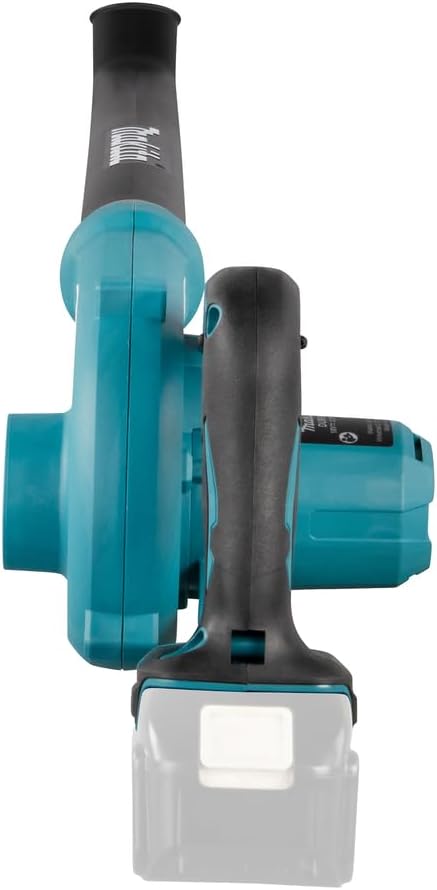
Figure 3.3: Rear view of the blower, highlighting the battery slot and handle.
4. Setup
4.1 Attaching the Nozzle
- Align the long nozzle assembly with the outlet on the front of the blower unit.
- Push the nozzle firmly onto the blower until it clicks into place, ensuring a secure connection.
- To remove, press the release button (if present) and pull the nozzle off.

Figure 4.1: Close-up of the nozzle attachment area.
4.2 Installing the Battery
The Makita DUB186Z requires an 18V Li-ion LXT slide-type battery (sold separately).
- Ensure the blower is turned off.
- Slide the battery pack into the battery slot on the rear of the blower until it locks into place with a click.
- To remove the battery, press the release button on the battery pack and slide it out.

Figure 4.2: View of the battery insertion point.
5. Operating Instructions
5.1 Powering On/Off
- To start the blower, pull the trigger switch located on the handle.
- To stop the blower, release the trigger switch.

Figure 5.1: Trigger switch and speed control lever.
5.2 Variable Speed Control
The blower features variable speed control, allowing you to adjust the airflow based on the task.
- The speed is controlled by the amount of pressure applied to the trigger switch. Pressing the trigger further increases the speed.
5.3 Air Volume Settings
The DUB186Z is equipped with a switch for three air volume settings: Low, Medium, and High.
- Move the air volume setting switch to select the desired airflow level.
- Use Low for light debris or delicate areas, Medium for general tasks, and High for heavy debris or faster clean-up.

Figure 5.2: Air volume setting switch (1, 2, 3 for Low, Medium, High).
5.4 Operating Tips
- For optimal performance, sweep from side to side, moving debris into piles.
- Avoid blowing debris towards people, pets, or open windows.
- Use the lowest effective speed setting to conserve battery life.

Figure 5.3: Blower in operation, clearing leaves.
6. Maintenance
Regular maintenance ensures the longevity and optimal performance of your blower.
6.1 Cleaning
- Always remove the battery before cleaning.
- Wipe the exterior of the blower with a soft, damp cloth. Do not use harsh chemicals or abrasive cleaners.
- Ensure the air intake and outlet are free from debris. Use a soft brush or compressed air to clear any blockages.
6.2 Storage
- Remove the battery pack from the blower before storage.
- Store the blower in a cool, dry place, away from direct sunlight and moisture.
- Keep the blower out of reach of children and unauthorized persons.
7. Troubleshooting
| Problem | Possible Cause | Solution |
|---|---|---|
| Blower does not start. | Battery not inserted correctly. Battery charge is low. Battery protection circuit activated. | Ensure battery is fully seated. Charge the battery. Allow battery to cool down or reset by reinserting. |
| Reduced airflow. | Nozzle or air intake blocked. Low battery charge. | Clear any obstructions from nozzle or air intake. Charge the battery. |
| Blower stops during operation. | Battery protection circuit activated (overload/overheat). | Release trigger, allow tool/battery to cool. Reduce load on the tool. |
If the problem persists after attempting these solutions, contact Makita authorized service center for assistance.
8. Specifications
| Feature | Detail |
|---|---|
| Model | DUB186Z |
| Power Source | Battery Powered (18V Li-ion LXT) |
| Voltage | 18 Volts |
| Air Flow Capacity | Up to 3.2 Cubic Meters per Minute |
| Maximum Air Velocity | 68 metres per second |
| Noise Level | 82.5 dB |
| Item Weight | 3 Pounds |
| Product Dimensions | 33.9"L x 6.14"W x 8.27"H |
| Included Components | 1 x Nozzle assembly, 1 x Makita DUB186Z Blower |
9. Warranty and Support
9.1 Manufacturer's Warranty
Makita offers a 1-year manufacturer warranty for the DUB186Z Blower. This warranty can be extended by a further 2 years (total 3 years) when the product is registered within 30 days of purchase.
Important Note:
- This guarantee does not apply where non-genuine or recommended parts or accessories are fitted to the tool.
- The use of non-genuine or compatible batteries and chargers with Makita tools will invalidate the Makita guarantee for our tools.
9.2 Customer Support
For warranty claims, technical assistance, or service inquiries, please contact Makita customer support or visit their official website. Ensure you have your product model number (DUB186Z) and proof of purchase available.
You can also visit the official Makita store on Amazon for more information: Makita Store
Ask a question about this manual
Ask about setup, troubleshooting, compatibility, parts, safety, or missing instructions. Manuals+ will review the question and use this page’s manual context to help answer it.