
Introduction
The Dreadbox Typhon is a powerful and portable monophonic analog synthesizer, designed for sound creation and musical expression. This manual provides essential information for setting up, operating, maintaining, and troubleshooting your Typhon synthesizer.
Product Overview
The Typhon features two all-analog VCOs, a four-pole resonant lowpass filter, two envelope generators, and analog VCAs. It also includes an expansive effects section powered by Sinevibes DSP technology, offering six distinct distortions, a bitcrusher, two delays, reverb, and three modulation effects. Its compact design and USB power capability make it suitable for various studio and portable setups.
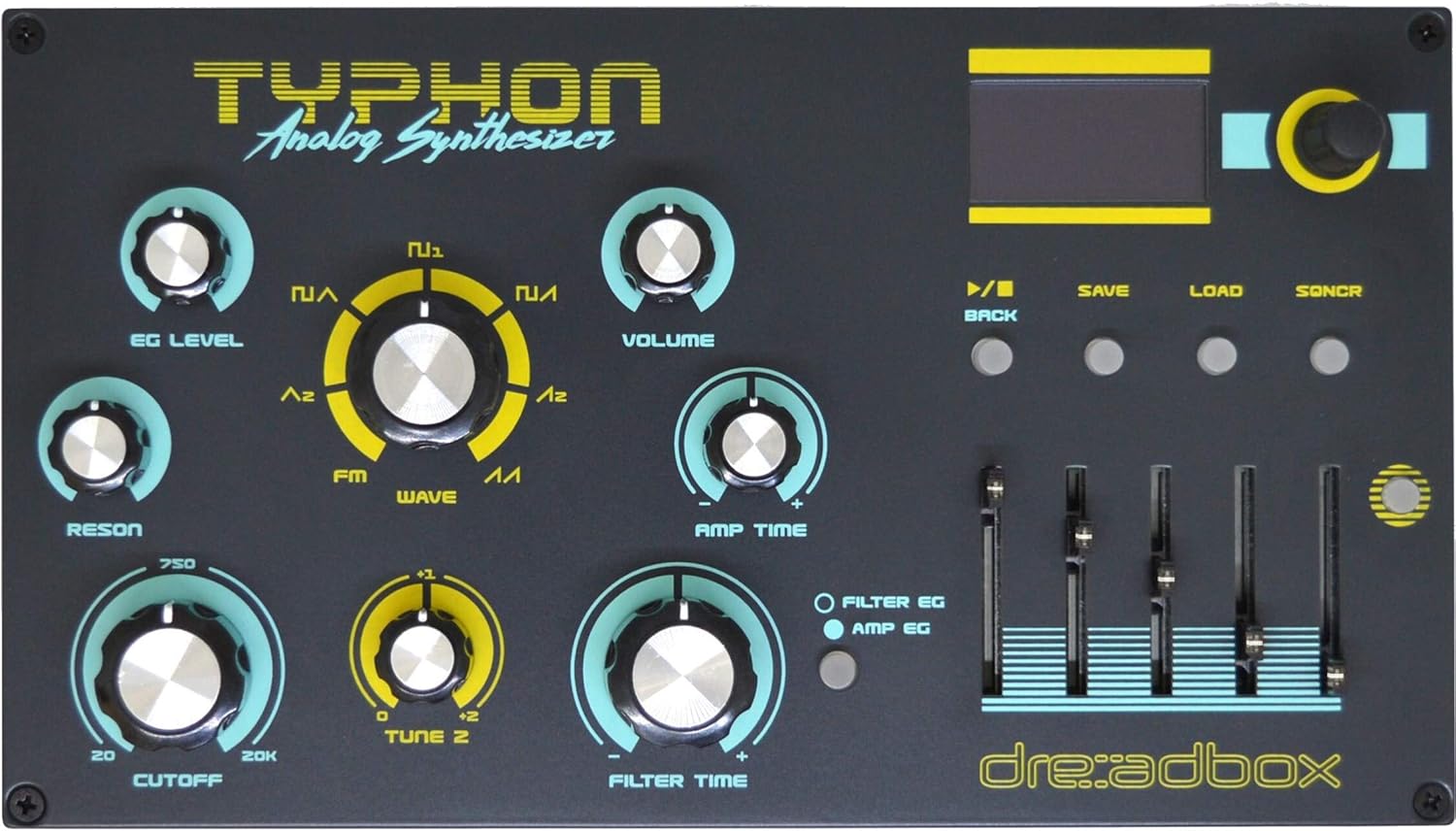
Figure 1: Front panel view of the Dreadbox Typhon Desktop Monophonic Analog Synthesizer, showing its various knobs, sliders, display, and controls.
Setup
1. Power Connection
The Typhon is powered via a USB Type B connection. Connect the provided USB cable to the USB port on the rear panel of the synthesizer and to a compatible USB power source (e.g., a USB power adapter, computer USB port, or power bank).
2. Audio Connections
- Headphone Output: Connect headphones to the 3.5mm headphone jack on the rear panel for private monitoring.
- Main Outputs: Use the 1/4-inch L/R output jacks to connect the Typhon to an audio interface, mixer, or amplifier.
- Audio Input: The 1/4-inch audio input allows external audio signals to be processed through the Typhon's filter and effects section.
3. MIDI Connections
The Typhon features standard 5-pin DIN MIDI In and MIDI Out ports. Connect a MIDI keyboard or sequencer to the MIDI In port to control the synthesizer. The MIDI Out port can be used to send MIDI data to other devices.

Figure 2: Rear panel view of the Dreadbox Typhon, illustrating the USB power input, MIDI In/Out ports, audio input, and stereo audio outputs, along with the headphone jack.
4. External MIDI Keyboard
An external MIDI keyboard is required to play sounds and interact with the synthesizer's musical capabilities. The Typhon itself does not have an integrated keyboard.
Operating Instructions
1. Controls and Interface
The Typhon's front panel features a variety of knobs and sliders for sound shaping. These include controls for EG Level, Reson, Cutoff, Tune 2, FM Wave, Volume, Amp Time, and Filter Time. The sliders provide additional modulation control.

Figure 3: Angled view of the Dreadbox Typhon, highlighting the robust build quality, including the wooden side panels and the arrangement of the control knobs and sliders.
2. LED Display and Navigation
The integrated LED display provides visual feedback for various parameters, including sequencer settings, preset selection, and modulator configurations. Use the navigation buttons (Back, Save, Load, SQNCR) and the main encoder knob to browse menus, select options, and adjust values.
3. Presets and Sound Design
The Typhon comes with numerous factory presets organized into banks. You can load existing presets, modify their parameters using the front panel controls, and save your custom sounds. The ability to save modified presets ensures that your original sounds are preserved while allowing for extensive experimentation.
4. Sequencer
The built-in 32-step sequencer allows for the creation and playback of melodic and rhythmic patterns. Refer to the on-screen display for sequencer programming and control.
5. Effects Section
The Typhon's digital effects section includes a wide range of options to enhance your sound: six types of distortion, a bitcrusher, two delays, reverb, and three modulation effects. These effects can be accessed and adjusted via the display and controls.
Maintenance
To ensure the longevity and optimal performance of your Dreadbox Typhon, follow these general maintenance guidelines:
- Keep the device clean by wiping it with a soft, dry cloth. Avoid abrasive cleaners or solvents.
- Protect the synthesizer from dust, moisture, and extreme temperatures.
- Avoid placing heavy objects on top of the unit.
- Ensure proper ventilation to prevent overheating.
Troubleshooting
If you encounter issues with your Typhon, consider the following common troubleshooting steps:
- No Power: Verify that the USB cable is securely connected to both the Typhon and a working USB power source. Try a different USB cable or power adapter.
- No Sound: Check all audio connections (headphones, main outputs). Ensure the volume knob is turned up and that your external audio system is functioning correctly. Confirm that a MIDI keyboard is connected and sending signals.
- MIDI Issues: Ensure MIDI cables are correctly connected (MIDI Out of controller to MIDI In of Typhon). Check MIDI channel settings on both the Typhon and your controller.
- Unexpected Behavior: Try performing a factory reset (refer to the official Dreadbox documentation for specific instructions on how to do this).
For persistent issues, contact Dreadbox customer support.
Specifications
| Feature | Description |
|---|---|
| Product Type | Monophonic Analog Synthesizer Module |
| Oscillators | 2 VCOs |
| Filter | Resonant Lowpass Filter (4-pole) |
| Envelope Generators | 2 Envelope Generators |
| Sequencer | 32-step Sequencer |
| Effects | 6 Distortions, Bitcrusher, 2 Delays, Reverb, 3 Modulation Effects |
| Power | USB Type B |
| MIDI Connectivity | MIDI In, MIDI Out (5-pin DIN) |
| Audio Connections | Headphone Output (3.5mm), Stereo (L/R) Outputs (1/4-inch), Audio Input (1/4-inch) |
| Dimensions (L x W x H) | 10.3 x 5.7 x 3.5 inches |
| Weight | 2.79 Pounds |
| Chassis Material | Steel (with Bass Wood side panels) |
| Model Number | DBX-TYPH |
Warranty
The Dreadbox Typhon Desktop Monophonic Analog Synthesizer comes with a 2-year warranty. Please retain your proof of purchase for warranty claims.
Support
For further assistance, technical support, or detailed product information, please visit the official Dreadbox website or contact their customer service department. Keep your product's model number (DBX-TYPH) and serial number handy when seeking support.


