
1. Important Safety Information
Please read all instructions carefully before installing or operating this appliance. Keep this manual for future reference.
- Electrical Safety: Installation must be performed by a qualified electrician in accordance with all local codes and ordinances. Ensure the appliance is properly grounded.
- Cookware: Use only induction-compatible cookware. Non-magnetic cookware will not heat.
- Burn Hazard: The cooktop surface may remain hot after use due to residual heat. Do not touch the surface until it has cooled.
- Children: Keep children away from the appliance during operation and when it is cooling down.
- Flammable Materials: Do not store flammable materials or aerosols near the cooktop.
- Medical Implants: Individuals with pacemakers or similar medical implants should consult their doctor before using an induction cooktop.
- Ventilation: Ensure adequate ventilation around the cooktop as specified in the installation instructions.
2. Product Overview
The ZLINE RCIND-24 is a 24-inch induction cooktop featuring four heating elements and intuitive touch controls. Its design prioritizes efficiency and safety in modern kitchens.
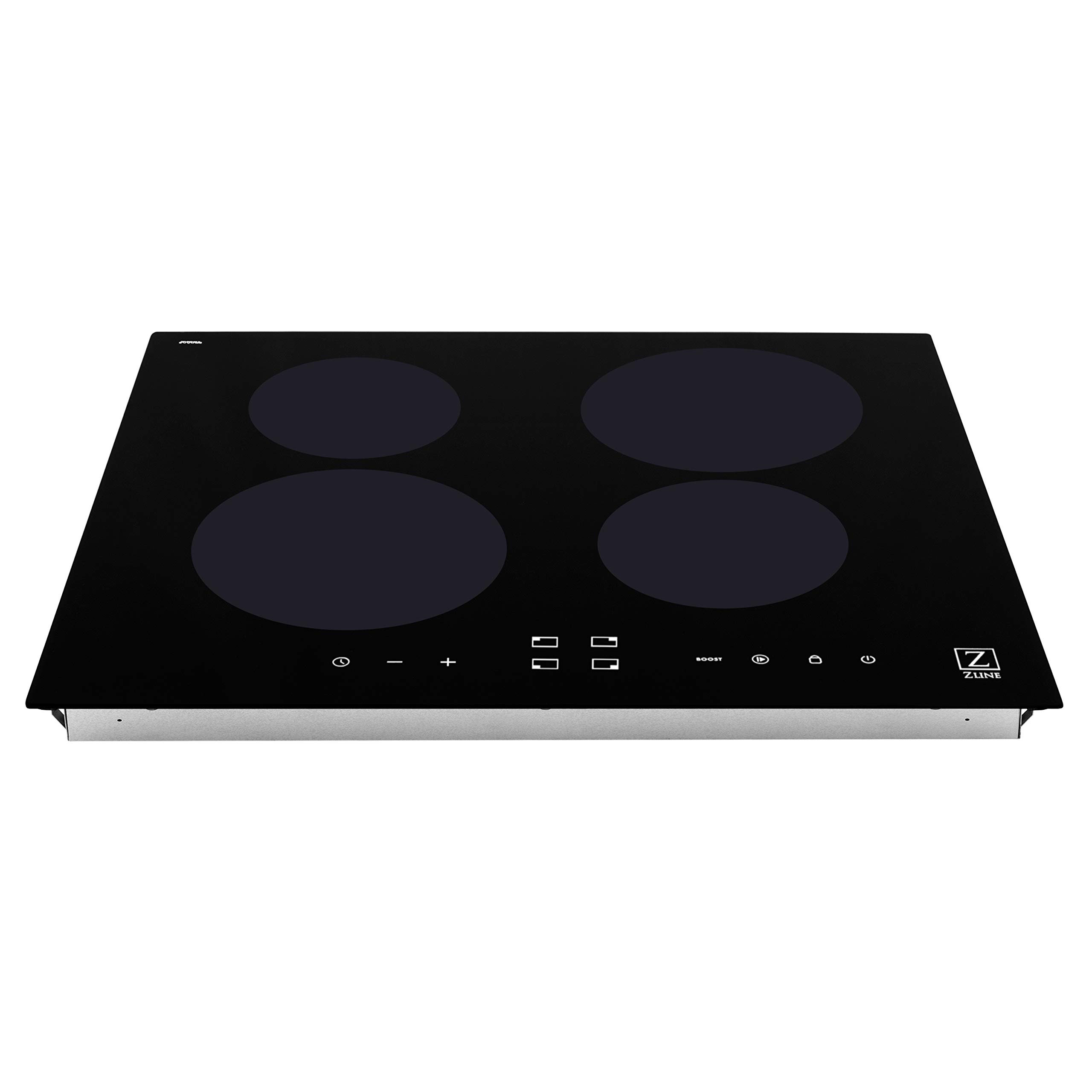
Figure 2.1: Overall view of the ZLINE 24 inch Induction Cooktop (RCIND-24).
Key Features:
- Power Boost Mode: Provides maximum power to a cooking zone for a short period, ideal for rapid boiling.
- Power Sharing Mode: Allows for convenient heat transitions between cooking zones, optimizing power distribution.
- Touch Controls: White LED illuminated touch controls offer precise adjustment of heat and time settings.
- Independent Countdown Timers: Each cooking zone can have its own timer for precise cooking control.
- Residual Heat Indicator: Visually alerts when a cooking zone is still hot to the touch after use.
- Control Locks: Manual and automatic control locks enhance safety by preventing accidental changes to settings.
- Automatic Power Level Control: Prevents overheating by automatically adjusting power levels.
- Keep Warm Mode: Maintains food at a serving temperature.
- Energy Efficiency: Superior induction technology provides a more heat and energy-efficient cooking experience.

Figure 2.2: Detailed view of the touch control panel with white LED indicators.
3. Installation
This induction cooktop is designed for drop-in installation. Proper electrical connection is critical for safe and efficient operation.
Electrical Requirements:
- Power Source: Electric
- Voltage: 240 Volts
- Wattage: 8160 Watts
- Connection: Hardwired - 3 Copper Wire Cable from Home Power Supply.
Dimensions and Cutout:
Ensure your countertop cutout meets the specified dimensions for a proper fit.
- Product Dimensions (D x W x H): 20.5" x 23.5" x 2.56" (521mm x 597mm x 65mm)
- Item Weight: 28 Pounds

Figure 3.1: Dimensional drawing showing the cooktop's measurements for installation planning.
Refer to the detailed installation guide provided with your appliance for specific cutout dimensions and wiring diagrams. Always consult a professional for installation.
4. Operating Instructions
Familiarize yourself with the touch controls for optimal cooking performance.
Basic Operation:
- Power On/Off: Touch the power symbol (U) to turn the cooktop on or off.
- Select Cooking Zone: Touch the corresponding zone selection button for the desired burner.
- Adjust Heat Level: Use the '+' and '-' symbols to increase or decrease the heat level (typically 1-9).
Advanced Functions:
- Power Boost Mode: Select a cooking zone and then touch the 'BOOST' button. This provides maximum power for a short duration. The boost function will automatically deactivate after a set time or if the cooktop detects overheating.
- Power Sharing Mode: This feature automatically manages power distribution between linked cooking zones to prevent exceeding the total power limit.
- Independent Timers: Select a cooking zone, then touch the timer button. Use '+' and '-' to set the desired cooking time. The timer will count down and automatically turn off the selected zone when complete.
- Keep Warm Mode: Select a cooking zone and activate the 'Keep Warm' function (refer to specific icon in your manual). This maintains a low, consistent temperature.
- Control Lock: To prevent accidental operation, touch and hold the lock symbol (P) for a few seconds. Repeat to unlock.
Safety Indicators:
- Residual Heat Indicator ('H'): An 'H' will appear on the display for a cooking zone that is still hot after being turned off. Do not touch the surface while 'H' is displayed.
- Automatic Shut-off: If a cooking zone is left on for an extended period without adjustment, it will automatically shut off as a safety measure.
5. Care and Cleaning
Regular cleaning helps maintain the appearance and performance of your induction cooktop.
- Daily Cleaning: Wipe the glass ceramic surface with a soft cloth and a mild detergent after each use, once the surface has cooled.
- Stubborn Stains: For burnt-on food or stubborn stains, use a ceramic cooktop cleaner and a non-abrasive pad. Follow the cleaner's instructions.
- Avoid: Do not use abrasive cleaners, scouring pads, or harsh chemicals, as these can scratch or damage the glass surface. Avoid spilling sugary substances on the hot cooktop, as they can cause pitting.
- Control Panel: Wipe the touch control panel with a damp cloth. Ensure it is dry before operating the cooktop.
6. Troubleshooting
If you encounter issues with your cooktop, refer to the following common problems and solutions before contacting service.
| Problem | Possible Cause | Solution |
|---|---|---|
| Cooktop does not turn on | No power supply; Control lock activated | Check circuit breaker; Unlock controls by pressing and holding the lock button. |
| Cooking zone not heating | Non-induction compatible cookware; Cookware not centered; Small cookware size | Use magnetic cookware; Center cookware on the zone; Use cookware with a base diameter appropriate for the zone. |
| Display shows 'E' or error code | Internal fault; Overheating; Voltage issue | Turn off the cooktop, wait a few minutes, then restart. If error persists, consult a qualified technician. |
| Cooktop makes humming noise | Normal operation of induction technology; Cookware vibration | This is normal. Some cookware may produce more noise than others. |
For issues not listed here or if solutions do not resolve the problem, please contact ZLINE customer support or a qualified service technician.
7. Technical Specifications
| Specification | Detail |
|---|---|
| Model Number | RCIND-24 |
| Brand | ZLINE Kitchen and Bath |
| Installation Type | Drop-In |
| Number of Heating Elements | 4 |
| Burner Type | Induction |
| Control Type | Touch |
| Heater Surface Material | Glass Ceramic |
| Material | Glass |
| Color | Black |
| Power Source | Electric |
| Voltage | 240 Volts |
| Wattage | 8160 Watts |
| Product Dimensions (D x W x H) | 20.5" x 23.5" x 2.56" |
| Item Weight | 28 Pounds |
| Included Components | Tools |
| Certifications | ETL Listed, ADA Compliant |
8. Warranty and Customer Support
For warranty information, please refer to the warranty card included with your product or visit the official ZLINE Kitchen and Bath website. For technical assistance, parts, or service inquiries, please contact ZLINE customer support directly.
Always provide your product model number (RCIND-24) and serial number when contacting support to ensure efficient service.