
1. Introduction
Welcome to your Neosonic Pocket Hearing Aid Amplifier Device. This manual provides detailed instructions for the proper setup, operation, and maintenance of your device to ensure an optimal listening experience. Please read this manual thoroughly before use.

Image: A man wearing the Neosonic Pocket Hearing Aid Amplifier Device, demonstrating its discreet and portable design.
2. Package Contents
Verify that all items are present in the package:
- Pocket Aid Device
- Earphones
- Ear Domes (various sizes)
- Charging Cable (USB)
- Adjustment Tool (screwdriver)
- Lanyard

Image: All components included in the Neosonic Pocket Hearing Aid package, laid out for inspection.
3. Device Components
Familiarize yourself with the different parts of your Pocket Aid:
- Power Indicator: Shows device status.
- Microphone: Captures surrounding sounds.
- Charging Port / Receiver Cable Connection Port: Used for charging and connecting earphones.
- Volume Control: Adjusts the sound amplification level.
- Power ON/OFF Switch: Turns the device on or off.
- Mode Switch Button (Normal / Mute): Toggles between listening modes.
- Back Cover: Protects internal fine-tuning controls.
- Back Clip: For attaching the device to clothing.

Image: Detailed diagram illustrating the various external components of the Neosonic Pocket Hearing Aid.
4. Setup
4.1. Connecting Earphones and Installing Ear Domes
- Insert the earphone plug firmly into the designated port on the device.
- Select the appropriate size ear domes for a comfortable and secure fit in your ear canal. Gently push the chosen ear dome onto the earphone tip.
Video: This video demonstrates how to connect the earphones to the Neosonic Pocket Aid (0:08-0:19) and how to install the ear domes onto the earphone tips (0:31-0:48).
4.2. Charging the Device
Before first use, fully charge the device. Connect the provided USB charging cable to the device's charging port and then to a USB power adapter (not included) or a computer's USB port. The power indicator light will show charging status. A full charge takes approximately 2 hours and provides up to 50 hours of use.

Image: The device connected to a charger, illustrating its rechargeable feature and battery life.
Video: This video demonstrates how to connect the USB charging cable to the device for charging (1:13-1:24).
5. Operating Instructions
5.1. Power On and Volume Adjustment
- Locate the Power ON/OFF switch on the side of the device. Slide it to the "ON" position to power on.
- Use the Volume Control wheel to increase or decrease the sound amplification to a comfortable level. Start with a low volume and gradually increase it.
Video: This video illustrates how to power on the device and adjust the volume control (0:21-0:30).
5.2. Mode Selection
Use the Mode Switch Button to toggle between "Normal" and "Mute" modes as needed. The "Normal" mode provides standard amplification, while "Mute" temporarily silences the device.
6. Fine-Tuning Frequency Response
The device features fine-tuning controls located under the back cover, allowing for personalized adjustment of frequency response to match your specific hearing needs and environment.
- Carefully open the back cover of the device.
- Use the provided adjustment tool (small screwdriver) to adjust the three settings:
- MPO (Maximum Power Output): Limits the maximum sound output to protect hearing from excessively loud sounds.
- NH (Noise Reduction High Frequency): Adjusts low frequencies to reduce background noise in noisy environments.
- NL (Noise Reduction Low Frequency): Adjusts high frequencies to make speech and high-pitched sounds clearer.
- Adjust these settings incrementally until the desired sound quality is achieved. Close the back cover securely after adjustment.
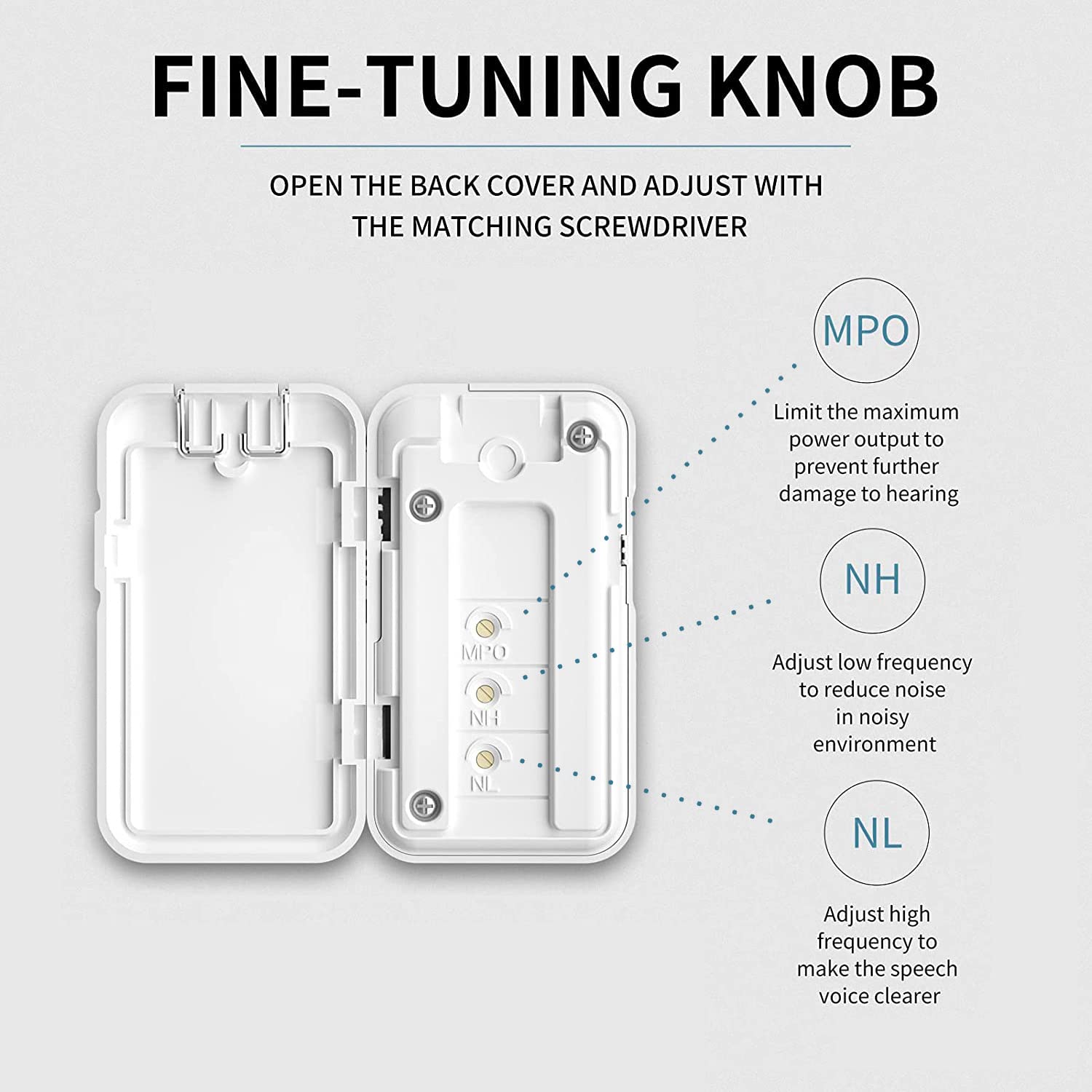
Image: The internal fine-tuning controls for MPO, NH, and NL, accessible with the adjustment tool.
Video: This video demonstrates how to open the back cover and use the adjustment tool to fine-tune the frequency response settings (0:56-1:12).
7. Wearing the Device
The Neosonic Pocket Aid offers flexible wearing options for your convenience:
- Using the Back Clip: Easily clip the device to your shirt pocket, collar, or other suitable clothing.
- Using the Lanyard: Attach the lanyard to the device and wear it comfortably around your neck.
Video: This video illustrates how to use the back clip to attach the Neosonic Pocket Aid to clothing (1:25-1:34) and how to attach and wear the device using the provided lanyard (1:35-1:52).
8. Specifications

Image: The device's high power capability, offering up to 70dB maximum sound gain.
| Feature | Detail |
|---|---|
| Model Name | Neosonic Pocket Aid |
| Model Number | 604015885838 |
| Brand | Neosonic |
| Power Output | Up to 70dB peak sound gain |
| Battery Life | Up to 50 hours per charge |
| Charging Time | Approximately 2 hours for full charge |
| Material | Plastic, Resin |
| Style | Neck-Worn (with clip option) |
| Color | White |
9. Troubleshooting
9.1. No Sound or Low Volume
- Ensure the device is powered on.
- Check the volume control and increase it gradually.
- Verify that the earphones are securely connected.
- Check battery level and charge if necessary.
- Ensure ear domes are properly installed and not blocked.
9.2. Feedback/Whistling Sound
- Ensure ear domes are properly seated in the ear canal to create a good seal.
- Try a different size ear dome for a better fit.
- Reduce the volume.
- Ensure the device microphone is not covered or too close to the earphones.
9.3. Distorted Sound
- Check the battery level; low battery can cause distortion.
- Adjust the fine-tuning settings (MPO, NH, NL) using the adjustment tool.
- Ensure the microphone is clean and unobstructed.
9.4. Device Not Charging
- Verify the charging cable is correctly connected to both the device and the power source.
- Try a different USB power adapter or port.
- Check for any damage to the charging cable or port.
10. Safety Information
- Do not expose the device to extreme temperatures, humidity, or direct sunlight.
- Keep the device and its components out of reach of children and pets.
- Avoid dropping the device or subjecting it to strong impacts.
- Do not attempt to open or repair the device yourself. Contact customer support for assistance.
- If you experience discomfort or pain while using the device, discontinue use and consult a healthcare professional.
- Always start with a low volume setting and gradually increase it to avoid sudden loud sounds.
11. Warranty and Support
For warranty information or technical support, please refer to the contact details provided with your purchase or visit the official Neosonic website.
Our products are designed to aid with mild to moderate high-frequency hearing loss. If you have questions regarding the type of hearing loss this device is suitable for, please consult a healthcare professional.
All Neosonic hearing aids are FDA-approved and registered for over-the-counter sales.