1. Product Overview
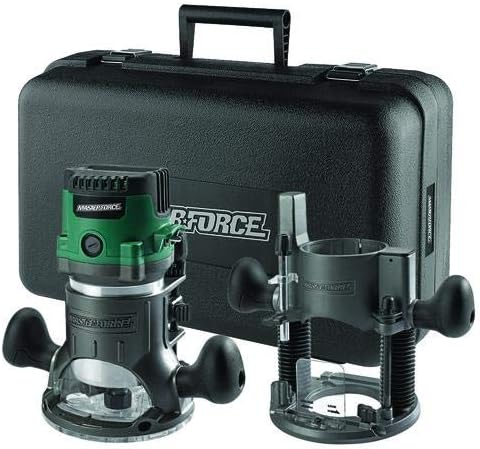
The Masterforce digital router features a digital control that makes it easy to configure the router to your project. The electronic speed control monitors and maintains speed under loads for consistent performance. The router's soft start feature reduces the torque on startup for smooth and controlled starts. To make precise cuts, the depth adjustments are in increments of 1/64 inch. To keep the work space clean and visible the router has an acrylic base, a three-LED work light, and a 1-1/4" vacuum hose dust/chip extraction port.
Included Components:
- Digital router motor
- Fixed base
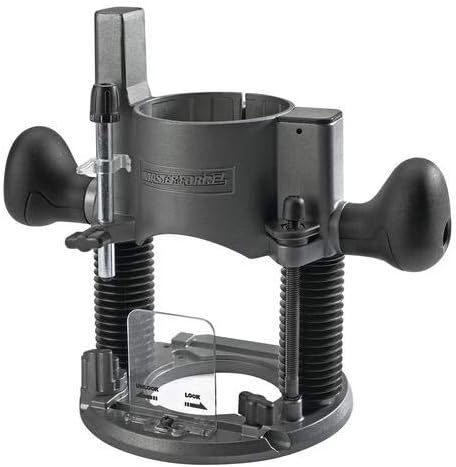
- Plunge base
- Collet wrench
- 1/4" collet
- 1/2" collet
- Router edge guide
- Storage case
2. Important Safety Instructions
WARNING: Read all safety warnings and instructions. Failure to follow the warnings and instructions may result in electric shock, fire and/or serious injury.
- Always wear eye protection and hearing protection when operating power tools.
- Keep your work area clean and well lit. Cluttered or dark areas invite accidents.
- Do not operate power tools in explosive atmospheres, such as in the presence of flammable liquids, gases or dust.
- Keep children and bystanders away while operating a power tool. Distractions can cause you to lose control.
- Ensure the power switch is in the OFF position before connecting to power source, picking up or carrying the tool.
- Disconnect the plug from the power source before making any adjustments, changing accessories, or storing power tools.
- Use the correct router bit for your application. Ensure bits are sharp and clean.
- Secure the workpiece. Use clamps or other practical ways to secure the workpiece to a stable platform.
- Maintain power tools. Check for misalignment or binding of moving parts, breakage of parts and any other condition that may affect the power tool’s operation.
3. Setup
3.1 Unpacking and Inspection
Carefully remove all components from the packaging. Inspect the tool and accessories for any damage that may have occurred during shipping. Do not discard packaging material until you have thoroughly inspected the tool and are satisfied with its condition.
3.2 Attaching the Router Motor to Bases
The router motor can be used with either the fixed base or the plunge base. To attach, align the motor with the base and slide it in until it locks securely. Ensure the motor is fully seated and the locking mechanism is engaged.

3.3 Installing Collets and Router Bits
- Ensure the router is unplugged from the power source.
- Select the appropriate collet (1/4" or 1/2") for your router bit.
- Insert the collet into the router spindle.
- Insert the router bit into the collet, ensuring at least 3/4 of the shank is inserted.
- Use the collet wrench to securely tighten the collet nut. Do not overtighten.
3.4 Connecting Dust Extraction
The router features a 1-1/4" vacuum hose dust/chip extraction port. Connect a compatible vacuum hose to this port to maintain a clean and visible work area during operation.
4. Operation
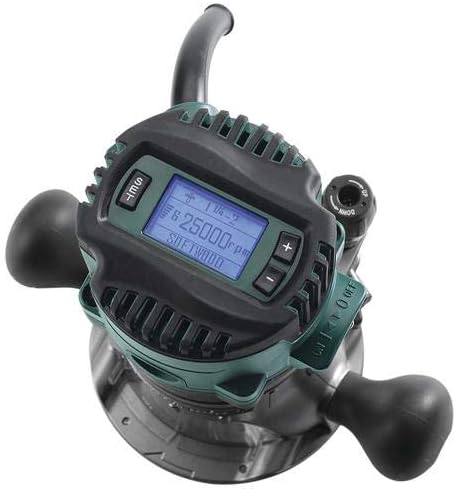
4.1 Digital Controls and Speed Adjustment
The router is equipped with digital controls and a backlit LCD screen for easy setup and precise speed control. The speed can be adjusted from 10,000 to 25,000 RPM. Use the '+' and '-' buttons to set the desired RPM for your specific material and bit type.
4.2 Soft Start Feature
The integrated soft start feature gradually increases the motor speed upon startup, reducing torque and providing smooth, controlled starts. This helps prevent sudden jolts and improves user control.
4.3 Depth Adjustment - Fixed Base
The fixed base features a micro depth adjustment mechanism. This allows for precise depth adjustments in 1/64" increments. Loosen the locking lever, adjust the depth using the fine adjustment knob, and then re-tighten the lever to secure the setting.
4.4 Depth Adjustment - Plunge Base
The plunge base includes a micro-adjustment knob for precise depth adjustments in 1/64" increments. It also features a 4-stage depth stop, allowing for stepped or repeated plunge cuts. Set the desired depth stops for consistent results.
4.5 Using the Router Edge Guide
The included router edge guide is compatible with both the fixed and plunge bases. It assists in making straight cuts parallel to the edge of your workpiece. Attach the guide to the base and adjust its position for the desired offset.

4.6 Work Light and Power Indicator
The router features a 3-LED work light to illuminate the work area, improving visibility during operation. A power indicator light signals when the tool is connected to power.
5. Maintenance
Regular maintenance ensures optimal performance and extends the life of your router.
- Cleaning: After each use, disconnect the router from power and clean dust and debris from the motor housing, bases, and collet area using a soft brush or compressed air. Do not use solvents.
- Bit Inspection: Regularly inspect router bits for sharpness and damage. Dull or damaged bits can cause kickback and poor cut quality.
- Cord Inspection: Check the power cord for any cuts, fraying, or damage. Replace damaged cords immediately.
- Storage: Store the router and its accessories in the provided carrying case in a dry, secure location, out of reach of children.
6. Troubleshooting
Refer to the table below for common issues and their potential solutions.
| Problem | Possible Cause | Solution |
|---|---|---|
| Router does not start | No power supply; Damaged power cord; Faulty switch | Check power connection; Inspect cord for damage; Contact service center |
| Inconsistent speed under load | Overloading the tool; Dull bit; Electronic speed control issue | Reduce feed rate; Replace or sharpen bit; Contact service center |
| Poor cut quality / Burning wood | Dull bit; Incorrect speed setting; Too fast feed rate | Replace or sharpen bit; Adjust RPM for material; Reduce feed rate |
| Excessive vibration | Loose bit; Damaged bit; Bent spindle | Ensure bit is securely tightened; Replace damaged bit; Contact service center |
7. Specifications
| Feature | Specification |
|---|---|
| Manufacturer | Masterforce |
| Part Number | 2410835 |
| Item Model Number | 2410835 |
| Power Source | Corded Electric |
| Base Type | Fixed, Plunge |
| Speed Control | Digital Variable Speed (10,000 to 25,000 RPM) |
| Depth Adjustment | 1/64" increments |
| Dust Extraction Port | 1-1/4" |
| UPC | 308175595568 |
8. Warranty and Support
For warranty information, technical support, or to order replacement parts, please refer to the official Masterforce website or contact their customer service department. Keep your purchase receipt as proof of purchase for any warranty claims.
Please visit the Masterforce official website for the most up-to-date support information.


