
AODELAN RMT-P1BTA
AODELAN RMT-P1BTA Wireless Remote Shutter Release
User Manual
1. Introduction
Welcome to the user manual for your AODELAN RMT-P1BTA Wireless Remote Shutter Release. This manual provides detailed instructions on how to set up, operate, and maintain your remote control to enhance your photography experience with compatible Sony cameras. Please read this manual thoroughly before using the product to ensure proper functionality and longevity.

Image: Banner displaying "Wireless Remote Control Sony" with the remote control.
2. Product Overview
The AODELAN RMT-P1BTA is a wireless remote control designed to provide convenient and precise control over your Sony camera's shutter, video recording, and zoom functions. It replaces the Sony RMT-P1BT remote commander, offering a reliable wireless connection for various shooting scenarios.

Image: The AODELAN RMT-P1BTA wireless remote control shown with a generic camera outline, illustrating its wireless connection.
3. Key Features
- Wireless Operation: Utilizes Bluetooth technology for wireless shooting, eliminating the need for cables.
- Remote Video Control: Allows for remote start and stop of video recording.
- Zoom Control: Features dedicated buttons for wide-angle (W) and telephoto (T) zoom adjustments.
- AF-ON Functionality: Includes an AF-ON button for precise autofocus control.
- Customizable C1 Button: A programmable C1 button for quick access to frequently used camera functions.
- Reduced Camera Vibration: Enables remote triggering of the shutter, minimizing camera shake for sharper images.
- Operating Range: Effective operating distance of approximately 10 meters (32.8 feet).
- Versatile Applications: Suitable for self-portraits, group photos, macro photography, long exposures, and more.

Image: The AODELAN RMT-P1BTA remote control against a sunset backdrop, highlighting its wireless shooting, remote video start/stop, and approximate 32.8-foot operating range.

Image: A comparison showing a "Before" and "After" shot, illustrating how using the remote control reduces camera vibration for clearer images.

Image: A collage showcasing various shooting styles enabled by the remote, including self-portraits, group photos, macro photography, and long exposures.
4. Compatibility
The AODELAN RMT-P1BTA Wireless Remote Shutter Release is compatible with a limited range of Sony cameras that support Bluetooth remote control. Please ensure your camera model is listed below and has the necessary firmware update, if applicable.
Compatible Sony Camera Models:
- Sony A7C
- Sony A7SIII
- Sony A6100
- Sony A6400
- Sony A6600
- Sony A7 III (with Ver. 3.0 firmware update)
- Sony A7R III (with Ver. 3.0 firmware update)
- Sony A7R IV
- Sony A9 (with Summer 2019 firmware update)
- Sony A9 II
- Cyber-shot DSC-RX0 II (with Ver. 2.0 firmware update)
- Cyber-shot DSC-RX100 VII
- ZV-1

Image: Visual representation of the AODELAN remote and a list of compatible Sony camera models, including A6100, A6400, A6600, A7 III, A7R III, A7C, RX100 VII, RX0 II, ZV-1, A7R IV, A9, and A9 II.

Image: A graphic indicating compatibility with Sony Bluetooth cameras, listing specific models like A7C, A7R III, A7 III, A7R IV, A6100, A6400, A6600, RX100 VII, RX0 II, ZV-1, A9, and A9 II.
5. Package Contents
Upon opening the package, please verify that all items are present and in good condition.
- 1 x AODELAN RMT-P1BTA Wireless Remote Shutter Release
- 1 x CR2 Battery (pre-installed or included separately)
- 1 x Wrist Strap
- 1 x User Manual (this document)
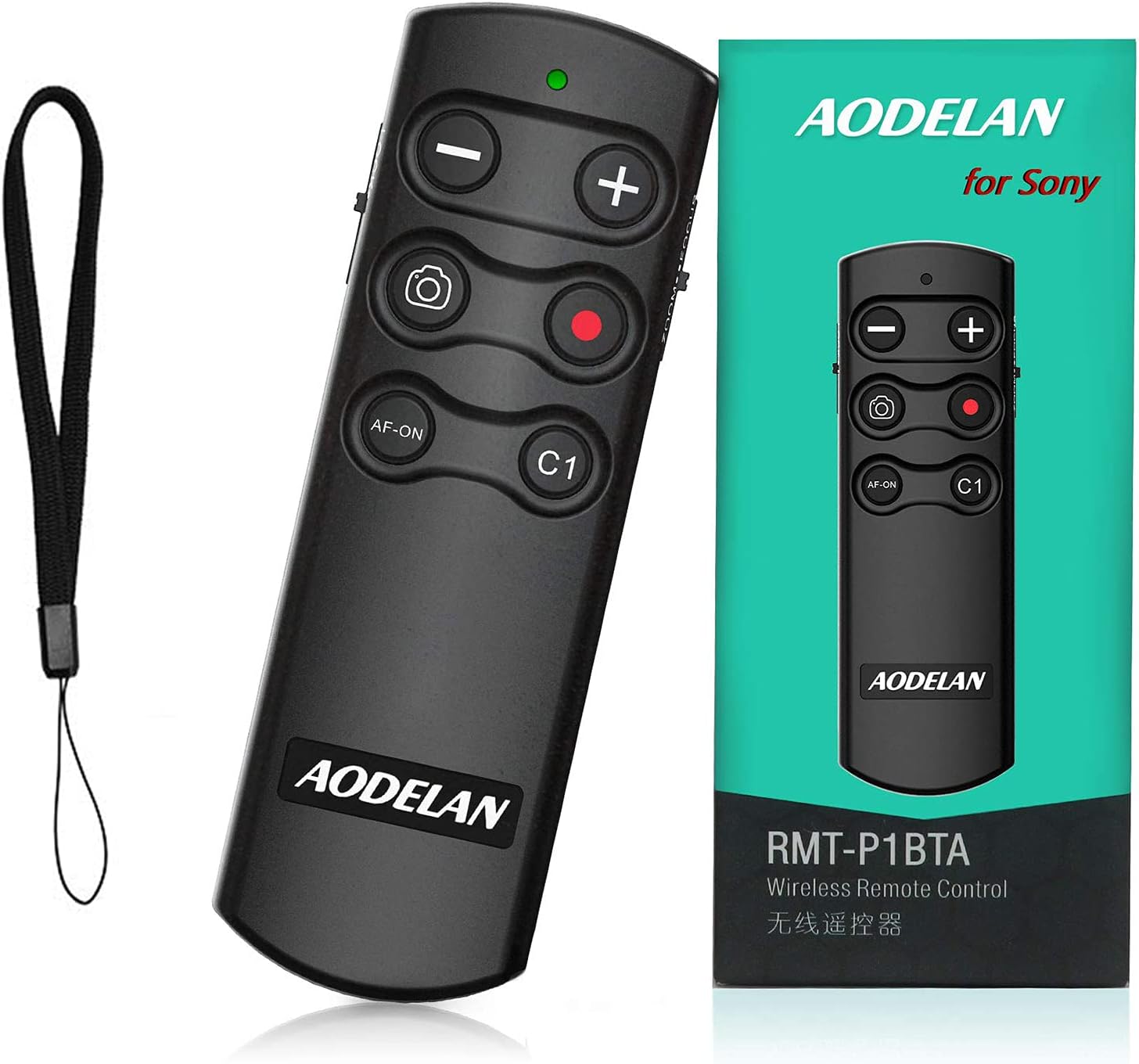
Image: The AODELAN RMT-P1BTA remote control displayed alongside its packaging and an included wrist strap.
6. Setup Instructions
6.1. Battery Installation
The remote control requires one CR2 battery. If not pre-installed, open the battery compartment cover on the back of the remote and insert the CR2 battery, ensuring correct polarity (+/-). Close the cover securely.
6.2. Pairing with Your Camera
To use the remote, it must first be paired with your compatible Sony camera via Bluetooth. The pairing process may vary slightly depending on your camera model. Refer to your camera's instruction manual for specific Bluetooth pairing steps. Generally, the steps involve:
- On your camera, navigate to the Network or Bluetooth Settings menu.
- Enable Bluetooth Function.
- Select Bluetooth Remote Control and set it to On.
- Choose Pairing. The camera will enter pairing mode.
- On the AODELAN RMT-P1BTA remote, press and hold the Shutter Release button (large circular button) and the "+" (Zoom In) button simultaneously for at least 7 seconds. The indicator light on the remote will start blinking rapidly, indicating it is in pairing mode.
- Once the camera detects the remote, confirm the pairing on the camera screen.
- The indicator light on the remote will stop blinking and remain solid for a few seconds, confirming successful pairing.
After successful pairing, the remote control should automatically connect to your camera when both devices are powered on and within range.
7. Operating Instructions
Familiarize yourself with the buttons on your AODELAN RMT-P1BTA remote control:
- Shutter Release Button (Large Circular Button):
- Press halfway to activate autofocus.
- Press fully to take a still photograph.
- Video Recording Button (Red Circular Button):
- Press once to start video recording.
- Press again to stop video recording.
- Zoom Buttons ("W" and "T"):
- Press "W" for wide-angle zoom (zoom out).
- Press "T" for telephoto zoom (zoom in).
- AF-ON Button:
- Activates autofocus independently of the shutter release. Useful for focus-recompose techniques.
- C1 Button:
- This is a customizable function button. Its function can be assigned via your camera's menu settings. Refer to your camera's manual for C1 button customization.
- LOCK Switch:
- Slide to the LOCK position to prevent accidental button presses when not in use.

Image: Illustration showing the effect of wide-angle (W) and telephoto (T) zoom functions, controlled by the remote.
8. Maintenance
To ensure the longevity and optimal performance of your AODELAN RMT-P1BTA remote control, follow these maintenance guidelines:
- Keep the remote clean by wiping it with a soft, dry cloth. Avoid using harsh chemicals or abrasive materials.
- Do not expose the remote to extreme temperatures, humidity, or direct sunlight for extended periods.
- Avoid dropping the remote or subjecting it to strong impacts.
- If the remote will not be used for an extended period, it is recommended to remove the battery to prevent leakage.
9. Troubleshooting
If you encounter issues with your AODELAN RMT-P1BTA remote control, please refer to the following common problems and solutions:
| Problem | Possible Cause | Solution |
|---|---|---|
| Remote does not respond. | Battery is dead or incorrectly installed. Remote is out of range. Not paired with camera. Remote is in LOCK position. | Replace battery. Ensure correct polarity. Move closer to camera (within 10m/32.8ft). Re-pair the remote with the camera. Slide LOCK switch to unlock position. |
| Cannot pair the remote. | Camera's Bluetooth is off. Incorrect pairing procedure. Camera firmware not updated. | Ensure Bluetooth is enabled on camera. Follow pairing steps precisely. Check camera's firmware version and update if necessary. |
| Zoom function not working. | Lens does not support power zoom. Camera settings. | Ensure you are using a power zoom lens. Check camera settings related to zoom control. |
| Video recording not starting/stopping. | Camera is not in video mode. Memory card full. | Switch camera to video recording mode. Check memory card space. |
10. Specifications
| Feature | Detail |
|---|---|
| Model Number | RMT-P1BTA |
| Connectivity Technology | Bluetooth |
| Operating Range | Approx. 10 meters (32.8 feet) |
| Power Source | 1 x CR2 Battery (included) |
| Item Weight | 1.76 ounces |
| Package Dimensions | 4.49 x 2.01 x 1.06 inches |
| Manufacturer | AODELAN |
| Compatible Devices | Sony A9, A9 II, A6100, A6400, A6600, A7 III, A7R III, A7R IV, RX100M7, RX0 II, ZV-1 |
11. Warranty and Support
Warranty Information: Specific warranty details for the AODELAN RMT-P1BTA are not provided in this manual. Please refer to the product packaging or the manufacturer's official website for warranty terms and conditions.
Customer Support: For technical assistance, troubleshooting beyond this manual, or inquiries regarding your product, please contact AODELAN customer support through their official website or the retailer from whom you purchased the product. Contact information is typically available on the product packaging or the manufacturer's website.