
1. Important Safety Information
Please read all instructions carefully before using the Goplus 2-in-1 Folding Treadmill. Retain this manual for future reference.
- Always place the treadmill on a flat, stable surface.
- Ensure adequate clear space (at least 2 meters behind and 0.6 meters on each side) around the treadmill during operation.
- Keep children and pets away from the treadmill during operation.
- Use the safety key at all times. Attach the clip to your clothing to ensure the treadmill stops immediately if you step off.
- Do not operate the treadmill if it is damaged or malfunctioning.
- Consult a physician before starting any new exercise program.
- Maximum user weight capacity: 265 pounds.
2. Product Overview
The Goplus 2-in-1 Folding Treadmill offers versatile exercise options for walking and jogging. Its compact design makes it suitable for home and office use.
Key Features:
- 2-in-1 Design: Functions as an under-desk walking pad (riser folded) and a jogging treadmill (handrail raised).
- Powerful Motor: Equipped with a 2.25HP motor for quiet and efficient operation.
- Running Belt: 5-layer non-slip texture running belt (39.3" x 16") for shock absorption and comfort.
- LED Display: Shows time, speed, distance, and calories.
- Connectivity: Bluetooth speaker, remote control, and Gymax APP control.
- Portability: Foldable design and built-in transport wheels for easy storage and movement.
Included Components:
- 1x 2-in-1 Treadmill
- 1x Phone Holder
- 1x Power Cord
- 1x Remote Control (requires 1 x CR2032 button battery, not included)
- 1x Safety Key

Image 2.1: The Goplus 2-in-1 Folding Treadmill demonstrating its walking (under-desk) and running (with handrail) modes.

Image 2.2: Visual comparison highlighting the speed ranges and configurations for running mode (0.6-7.5 MPH) and walking mode (0.6-2.5 MPH).

Image 2.3: Detailed view of the treadmill's 5-layer running belt construction, designed for shock absorption and durability.
3. Setup
The Goplus 2-in-1 Folding Treadmill is designed for installation-free setup, meaning it is ready to use out of the box with minimal preparation.
Initial Setup Steps:
- Unpack: Carefully remove the treadmill from its packaging.
- Placement: Position the treadmill on a firm, level surface, ensuring sufficient clearance around the unit.
- Remote Control Battery: Open the remote control battery compartment and insert one CR2032 button battery (not included).
- Power Connection: Plug the power cord into a grounded electrical outlet.
- Safety Key: Ensure the safety key is properly placed on the treadmill console and the clip is attached to your clothing before starting any exercise.
- Adjust Foot Pads (Optional): The foot mats can be rotated to slightly adjust the inclination by approximately 2 degrees.

Image 3.1: The treadmill's folding mechanism, illustrating how it can be folded for convenient storage.

Image 3.2: Overview of key components including the remote control, safety key, adjustable foot pads, and transport wheels.
4. Operating Instructions
The treadmill offers two primary modes of operation: Walking Mode and Running Mode, controlled via the remote or the Gymax App.
4.1 Power On/Off
- To power on, ensure the treadmill is plugged in and the safety key is in place. Press the power button on the remote control.
- To power off, press the power button on the remote control or remove the safety key.
4.2 Walking Mode (Under-Desk)
In Walking Mode, the handrail is folded down. This mode is ideal for light exercise or use under a standing desk.
- Configuration: Handrail folded.
- Speed Range: 0.6 MPH to 2.5 MPH.
- Control: Use the remote control to start, stop, and adjust speed.
4.3 Running Mode
For more intense workouts, raise the handrail to engage Running Mode.
- Configuration: Handrail raised.
- Speed Range: 0.6 MPH to 7.5 MPH.
- Control: Use the remote control to start, stop, and adjust speed.
4.4 Remote Control
The remote control allows for convenient adjustment of treadmill functions.
- Start/Stop: Press the power button to begin or end a workout.
- Speed Adjustment: Use the '+' and '-' buttons to increase or decrease speed.
- Instant Stop: Removing the safety key will immediately stop the treadmill.
4.5 APP Control (Gymax App)
Enhance your exercise experience by connecting the treadmill to the Gymax App.
- Download: Search for 'Gymax App' on Google Play Store or Apple App Store.
- Connection: Follow the in-app instructions to connect your treadmill via Bluetooth.
- Features: The app allows you to record exercise data, access personal sports plans, participate in training courses, and view real-time sports rankings.
4.6 Bluetooth Speaker
Connect your mobile device to the treadmill's built-in Bluetooth speaker to play music during your workout.
- Pairing: Enable Bluetooth on your device and select the treadmill from the list of available devices.
- Disconnection: To disconnect Bluetooth, touch and hold the '-' button on the treadmill for 30 seconds.
4.7 LED Display
The integrated LED display provides real-time feedback on your workout progress.
- Metrics: Displays Time, Speed, Distance, and Calories burned.

Image 4.1: Screenshots illustrating the Gymax App interface for personalized health management and exercise tracking.

Image 4.2: The treadmill's LED display, showing workout metrics and indicating Bluetooth connectivity, alongside the remote control.
5. Maintenance
Regular maintenance ensures the longevity and optimal performance of your treadmill.
5.1 Running Belt Lubrication
Lubricate the running belt every 3 months or after approximately 50 hours of use to reduce friction and wear.
- Turn off and unplug the treadmill.
- Carefully lift one side of the running belt.
- Apply a small amount of silicone lubricant (provided or recommended by Goplus) evenly under the center of the belt.
- Repeat on the other side.
- Plug in the treadmill and run it at a low speed (e.g., 1 MPH) for 5 minutes to distribute the lubricant.
5.2 Cleaning
- Regularly wipe down the treadmill surfaces with a damp cloth. Avoid abrasive cleaners.
- Vacuum around and under the treadmill to prevent dust and debris buildup, especially near the motor area.
5.3 Belt Adjustment
If the running belt shifts to one side or slips, it may require adjustment.
- Refer to the detailed instructions in the full product manual for specific belt tension and centering procedures.
6. Troubleshooting
This section addresses common issues you might encounter with your treadmill.
| Problem | Possible Cause | Solution |
|---|---|---|
| Treadmill does not power on. | Power cord not plugged in, safety key not in place, power switch off, circuit breaker tripped. | Check power connection, ensure safety key is correctly inserted, verify power switch is on, reset circuit breaker if necessary. |
| Running belt slips or hesitates. | Belt too loose, insufficient lubrication. | Adjust belt tension (refer to full manual), lubricate the running belt as per maintenance instructions. |
| Unusual noise during operation. | Loose components, belt misalignment, motor issue. | Check for loose screws, adjust belt alignment. If noise persists or is accompanied by burning smell, discontinue use and contact customer support. |
| Remote control not working. | Battery depleted, remote out of range. | Replace CR2032 battery in the remote. Ensure remote is pointed towards the treadmill's sensor. |
| Bluetooth connection issues. | Device not discoverable, treadmill Bluetooth off. | Ensure Bluetooth is enabled on your device. Try holding the '-' button on the treadmill for 30 seconds to reset Bluetooth. |
7. Specifications
| Feature | Detail |
|---|---|
| Brand | Goplus |
| Model Name | Treadmill (SU-37038WH-PS) |
| Motor Horsepower | 2.25 HP |
| Walking Speed Range | 0.6 - 2.5 MPH |
| Running Speed Range | 0.6 - 7.5 MPH |
| Running Area (Belt) | 39.3 inches (L) x 16 inches (W) |
| Maximum Weight Capacity | 265 Pounds |
| Product Dimensions (Unfolded) | 52.5"D x 29"W x 44.5"H |
| Folded Size | 55.9"L x 30.5"W x 11.8"H |
| Item Weight | 69.5 Pounds |
| Material | Steel, ABS |
| Display Type | LED |
| Connectivity | Bluetooth, Gymax App |
| Power Source | Electric (110 Watts) |
| Assembly Required | No |
| UPC | 798470130562 |
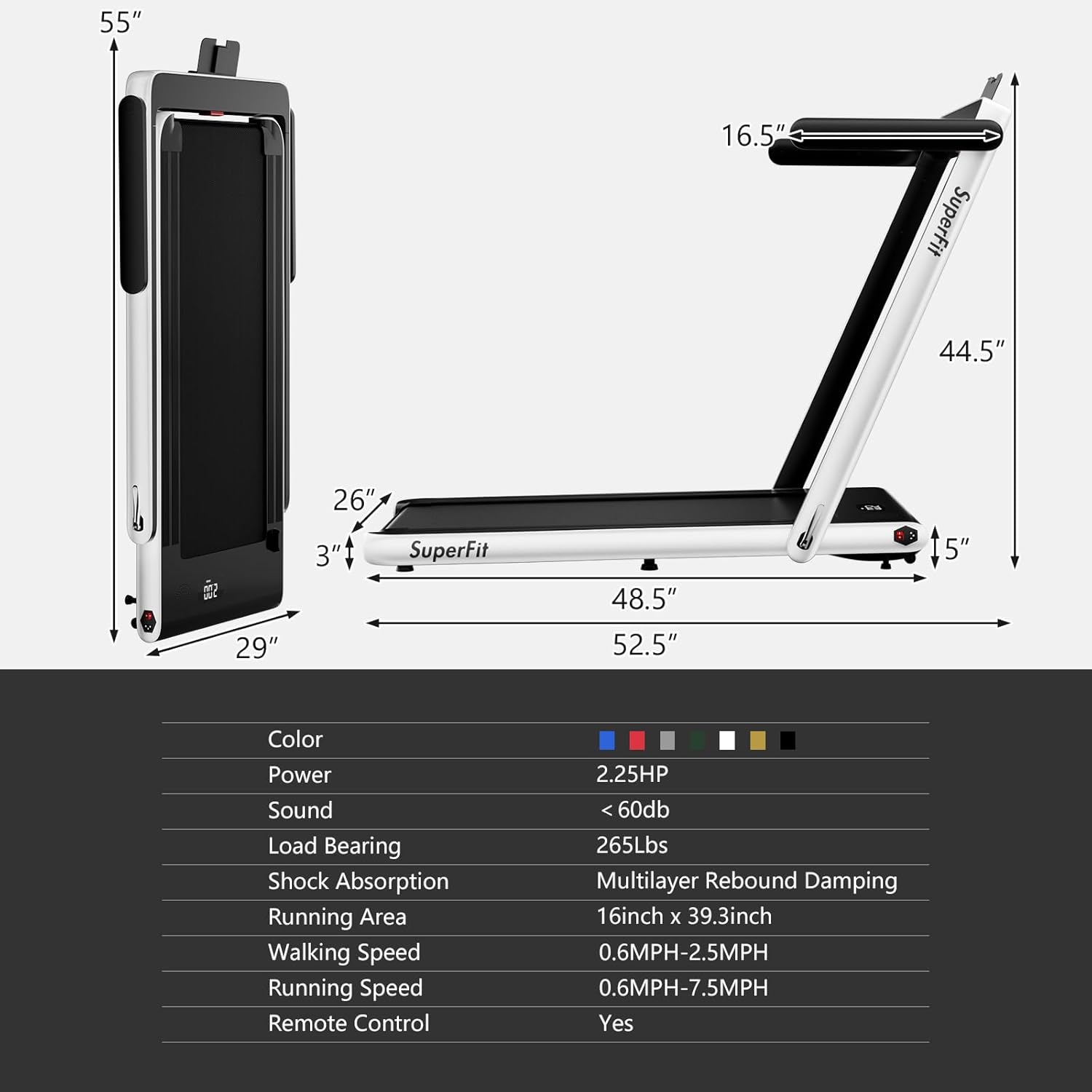
Image 7.1: A visual representation of the treadmill's dimensions and a summary table of its key specifications.
8. Warranty and Support
8.1 Warranty Information
The Goplus 2-in-1 Folding Treadmill comes with a 3-month warranty from the date of purchase. This warranty covers manufacturing defects under normal use. Please retain your proof of purchase for warranty claims.
The warranty does not cover damage resulting from misuse, accident, unauthorized modification, or failure to follow the instructions in this manual.
8.2 Customer Support
For technical assistance, warranty claims, or any questions regarding your Goplus treadmill, please contact Goplus customer service. Refer to your purchase documentation or the Goplus official website for contact details.