1. Introduction
This manual provides detailed instructions for the operation and maintenance of the RigExpert Stick Pro Portable Antenna Analyzer. Please read this manual thoroughly before using the device to ensure proper functionality and to maximize its capabilities. The RigExpert Stick Pro is designed for measuring and tuning antennas and cables across a wide frequency range.
2. Product Overview
The RigExpert Stick Pro is a compact, portable antenna analyzer featuring a color display, Bluetooth connectivity, and an N-Type connector. It is capable of operating within a frequency range of 0.1 to 600 MHz.

Figure 2.1: RigExpert Stick Pro Antenna Analyzer with its original packaging, USB cable, and lanyard. The device features a color display and control buttons.
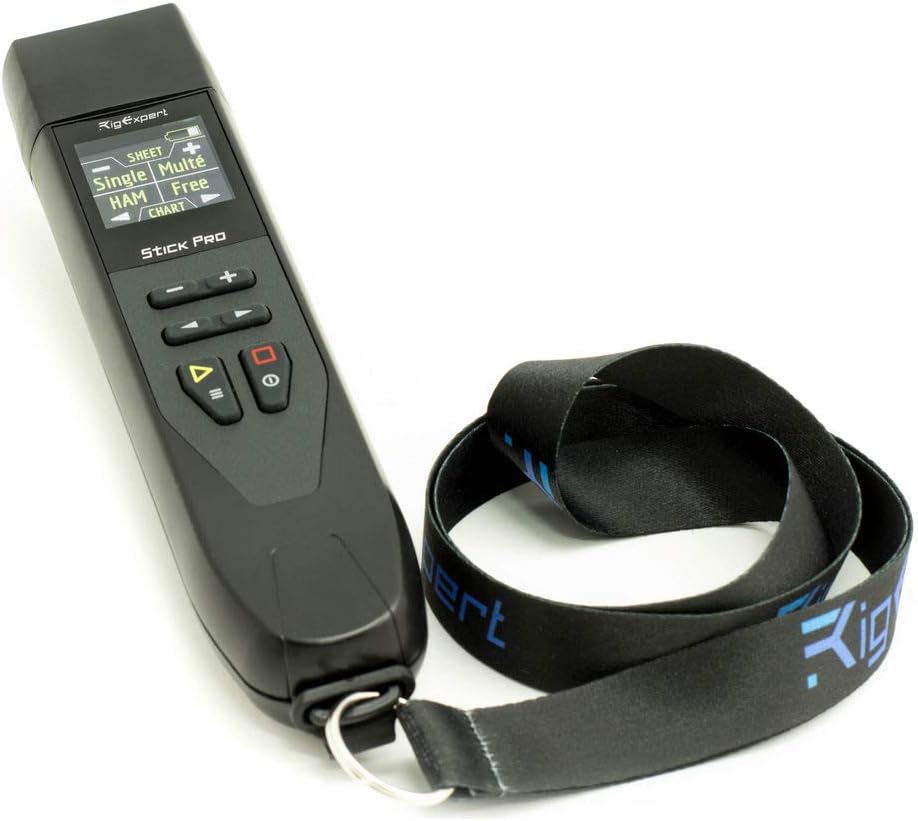
Figure 2.2: Close-up view of the RigExpert Stick Pro Antenna Analyzer, showing the display and control buttons, with the attached lanyard.

Figure 2.3: Front view of the RigExpert Stick Pro Antenna Analyzer, highlighting the color display and the arrangement of the control buttons.

Figure 2.4: Angled view of the RigExpert Stick Pro Antenna Analyzer, showcasing the display and control buttons from a different perspective.
3. Setup
3.1. Battery Installation and Charging
The RigExpert Stick Pro uses one 3.7V Li-Ion battery, type 18650. Ensure the battery is correctly inserted according to polarity markings. To charge the device, connect it to a personal computer via a USB cable or to a DC adapter with a USB socket. The device draws power from these sources during connection.
3.2. Initial Power On
Press and hold the power button to turn on the device. The color TFT display will illuminate, and the main menu will appear.
3.3. Antenna Connection
Connect the antenna or cable to be tested to the N-type connector located on the device. Ensure a secure connection for accurate measurements.
4. Operating Instructions
4.1. Navigation and Controls
The device features a 220x220 color TFT display and a 2x3 key waterproof keypad for navigation. Use the arrow keys to move through menus and select options. The 'Enter' or 'OK' button typically confirms selections, while the 'Back' or 'Escape' button returns to the previous screen.
4.2. Measurement Modes
The RigExpert Stick Pro offers various measurement modes:
- SWR, Return Loss, R, X, Z, L, C, Magnitude, and Phase Angle: These parameters can be measured at a single frequency.
- SWR Chart: Displays SWR over a frequency range with 100 data points.
- SWR Chart at Fixed HAM Bands: Provides SWR charts for IARU Regions, also with 100 data points.
- Multé Mode: Designed for quick checks of multiband antennas.
4.3. Cable Tools
The device includes specialized tools for cable analysis:
- Velocity Factor & Cable Length Measurer: Determines the velocity factor and physical length of a cable.
- Stub Tuner: Assists in tuning stubs.
- Cable Loss Chart: Displays signal loss across a cable over frequency.
- Cable Impedance Chart: Shows the impedance characteristics of a cable.
- TDR (Time Domain Reflectometer): Used for fault location in cables.
4.4. Bluetooth Connectivity
The RigExpert Stick Pro supports Bluetooth v.4.2 BLE Single-mode, Class B. This allows for wireless connection to a personal computer or other compatible devices for data transfer and remote control using companion software like AntScope2.
4.5. USB Connection
Connect the device to a personal computer via USB for data transfer, firmware updates, and use with PC-based analysis software.
5. Specifications
| Feature | Specification |
|---|---|
| Frequency Range | 0.1 to 600 MHz |
| Frequency Entry Resolution | 1 kHz |
| Measurement Systems | 25, 50, 75, 100, 150, 200, 300, 450, 600 Ohm |
| SWR Measurement Range | 1 to 100 (numerical), 1 to 10 (chart modes) |
| R and X Range | 0 to 2000, -2000 to 2000 |
| RF Output Connector | N-type |
| RF Output Signal Shape | Square, 0.1 to 600 MHz |
| RF Output Power | -10 dBm (at 50 Ohm load) |
| Power Source | One 3.7V Li-Ion battery, type 18650 |
| Display | 220x220 color TFT |
| Keypad | 2x3 water-proof keys |
| Interface | USB connection, Bluetooth v.4.2 BLE Single-mode, Class B |
| Product Dimensions | 8 x 2 x 2 inches |
| Item Weight | 8 ounces |
6. Maintenance
6.1. Cleaning
Wipe the device with a soft, dry cloth. Do not use abrasive cleaners or solvents. Ensure the N-type connector is kept clean and free of debris.
6.2. Battery Care
To prolong battery life, avoid fully discharging the battery frequently. Store the device in a cool, dry place when not in use for extended periods. If the device will not be used for a long time, it is recommended to charge the battery to about 50% before storage.
6.3. Firmware Updates
Periodically check the Rig Expert official website for available firmware updates. Updates can provide new features, performance improvements, and bug fixes. Follow the instructions provided by the manufacturer for safe firmware installation.
7. Troubleshooting
- Device does not power on:
- Ensure the 18650 Li-Ion battery is correctly inserted and charged.
- Connect the device to a USB power source to check if it powers on.
- Inaccurate measurements:
- Verify that the N-type connector is securely attached to the antenna/cable.
- Ensure the correct system impedance (e.g., 50 Ohm) is selected in the device settings.
- Check for any damage to the antenna or cable being tested.
- Bluetooth connection issues:
- Ensure Bluetooth is enabled on both the RigExpert Stick Pro and the connecting device (e.g., PC).
- Confirm the devices are within the Bluetooth range (Class B).
- Restart both devices and attempt to pair again.
- Display not responding:
- Perform a soft reset by holding down the power button until the device restarts.
- If the issue persists, contact customer support.
8. Warranty and Support
For warranty information, please refer to the warranty card included with your product or visit the official Rig Expert website. Technical support can be accessed through the manufacturer's website or by contacting their customer service department. Please have your product model number (STICK PRO) and serial number ready when contacting support.
Manufacturer: Rig Expert
Model: STICK PRO