
RUIZU X50
RUIZU X50 MP3 MP4 Player User Manual
Model: X50
1. Product Overview
The RUIZU X50 is a versatile MP3/MP4 player designed for a rich multimedia experience. It supports various audio and video formats, and features Bluetooth connectivity, a pedometer, FM radio, e-book reading, and voice recording. Its compact design with a convenient clip makes it ideal for on-the-go use.

Figure 1.1: Front view of the RUIZU X50 MP3 MP4 Player, showcasing its screen and control buttons.
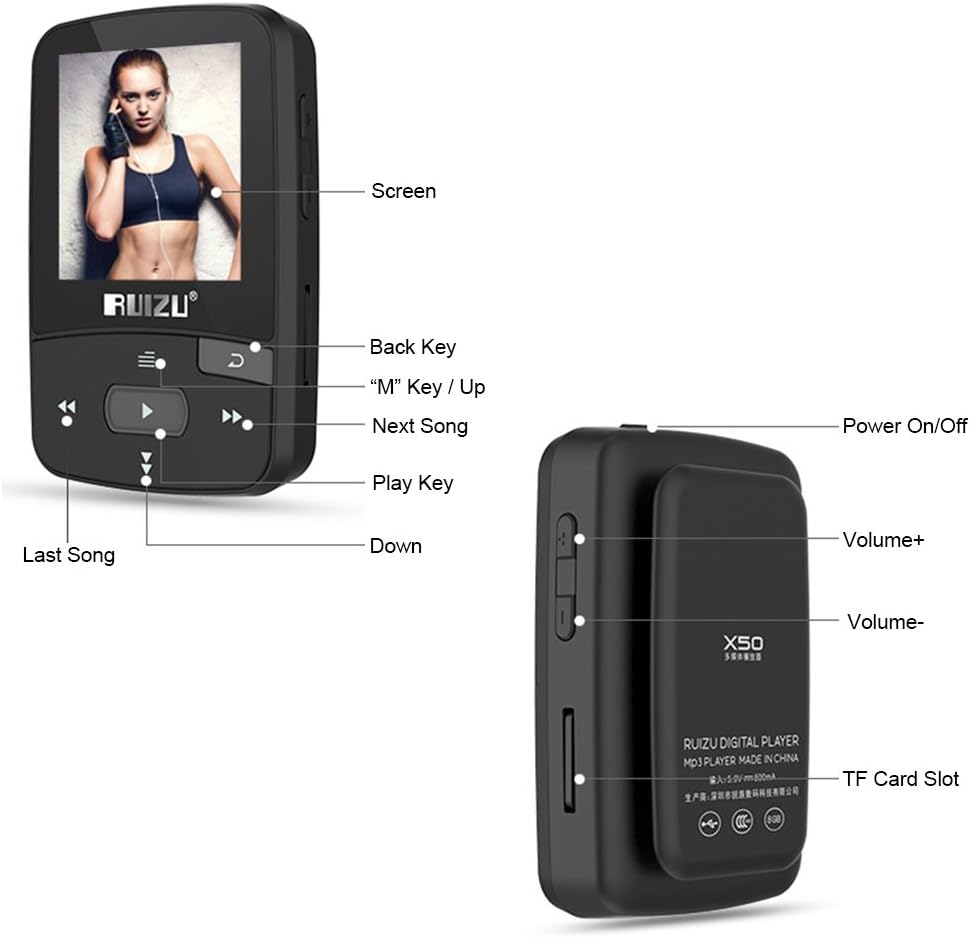
Figure 1.2: Diagram illustrating the various buttons and ports on the RUIZU X50, including the screen, back key, M key/Up, Next Song, Play Key, Last Song, Down, Power On/Off, Volume+, Volume-, and TF Card Slot.
2. Key Features
- Bluetooth 4.0 Connectivity: Seamlessly connect to wireless headphones or speakers for an untethered audio experience.
- HiFi Lossless Sound Quality: Supports MP3, APE, FLAC, WAV, OGG, AAC, WMA formats, delivering superior bass and high-pitch audio. Features 7 sound effects for personalized listening.
- Pedometer Function: Accurately records your movement trail, steps, distance, and calorie consumption, aiding in fitness tracking.
- Clip Design: Equipped with a sturdy back clip for secure attachment to belts, pockets, or clothing, preventing accidental drops during activities.
- Multi-functional: Beyond music playback, it includes FM radio, voice recording, e-book reader, video and picture viewer, time display, and calendar.

Figure 2.1: Visual representation of the RUIZU X50's multi-functional capabilities, including music listening, pedometer, FM radio, video and pictures, recording, and electronic book reading.

Figure 2.2: Demonstration of the player's clip design, showing it attached to a belt and inside a pocket, highlighting its secure fit for active use.
3. Setup Guide
3.1 Charging the Device
Before first use, fully charge the RUIZU X50. Connect the provided charging cable to the player's charging port and the other end to a USB power adapter (not included) or a computer's USB port. The battery indicator on the screen will show charging status.
3.2 Inserting a TF Card
The device supports TF cards up to 128GB for expanded storage. Locate the TF card slot on the side of the player. Gently insert the TF card until it clicks into place. To remove, push the card in slightly until it springs out.
3.3 Powering On/Off
To power on, press and hold the Power On/Off button located on the side of the device until the screen lights up. To power off, press and hold the same button until the device shuts down.
4. Operating Instructions
4.1 Basic Navigation
- Use the Up/Down buttons (often labeled with arrows or integrated with the "M" key) to navigate through menu options.
- Press the Play Key (center button) to select an option or confirm an action.
- Press the Back Key (often a curved arrow) to return to the previous menu.
4.2 Music Playback
From the main menu, select "Music". Browse your music library by artist, album, genre, or all songs. Press the Play Key to start playback. Use the Last Song/Next Song buttons to skip tracks. Adjust volume using the Volume +/- buttons on the side.

Figure 4.1: The RUIZU X50 screen showing the "Music" interface, indicating active music playback and highlighting its HiFi lossless sound quality.
4.3 Bluetooth Connection
Navigate to the "Bluetooth" menu. Turn on Bluetooth on the player. It will scan for available devices. Select your Bluetooth headphones or speaker from the list to pair. Once paired, audio will be routed through the connected device.
4.4 FM Radio
Select "FM Radio" from the main menu. You can auto-scan for stations or manually tune to a specific frequency. Ensure headphones are connected as they often act as the antenna.
4.5 Pedometer Function
Access the "Pedometer" function. Start a new recording to track your steps, distance, and calorie burn. This feature is useful for monitoring your physical activity.
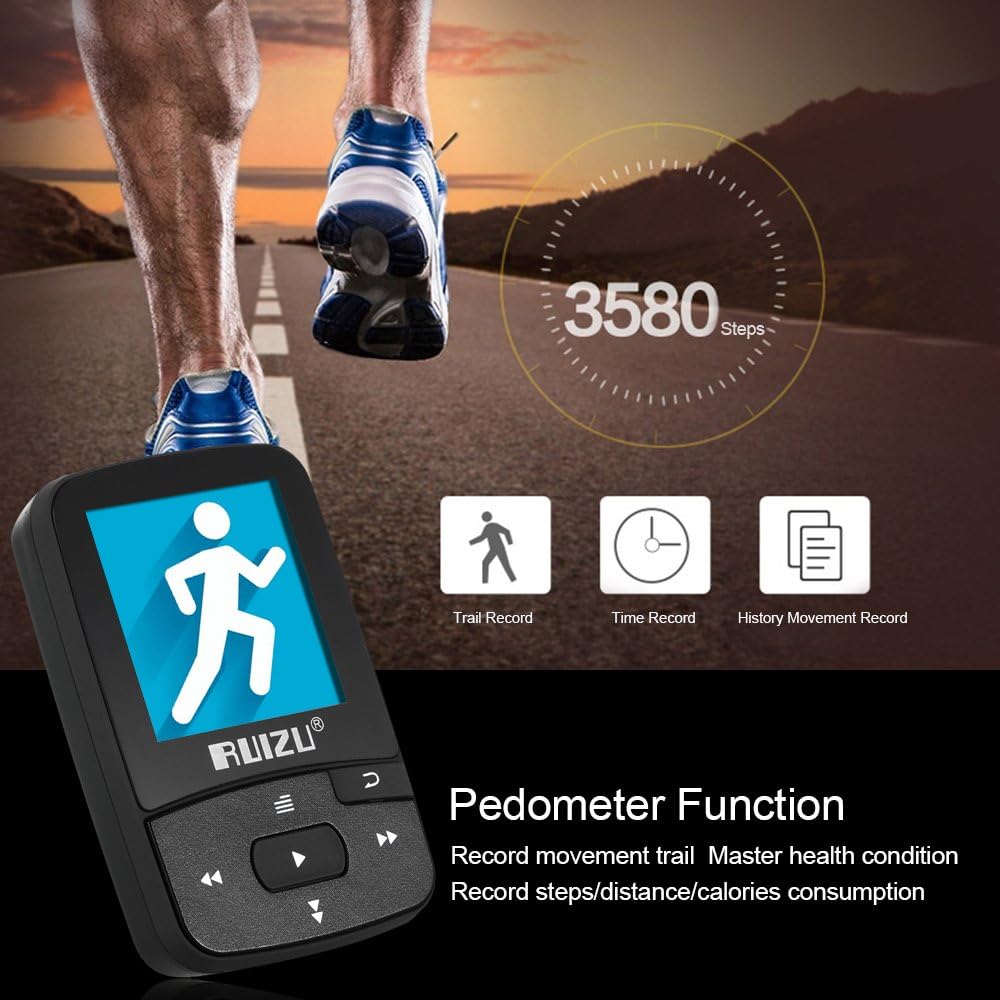
Figure 4.2: The RUIZU X50 displaying its pedometer function, showing recorded steps and options for trail record, time record, and history movement record.
4.6 Other Functions (Recording, E-book, Video, Pictures)
- Recording: Select "Record" to start voice recording.
- E-book: Open "E-book" to read text files (LRC format supported).
- Video: Select "Video" to play supported video files (128*160 AMV format).
- Pictures: View image files through the "Pictures" option.
5. Maintenance and Care
- Keep the device dry. Avoid exposure to moisture or liquids.
- Clean the screen and body with a soft, dry cloth. Do not use abrasive cleaners or solvents.
- Avoid extreme temperatures. Do not leave the device in direct sunlight or very cold environments.
- Handle with care. Avoid dropping or subjecting the device to strong impacts.
6. Troubleshooting
6.1 Device Does Not Power On
- Ensure the battery is charged. Connect the player to a power source and allow it to charge for at least 30 minutes before attempting to power on again.
- Try a different charging cable or USB port.
6.2 Cannot Connect to Bluetooth Device
- Ensure Bluetooth is enabled on both the RUIZU X50 and the target device.
- Make sure both devices are within close proximity (typically within 10 meters).
- Turn off and on Bluetooth on both devices, then try pairing again.
- Clear previous Bluetooth pairings on both devices if issues persist.
6.3 No Sound During Playback
- Check the volume level on the player and any connected headphones/speakers.
- Ensure headphones are properly plugged into the audio jack (if using wired headphones).
- Verify the audio file format is supported by the player.
6.4 TF Card Not Recognized
- Ensure the TF card is inserted correctly and fully into the slot.
- Check if the TF card is damaged or corrupted. Try another TF card if available.
- Ensure the TF card capacity does not exceed 128GB.
7. Specifications
| Feature | Detail |
|---|---|
| Brand Name | RUIZU |
| Model | X50 |
| Screen Size | 1.5 inches |
| Bluetooth Version | 4.0 |
| SNR | 90dB |
| Audio Formats | MP3/APE/FLAC/WAV/OGG/AAC/WMA |
| Video Format | 128*160 AMV video |
| Lyric Format | LRC |
| FM Radio Frequency (Europe) | 87.5-108KHz |
| FM Radio Frequency (Japan) | 76-90KHz |
| Supported Languages | Chinese, English, Japanese, Korean, 28 languages total |
| TF Card Support | 1-128GB |
| Battery | 3.7V, 300mAh |
| Music Playback Time | Approx. 8 hours (depends on music volume) |
| Product Size | 5.6 * 3.5 * 1.2 cm / 2.20 * 1.38 * 0.47 inches |
| Product Weight | Approx. 24g |
| Color Options | Black / Blue / Red / Green (Optional) |

Figure 7.1: The RUIZU X50 player available in multiple color options: green, red, and blue.
8. Package Contents
- 1 * MP3 Player
- 1 * Earphone
- 1 * Charging Cable
- 1 * User Manual
9. Warranty and Support
Please refer to your purchase documentation or contact the retailer for specific warranty information. For technical support or further assistance, please contact RUIZU customer service through their official website or the contact information provided with your purchase.
Ask a question about this manual
Ask about setup, troubleshooting, compatibility, parts, safety, or missing instructions. Manuals+ will review the question and use this page’s manual context to help answer it.