
1. Introduction
Thank you for choosing the Ankuka Bluetooth Karaoke Machine AK-K800. This portable PA speaker system is designed to provide high-quality audio and entertainment with its 8-inch subwoofer, colorful LED lights, and wired microphone. This manual will guide you through the setup, operation, and maintenance of your device to ensure a satisfying user experience.
2. Package Contents
Please check the package carefully to ensure all items are present:
- Ankuka Bluetooth Karaoke Machine (Speaker)
- Wired Microphone
- Charging Cable
- User Manual (this document)
3. Product Overview
The Ankuka AK-K800 features a robust design with an 8-inch subwoofer for powerful sound and integrated colorful LED lights for an enhanced entertainment experience. It includes a retractable handle for easy portability.
3.1 Front View
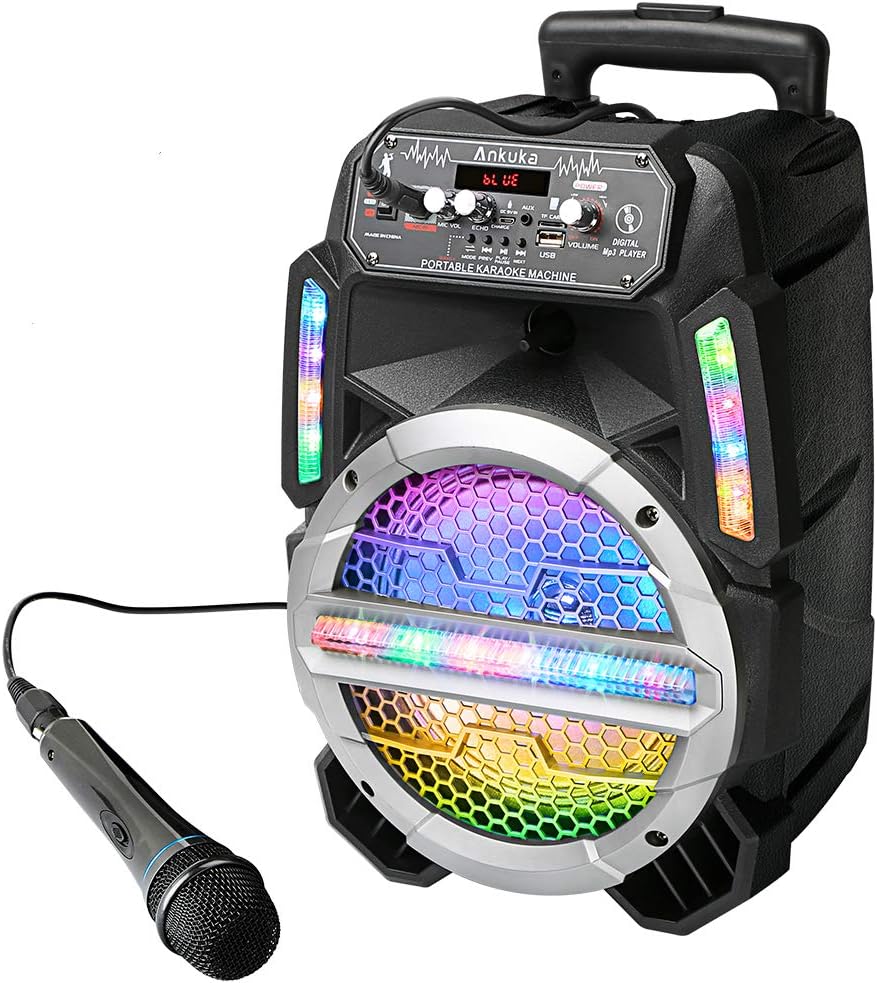
Figure 1: Front view of the Ankuka Bluetooth Karaoke Machine with its vibrant LED lights and connected wired microphone.
3.2 Control Panel

Figure 2: Detailed view of the control panel, highlighting the power/volume knob, microphone volume, echo control, mode selection, and various input ports.
- Power/Volume Knob: Turns the unit on/off and adjusts the main volume.
- MIC VOL Knob: Adjusts the volume of the connected microphone.
- ECHO Knob: Controls the echo effect for the microphone.
- Mode Button: Cycles through input modes (Bluetooth, FM Radio, AUX, USB, TF Card).
- Play/Pause Button: Controls media playback.
- Previous/Next Buttons: Navigates tracks or FM stations.
- LED Switch: Toggles the colorful LED lights on/off.
- MIC IN Port: 3.5mm jack for connecting the wired microphone.
- AUX IN Port: 3.5mm jack for connecting external audio devices.
- USB Port: For playing music from a USB flash drive.
- TF Card Slot: For playing music from a TF (MicroSD) card.
- DC 5V IN / CHARGE Port: For charging the unit.
3.3 Portability

Figure 3: The machine features an extra-long retractable handle and wheels for easy transport.
4. Setup
4.1 Charging the Unit
- Connect the provided charging cable to the DC 5V IN / CHARGE port on the control panel.
- Plug the other end of the cable into a compatible USB power adapter (not included) or a USB port.
- The charging indicator light will illuminate during charging. It will typically turn off or change color when fully charged.
4.2 Connecting the Microphone
- Insert the wired microphone's 3.5mm jack into the MIC IN port on the control panel.
- Adjust the MIC VOL and ECHO knobs to your desired levels during operation.
4.3 Bluetooth Pairing
- Turn on the karaoke machine by rotating the Power/Volume knob clockwise.
- Press the Mode button until "BLUE" or "BT" appears on the display, indicating Bluetooth mode.
- On your smartphone or other Bluetooth-enabled device, enable Bluetooth and search for available devices.
- Select "Ankuka" or a similar name from the list to pair.
- Once paired, you will hear an audible confirmation, and the display may show "CONNECTED".
4.4 Other Input Methods
- USB: Insert a USB flash drive into the USB port. The unit will automatically switch to USB mode and begin playing compatible audio files.
- TF Card: Insert a TF (MicroSD) card into the TF Card slot. The unit will automatically switch to TF Card mode and play compatible audio files.
- AUX: Connect an external audio device (e.g., MP3 player, tablet) to the AUX IN port using a 3.5mm audio cable (not included). Press the Mode button to select AUX mode.
- FM Radio: Press the Mode button to select FM Radio mode. Use the Previous/Next buttons to scan for stations.
5. Operating Instructions
5.1 Power On/Off and Volume Control
- To turn on the machine, rotate the Power/Volume knob clockwise until it clicks and the display illuminates.
- To turn off the machine, rotate the Power/Volume knob counter-clockwise until it clicks.
- Adjust the main playback volume by rotating the Power/Volume knob.
5.2 Microphone Usage
- Ensure the microphone is connected to the MIC IN port.
- Adjust the MIC VOL knob to control the microphone's output volume.
- Use the ECHO knob to add or reduce the echo effect on your voice.
5.3 LED Light Control
- Toggle the LED lights on or off using the dedicated LED switch on the control panel.
- The lights will cycle through various colors and patterns automatically.
6. Maintenance
- Cleaning: Use a soft, dry cloth to clean the exterior of the machine. Do not use abrasive cleaners or solvents.
- Storage: Store the machine in a cool, dry place away from direct sunlight and extreme temperatures.
- Battery Care: For optimal battery life, fully charge the unit before first use and recharge it regularly, even if not in use for extended periods. Avoid completely draining the battery frequently.
- Microphone Care: Handle the microphone with care. Avoid dropping it or exposing it to moisture.
7. Troubleshooting
| Problem | Possible Cause | Solution |
|---|---|---|
| No power | Battery is low or depleted. | Charge the unit using the provided charging cable. |
| No sound from speaker | Volume is too low; incorrect mode selected; device not connected properly. | Increase main volume; press Mode button to select correct input; ensure Bluetooth is paired or AUX/USB/TF is connected. |
| Microphone not working | Microphone not connected; MIC VOL is too low. | Ensure microphone is securely plugged into MIC IN port; increase MIC VOL. |
| Bluetooth not connecting | Device is out of range; Bluetooth not enabled on source device; unit is in another mode. | Ensure devices are within 33 feet (10 meters); enable Bluetooth on your device; press Mode button to select Bluetooth mode. |
| LED lights not working | LED switch is off. | Toggle the LED switch to the ON position. |
8. Specifications
| Feature | Detail |
|---|---|
| Brand | Ankuka |
| Model | AK-K800 |
| Item Weight | 8.88 pounds |
| Package Dimensions | 17.75 x 10.9 x 10.9 inches |
| Color | Black, Colorful LED |
| Compatible Devices | Smartphone |
| Connector Type | 3.5 mm Jack |
| Speaker Count | 1 (with 8'' Subwoofer) |
| Power Source | Battery Powered |
| Special Feature | Portable, Bluetooth Connectivity, LED Lights, PA System |
9. Warranty and Support
For warranty information or technical support, please refer to the contact details provided with your product packaging or visit the official Ankuka website. Keep your purchase receipt as proof of purchase for any warranty claims.
10. Official Product Videos
No official seller-provided product videos are available for embedding at this time. Please refer to the written instructions and images for guidance.
