
findtime FTSHLAK16Rosegold
findtime Fitness Tracker Smart Bracelet for Women - Instruction Manual
Model: FTSHLAK16Rosegold
Introduction
This manual provides detailed instructions for the setup, operation, and maintenance of your findtime Fitness Tracker Smart Bracelet. Please read this manual thoroughly to ensure proper use and to maximize your device's capabilities. This smart bracelet is designed to assist with activity tracking, sleep monitoring, and smart notifications, integrating seamlessly into your daily routine.
What's in the Box
- Smart Watch (FTSHLAK16Rosegold)
- User Manual
- Charger
- Gift Box
- Additional watch bands (Silicone and Metal options)
- Band adjustment tool (for metal strap)
- Screen cleaning cloths
- Spare pins for band attachment
Setup
1. Charging the Device
Before initial use, fully charge your smart bracelet. Connect the provided charger to the charging port on the back of the watch and plug the USB end into a compatible power source. A full charge typically provides 10+ days of use and 20+ days of standby time.

Image: The smartwatch screen showing a full battery indicator, highlighting its long battery life.
2. Attaching/Adjusting Watch Bands
The smart bracelet comes with interchangeable bands. To attach a band, align the pins on the band with the holes on the watch face and slide them into place. The silicone band is generally easier to attach. For the metal band, use the provided adjustment tool to remove or add links for a comfortable fit. This process involves carefully pushing out small pins from the links.
Video: Demonstration of how to adjust the metal watch band by adding or removing links using the provided tool.
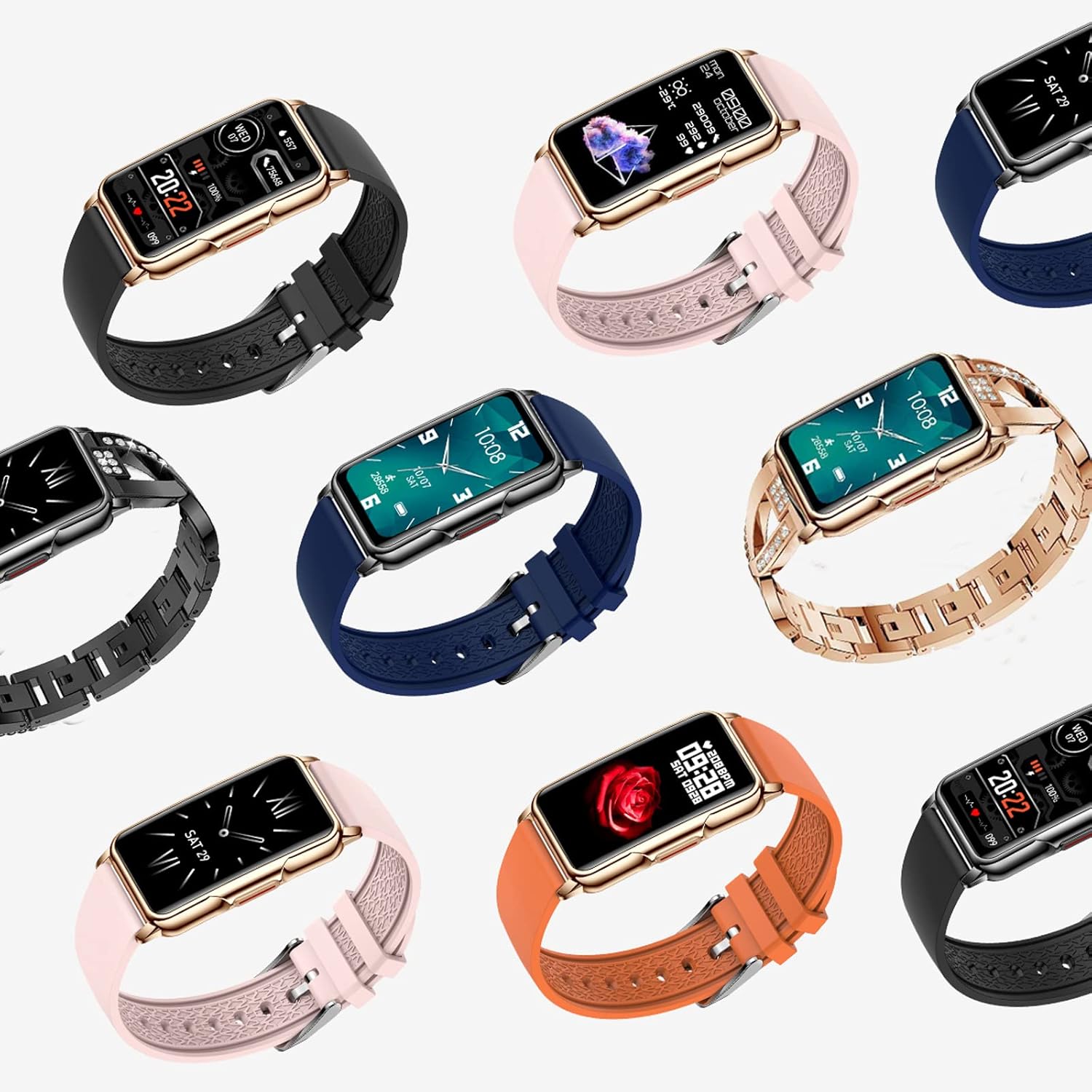
Image: Various band options for the findtime smart bracelet, showcasing different styles and materials.
3. App Installation and Pairing
Download the "Da Fit" app (or "FitCloudPro" as mentioned in some contexts) from your smartphone's app store. Ensure your phone's Bluetooth is enabled. Open the app and follow the on-screen instructions to pair your smart bracelet. This will enable data synchronization and notification features.
4. Customizing Watch Faces
The smart bracelet offers a variety of customizable watch faces. These can be changed directly on the watch or through the companion app. The app provides over 200 watch face options to suit different styles and preferences.

Image: Examples of customizable watch faces available for the smart bracelet.
Operating Instructions
1. Basic Navigation
The smart bracelet features a 1.47-inch colorful full touch screen. Swipe left, right, up, or down to navigate through menus and functions. Press the side button to return to the home screen or activate certain features.

Image: The 1.47-inch full touch screen of the smart bracelet.
2. Activity Tracking
The device tracks various activities automatically. Access the "Workout" or "Data" sections to view:
- Step Tracker: Counts your daily steps.
- Calorie Counter: Estimates calories burned based on activity.
- Distance Tracker: Records the distance covered.
- 20 Multi-Sport Modes: Select specific modes for various exercises to get more accurate data.

Image: The smartwatch interface showing various sport modes for activity tracking.
3. Health Monitoring
The smart bracelet offers continuous health monitoring features:
- Sleep Tracking: Monitors your sleep patterns and quality.
- Heart Rate: Measures your heart rate.
- Blood Pressure: Provides blood pressure readings.
- SpO2: Measures blood oxygen levels.
4. Smart Notifications & Communication
When connected to your smartphone via Bluetooth, the watch can display notifications and handle calls:
- Call Notifications: Receive alerts for incoming calls.
- Text Message Alerts: View incoming text messages.
- Smartphone App Notifications: Get alerts from various social media and other applications (e.g., Facebook, WhatsApp, Instagram).
- Make Phone Calls: Use the watch to dial numbers and make calls.
- Remote Camera: Control your phone's camera remotely from the watch.

Image: Notification reminder feature, showing how the watch displays alerts from various apps.
5. Additional Features
The smart bracelet includes several other useful functions:
- Alarm Clock: Set alarms directly on your watch.
- Calendar: View dates and schedule.
- Sedentary Reminder: Get alerts to move after periods of inactivity.
- Weather: Check current weather conditions.
- Drinking Water Reminder: Receive reminders to stay hydrated.
- Lift Wrist to Brighten Screen: Automatically illuminates the screen when you raise your wrist.
- Time Format Switch: Choose between 12-hour and 24-hour formats.
- Screen Time Settings: Adjust how long the screen stays active.
- Vibration Switch: Toggle vibration alerts on or off.
- Flashlight: Use the screen as a temporary light source.
- Do Not Disturb Mode: Silence notifications during specific times.
- Stopwatch: A basic stopwatch function.
- Find the Bracelet: Locate your watch if it's misplaced nearby.
- Music Control: Control music playback on your connected smartphone.
- Always-On Display (AOD) Clock: Configure the display to show time continuously (note: this consumes more battery).
Video: Overview of the findtime Smart Fitness Tracker for Women, demonstrating various features and functionalities.
Maintenance
1. Water Resistance
The smart bracelet has an IP67 rating, meaning it is resistant to daily splashes and dust. It is not suitable for showering, swimming, or prolonged submersion in water. Avoid pressing any buttons while the watch is wet. Do not expose the device to extreme hot or cold temperatures.
2. Cleaning
Use the provided screen cleaning cloths to gently wipe the screen and body of the watch. Avoid using harsh chemicals or abrasive materials that could damage the device.
3. Battery Care
To prolong battery life, avoid fully discharging the battery frequently. Charge the device regularly, especially if it will be stored for an extended period.
Troubleshooting
- Device not turning on: Ensure the device is fully charged. Connect it to the charger and wait a few minutes before attempting to power it on.
- Connectivity issues: Ensure Bluetooth is enabled on your smartphone and the watch is within range. Restart both the watch and your phone, then try pairing again through the app.
- Inaccurate data: Ensure the watch is worn snugly on your wrist. For activity tracking, select the appropriate sport mode.
- Notifications not appearing: Check the notification settings within the companion app and your phone's system settings to ensure the app has necessary permissions.
Specifications
| Feature | Detail |
|---|---|
| Case Material | Metal |
| Band Material | Stainless Steel (additional silicone band included) |
| Case Diameter | 31.5mm (1.24") |
| Case Thickness | 9.65mm (0.38") |
| Screen Size | 1.47 inches |
| Display Resolution | 360 x 360 pixels |
| Operating System | Wear OS |
| Connectivity | Bluetooth |
| GPS | No GPS |
| Water Resistance | IP67 (Daily waterproof/dustproof/shockproof) |
| Battery | 1 Unknown battery (included) |
| Compatibility | Android 5.0 and above, iOS 9.0 and above |
| App | Da Fit (or FitCloudPro) |
Warranty and Support
For any questions regarding your findtime Smart Fitness Tracker or service, please contact the manufacturer directly. They are committed to responding within 24 hours and providing a satisfactory solution to your problem.
Refer to the contact information provided in your product packaging or on the official findtime website for specific support channels.