
1. Introduction
This manual provides detailed instructions for the installation, operation, and maintenance of your EVIL ENERGY 16 Inch Electric Radiator Cooling Fan. Please read this manual thoroughly before installation and use to ensure proper function and safety. Retain this manual for future reference.
Safety Warning: Installation of automotive components can be complex. If you are not experienced with automotive electrical systems and mechanical work, it is recommended to seek assistance from a qualified professional mechanic.
2. Product Overview
The EVIL ENERGY 16 Inch Electric Radiator Cooling Fan is designed to enhance engine cooling by pulling or pushing air through the radiator. This universal fan is suitable for various vehicles and engines, operating on a 12V electrical system. It features a reversible design, allowing it to function as either a pusher or a puller fan.
2.1. Package Contents
Verify that all components are present before beginning installation:
- 1 x 16 Inch Electric Radiator Fan
- Mounting Kit:
- 4 x Mounting Rods
- 4 x Mounting Clips
- 4 x Mounting Feet (two types for flexibility)
- 4 x 1x1 Foam Pads
- 3 x Sheet Metal Screws
- 1 x Drilling Screw
- Thermostat Relay Switch Kit:
- 1 x 175-185 ℃ Thermostat (3/8" NPT Thread-in)
- 1 x 1/2" NPT Adapter
- 1 x Wiring Harness with Mount
- 1 x 40 Amp Relay
- 1 x 30 Amp Circuit Breaker
- 1 x 30 Amp Fuses
- 3 x Small Ring Terminals
- 1 x Large Ring Terminal
- 2 x Butt Connectors
- 1 x Female Connector
- 1 x Instruction Manual (this document)

Figure 1: Included Parts List for the 16 Inch Electric Radiator Cooling Fan.
2.2. Product Dimensions

Figure 2: Detailed dimensions of the 16 Inch Electric Radiator Cooling Fan. Please ensure sufficient space for installation.
3. Specifications
| Parameter | Value |
|---|---|
| Size | 16 Inch (417mm x 403mm x 73mm) |
| Voltage | 12V |
| Motor Wattage | 160W |
| Fan CFM (Cubic Feet Per Minute) | 2600 CFM |
| Blade Count | 10 Blades |
| Material | Polycarbonate |
| Power Connector Type | 2-Pin |
| Thermostat Activation Temperature | 175-185 ℃ |

Figure 3: Key specifications of the fan.
4. Installation (Setup)
Before installation, ensure the vehicle's battery is disconnected. Confirm there is adequate space for the fan and its mounting hardware. The fan can be configured as a 'puller' (as shipped) or a 'pusher' fan.
4.1. Determining Fan Mode (Pusher vs. Puller)
The fan is shipped in 'puller' mode, designed to pull air through the radiator from the engine side. If you need a 'pusher' configuration (to push air through the radiator from the grille side), the blade and wiring leads must be reversed.
- Reverse the Blade: Use a 5/16 inch or 8 mm socket to remove the nut. Flip the fan blade over and reinstall it on the shaft. Ensure the fan hub is properly seated on the flats of the motor shaft. Reinstall the retaining nut and do not overtighten.
- Reverse the Leads (Wires): For pusher mode, connect the RED or BLUE wire to the chassis ground (negative -) and the BLACK wire to the 12V positive (+). For puller mode (as shipped), connect the BLACK wire to chassis ground (negative -) and the RED or BLUE wire to 12V positive (+).
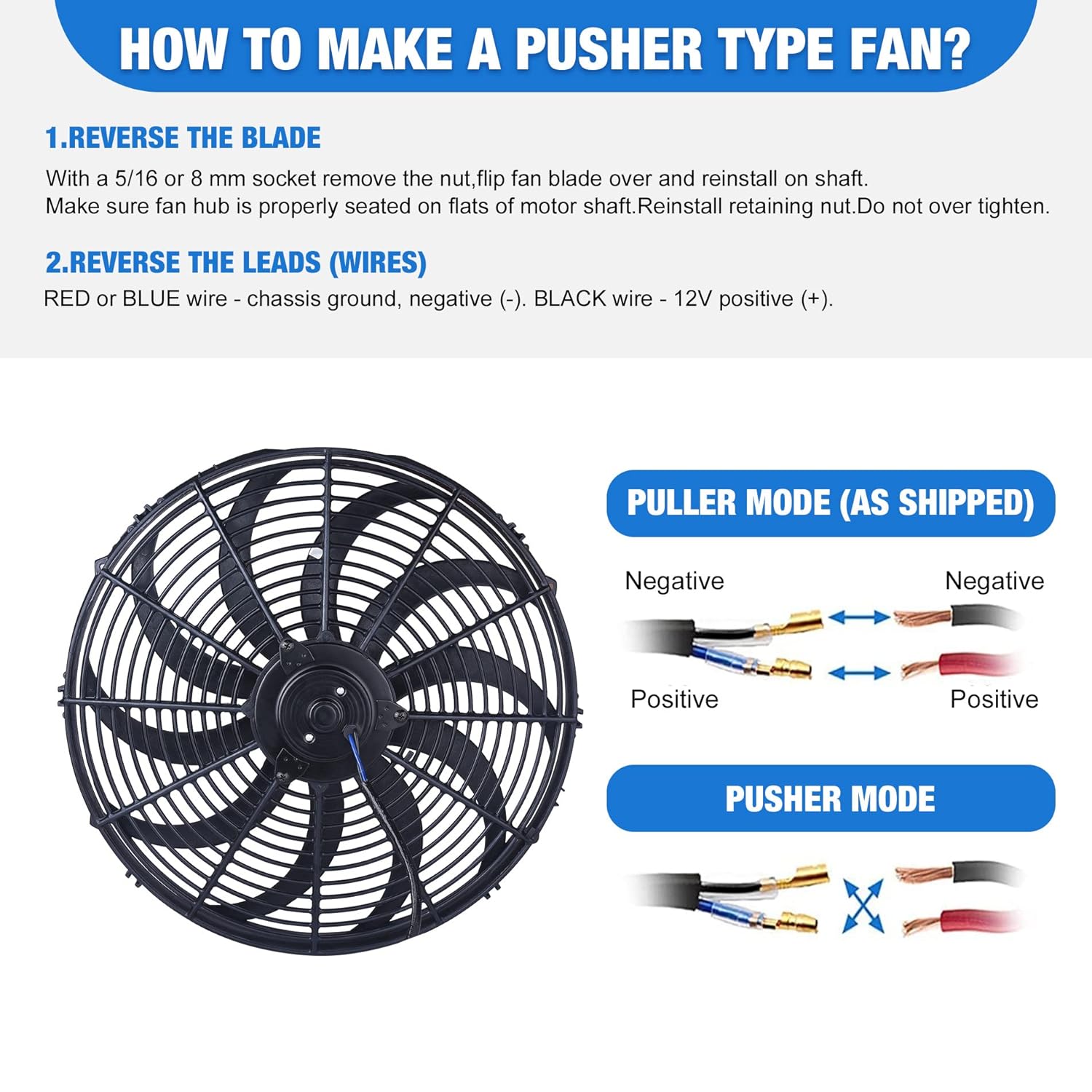
Figure 4: Instructions for reversing the fan blade and wiring for pusher mode.

Figure 5: Visual representation of airflow for pusher and puller fan configurations.
4.2. Mounting the Fan
The fan includes various mounting feet to enhance installation flexibility. Secure the fan to the radiator using the provided mounting rods, clips, and foam pads. Ensure the fan is firmly attached to prevent movement or vibration during operation.
Video 1: This video demonstrates the unboxing and shows the different types of mounting feet included with the fan, highlighting their flexibility for installation.
4.3. Wiring Diagram
Follow the wiring diagram carefully. Incorrect wiring can damage the fan or vehicle electrical system. The thermostat relay switch kit is designed to automatically activate the fan when the engine coolant reaches the specified temperature (175-185 ℃).
- Connect the Yellow wire from the relay to the positive terminal of the car battery, protected by the in-line fuse.
- Connect the Red wire from the relay to the fan's positive terminal.
- Connect the Grey wire from the relay to the temperature sensor.
- Connect the Orange wire from the relay to an ignition 'ON' power source.
- Connect the Black wire from the fan to vehicle ground.
- Ensure the temperature sensor is installed in the engine block or a grounded metal component to function correctly.

Figure 6: Detailed wiring diagram for single fan installation with thermostat relay switch kit.

Figure 7: Examples of the electric radiator fan installed in various automotive applications.
5. Operation
Once properly installed and wired, the EVIL ENERGY electric radiator cooling fan operates automatically via the thermostat relay switch kit. When the engine coolant temperature reaches the activation threshold (175-185 ℃), the thermostat will trigger the relay, turning on the fan. The fan will continue to run until the coolant temperature drops below the threshold, at which point it will automatically turn off.
The fan's primary function is to draw or push air through the radiator core, facilitating heat exchange and maintaining optimal engine operating temperatures. This helps prevent overheating, especially in situations with low vehicle speed or high ambient temperatures.
Video 2: This video provides an overview of the fan's components and demonstrates its application in various scenarios, including automotive cooling and industrial heat dissipation.
6. Maintenance
Regular maintenance ensures the longevity and efficient operation of your electric radiator cooling fan.
- Cleaning: Periodically inspect the fan blades and shroud for accumulation of dirt, debris, or leaves. Clean gently with a soft brush or compressed air. Avoid using harsh chemicals that could damage the plastic components.
- Wiring Inspection: Regularly check all electrical connections for tightness and corrosion. Ensure wires are not frayed or pinched. Secure any loose wiring to prevent damage from vibration.
- Mounting Security: Verify that the fan remains securely mounted to the radiator. Tighten any loose mounting hardware as needed.
- Thermostat Function: Monitor your vehicle's temperature gauge to ensure the fan is activating and deactivating correctly within the specified temperature range.
7. Troubleshooting
If you encounter issues with your EVIL ENERGY electric radiator cooling fan, refer to the following common problems and solutions:
- Fan Does Not Turn On:
- Check all wiring connections for proper contact and security.
- Verify the in-line fuse and circuit breaker are not blown or tripped.
- Ensure the temperature sensor is correctly installed and functioning. Test the sensor by temporarily grounding its wire to see if the fan activates (with ignition on).
- Confirm the vehicle battery has sufficient charge and the ignition 'ON' power source is active.
- Inspect the fan motor for any obstructions or damage.
- Fan Runs Continuously:
- Check the temperature sensor. A faulty sensor might continuously signal high temperature.
- Inspect the relay. A stuck relay can cause continuous operation.
- Ensure the temperature sensor is not directly grounded if it's meant to be in the coolant stream.
- Fan is Noisy or Vibrates Excessively:
- Check for loose mounting hardware.
- Inspect fan blades for damage or imbalance.
- Ensure no debris is caught in the fan shroud or blades.
- Engine Overheats Despite Fan Operation:
- Verify the fan is installed in the correct mode (pusher or puller) for your application.
- Ensure the fan is moving sufficient air through the radiator.
- Check for other cooling system issues (low coolant, clogged radiator, faulty water pump, etc.).
If troubleshooting steps do not resolve the issue, contact customer support or a qualified mechanic.
8. Warranty Information
For specific warranty details regarding your EVIL ENERGY 16 Inch Electric Radiator Cooling Fan, please refer to the product listing on the retailer's website or contact EVIL ENERGY customer service directly. Warranty terms typically cover manufacturing defects and material flaws for a specified period from the date of purchase.
9. Customer Support
If you require further assistance, have questions about installation, or need to report a product issue, please contact EVIL ENERGY customer support. You can typically find contact information on the official EVIL ENERGY website or through the retailer where the product was purchased.