
LATNEX PM 120W
LATNEX PM-120W Digital VHF UHF Power SWR Meter and Frequency Counter User Manual
Model: PM 120W
Brand: LATNEX
1. Introduction and Overview
The LATNEX PM-120W is a versatile digital power and SWR meter with an integrated frequency counter, designed for VHF and UHF frequencies ranging from 125 MHz to 525 MHz. It provides direct digital readouts of VSWR, forward power, and reflected power without requiring calibration. Its low insertion loss design allows for permanent connection within your radio setup. The device also features a built-in frequency counter and displays all essential functions including frequency, power, SWR, forward power (FW), reflected power (RW), and battery level.
Note: This device is not compatible with DMR digital radios.
2. Safety Information
- Read all instructions carefully before operating the device.
- Do not expose the device to extreme temperatures, humidity, or direct sunlight.
- Ensure proper connections to avoid damage to the meter or connected equipment.
- Use only the provided charger and cable for recharging the internal battery.
- Keep the device away from water and other liquids. The device has an IP67 waterproof rating, but prolonged submersion should be avoided.
- Do not attempt to open or repair the device yourself. Refer to qualified service personnel.
3. Package Contents
Your LATNEX PM-120W package should include the following items:
- LATNEX PM-120W Digital Power SWR Meter and Frequency Counter
- USB Charging Cable
- Power Adapter (5V micro USB)
- Antenna
- Various Adapters (for different connector types)
- Built-in 3.7V 900MAH Li-ion Rechargeable Battery
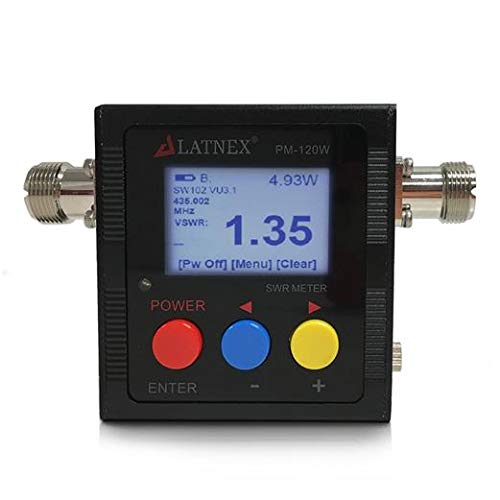
Figure 1: LATNEX PM-120W Digital Power SWR Meter, including the meter unit, USB charging cable, and power adapter.
4. Product Features
- VSWR Measurement: Direct digital readout of Voltage Standing Wave Ratio.
- Power Measurement: Measures forward (FW) and reflected (RW) power up to 120W.
- Frequency Counter: Built-in frequency counter for accurate readings (minimum 0.5W TX input required).
- Wide Frequency Range: Operates across 125 - 525 MHz (VHF/UHF).
- Low Insertion Loss: Less than 0.15dB (VHF) and 0.25dB (UHF), allowing for permanent inline connection.
- Battery Operated: Integrated 3.7V 900mAh Li-ion rechargeable battery with battery voltage display.
- Auto Power Off: Adjustable auto-off feature (1-9 minutes) to conserve battery.
- Backlight: Automatic backlight with adjustable auto-off (1-9 minutes).
- Durable Design: Water-resistant with IP67 international protection rating.
- SO239 Connectors: Standard SO239 interface for input and output.
5. Setup and Connections
Before using your PM-120W meter, ensure it is adequately charged. Connect the micro USB cable to the charging port on the top of the meter and plug the other end into the provided 5V power adapter. A red LED indicates charging, and a green LED indicates a full charge.
- Identify Ports: The meter has two SO239 ports. One is labeled 'TX' for connecting to your radio/transceiver, and the other is labeled 'ANT' for connecting to your antenna or a dummy load.
- Connect to Radio: Connect your radio's antenna output to the 'TX' port of the PM-120W meter. Use appropriate adapters if necessary.
- Connect to Antenna/Load: Connect your antenna or a dummy load to the 'ANT' port of the PM-120W meter.
- Power On: Press and hold the power button (usually labeled 'POWER' or 'ON/OFF') for a few seconds to turn on the meter. The display will illuminate.


Figure 2: TX (left) and ANT (right) ports on the LATNEX PM-120W meter.
6. Operating Instructions
The PM-120W meter displays various values depending on the selected mode. An indicator light on the left side of the screen shows the currently displayed value type.
- Mode Selection: Press the 'ENTER' or mode button (often a colored button like red, blue, or yellow) to cycle through the display modes: Forward Power (FW), Standing Wave Ratio (SWR), and Reflected Power (RW). The indicator light will move to show the active mode.
- Measuring Power (FW/RW):
- Select the 'FW' mode for Forward Power or 'RW' mode for Reflected Power.
- Transmit from your radio. The meter will display the corresponding power value in Watts.
- Ensure your radio's output power is within the meter's measurable range (1-120W).
- Measuring SWR:
- Select the 'SWR' mode.
- Transmit from your radio. The meter will display the SWR value. An SWR value closer to 1.0 indicates a better match between your radio and antenna.
- Frequency Counter: The frequency counter function is built-in and will display the transmission frequency when the radio is transmitting with at least 0.5W input.
- Battery Level: The display also shows the current battery level.

Figure 3: PM-120W Normal Work Display showing various parameters and error conditions.
6.1. Operational Demonstration Videos
The following videos demonstrate the operation of similar digital SWR and power meters. While the exact model may differ, the principles of connection and measurement are generally applicable to the LATNEX PM-120W.
Video 1: Demonstration of a similar digital SWR meter (Surecom SW-33) showing connection to a radio, power-on sequence, mode selection (FW, SWR, RW), and measurement of forward power and SWR with different antennas. This video provides a visual guide to the basic operation of such devices.
Video 2: A detailed guide on using another similar digital SWR and power meter (SW-33 Plus). This video illustrates connecting the meter to a radio, using adapters for different antenna types, and performing SWR measurements to evaluate antenna performance across various frequencies.
7. Troubleshooting
- No Display/Power: Ensure the battery is charged. Connect the meter to the charger and check if the red LED illuminates.
- Inaccurate Readings:
- Verify all connections are secure and correct (TX to radio, ANT to antenna/load).
- Ensure the radio's transmission power is within the meter's measurable range (1-120W).
- Check if the operating frequency is within the meter's specified range (125-525 MHz).
- Confirm that the TX input for frequency counter is at least 0.5W.
- "Error Working" Display (e.g., 229.9W): This typically indicates that the frequency is outside the 100-525MHz range, the input level is below 1 Watt, or the input exceeds 120 Watt. Refer to Figure 3 for visual examples of error messages.
- Not Compatible with Digital Radios: The LATNEX PM-120W is designed for analog two-way radios and external antennas. It is not compatible with DMR digital radio systems.
8. Specifications
| Feature | Specification |
|---|---|
| Frequency Range | 125 - 525 MHz |
| Measurable Power Range | 1 - 120W (±0.5%) |
| Maximum Power | 120W (Analog Radio Only) |
| Impedance | 50Ω |
| VSWR Range | 1.00 ~ 19.9 |
| Insertion Loss (VHF) | <0.15dB |
| Insertion Loss (UHF) | <0.25dB |
| Operating Temperature | 0℃ ~ 60℃ |
| Frequency Counter Input | Min 0.5W (±0.5%) |
| Battery | 3.7V 900mAh Li-ion Rechargeable (14500) |
| Charger Input | 5V (Micro USB) |
| Auto Power Off | 1-9 minutes (adjustable) |
| Backlight Auto Off | 1-9 minutes (adjustable) |
| Interface | SO239 (In and Out) |
| Dimensions (W x H x D) | 76 x 77 x 35 mm (approx. 3.0 x 3.0 x 1.4 inches) |
| Weight | <220 grams (including battery) |
| Water Resistance Level | IP67 |
9. Maintenance
- Clean the device with a soft, dry cloth. Do not use abrasive cleaners or solvents.
- Store the meter in a cool, dry place when not in use.
- Regularly check connections for wear and tear.
- Charge the battery periodically if the device is stored for extended periods to maintain battery health.
10. Warranty and Support
The LATNEX PM-120W Digital VHF UHF Power SWR Meter and Frequency Counter comes with a 1-year warranty from the date of purchase.
For technical support, warranty claims, or any inquiries, please contact LATNEX customer service:
- Manufacturer: LATNEX
- Contact Information: LATNEX, 10 Westcreek Dr, Unit 17 Woodbridge, ON L4L 9R5, Canada
Please retain your proof of purchase for warranty service.
Related documentsPM 120W

Ask a question about this manual
Ask about setup, troubleshooting, compatibility, parts, safety, or missing instructions. Manuals+ will review the question and use this page’s manual context to help answer it.