
1. Introduction
The AODELAN E2 Wireless Flash Trigger is a versatile transceiver designed for wirelessly synchronizing and remotely controlling flash units. It is compatible with the AODELAN radio system and can control Profoto lights with built-in Air systems. This manual provides detailed instructions for setup, operation, and maintenance of your E2 flash trigger.
2. Package Contents
- 1 x AODELAN E2 Wireless Flash Trigger
- 1 x 3.5mm to 3.5mm Sync Cable
- 1 x Lanyard
- 1 x User Manual
3. Product Overview
The AODELAN E2 features a user-friendly interface with clearly labeled buttons for channel selection, group control, and flash power adjustments. It is designed to be compact and easily mountable on most camera hot shoes.
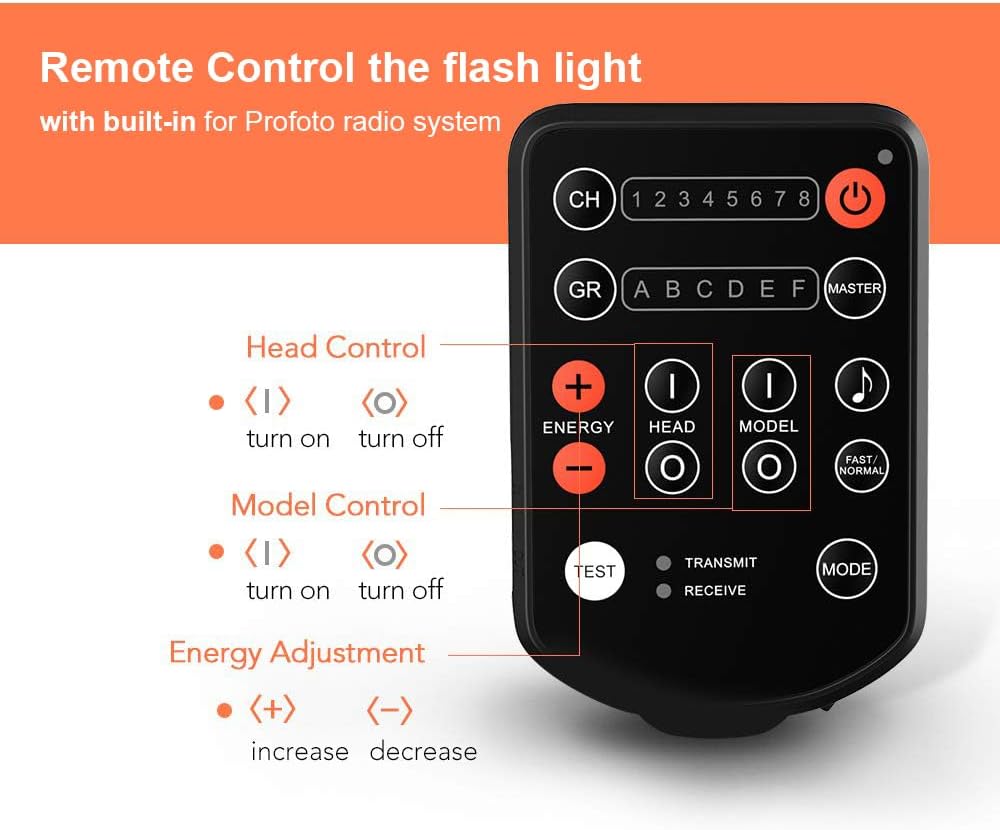
Figure 3.1: This diagram labels the various buttons and indicators on the AODELAN E2 Wireless Flash Trigger, including Channel (CH), Group (GR), Power, Energy Adjustment (+/-), Head Control, Model Control, Test, Transmit/Receive indicators, and Mode button.
Figure 3.2: This image illustrates the universal hot shoe design of the AODELAN E2 Wireless Flash Trigger, compatible with standard single-pin contact hot shoe mounts found on Canon, Nikon, Sony, Olympus, Fujifilm, Panasonic, Pentax, and Samsung cameras.

Figure 3.3: This image provides the physical dimensions of the AODELAN E2 Wireless Flash Trigger (approximately 3.6 inches height, 2.2 inches width, 1.2 inches depth) and shows the included 3.5mm to 3.5mm flash sync cable.
4. Specifications
| Feature | Specification |
|---|---|
| Brand | AODELAN |
| Model Number | E2-Flash |
| Connectivity Technology | Radio Frequency (2.4 GHz) |
| Maximum Range | Up to 650' / 200m |
| Channels | 8 |
| Groups | 6 (A-F) |
| Max Flash Sync Speed | 1/250s |
| Battery Type | 2 x AAA batteries (not included) |
| Item Weight | 0.14 Kilograms |
| Compatible Devices | Cameras with standard single pin hot shoe (Canon, Nikon, Sony, Olympus, Fujifilm, Panasonic, Pentax, Samsung) |
| Profoto Compatibility | Profoto A1, A1X, B2, B10, B1X, D1, D2, Pro-10 (manual control only, no TTL/HSS) |
5. Setup
- Install Batteries: Open the battery compartment and insert two AAA batteries, ensuring correct polarity.
- Mount on Camera: Slide the E2 trigger onto your camera's hot shoe. Secure it by rotating the locking lever or wheel until it is firmly attached. Ensure the trigger is properly aligned and locked to prevent accidental detachment or damage.
- Connect Sync Cable (Optional): If using the co-channel relay function or triggering a remote camera, connect one end of the 3.5mm sync cable to the E2's 'In Port' and the other end to your camera's sync terminal.
6. Operation
6.1 Power On/Off
Press and hold the Power Button (usually marked with a circle and vertical line) to turn the unit on or off.
6.2 Channel and Group Selection
- Press the CH (Channel) Button to cycle through the 8 available channels (1-8). Ensure the trigger and your flash units are set to the same channel.
- Press the GR (Group) Button to select the desired flash group (A-F) you wish to control. The E2 supports up to 6 groups.
6.3 Flash Control
The E2 allows manual control over connected Profoto flash units:
- Energy Adjustment: Use the ENERGY + and ENERGY - buttons to increase or decrease the flash power output for the selected group.
- Head Control: Press the HEAD (I) button to turn on the flash head for the selected group, and HEAD (O) to turn it off.
- Modeling Light Control: Press the MODEL (I) button to turn on the modeling light for the selected group, and MODEL (O) to turn it off.
6.4 Co-channel Relay Function
The E2 features a co-channel relay function, enabling it to trigger a remote camera in sync with remote flash lights. Connect the E2 to your camera via the sync cable for this functionality.
6.5 Shutter Release Function
The E2 can also function as a remote shutter release for your camera when connected via the appropriate sync cable.
6.6 Sync Speed
The maximum flash sync speed supported by the E2 is up to 1/250s.
Video 6.1: This video illustrates how the AODELAN E2 Wireless Flash Trigger functions as a replacement for the Profoto 901031 Air Remote, demonstrating its ability to wirelessly trigger and control Profoto flash units.
7. Maintenance
- Keep the device dry. Do not handle with wet hands.
- Clean the exterior with a soft, dry cloth. Avoid using harsh chemicals or solvents.
- Remove batteries if the device will not be used for an extended period to prevent leakage.
- Store in a cool, dry place away from direct sunlight and extreme temperatures.
8. Troubleshooting
- Device not powering on: Ensure batteries are correctly inserted and fully charged.
- Flash units not triggering:
- Verify that the E2 trigger and all flash units are set to the same channel and group.
- Check the distance between the trigger and flash units; ensure it is within the maximum operating range (200m).
- Confirm that the flash units are powered on and ready to fire.
- Trigger stuck on camera hot shoe: If the trigger becomes difficult to remove, ensure the locking mechanism is fully disengaged. Gently wiggle the trigger while pulling it backward. Do not apply excessive force to avoid damaging the camera's hot shoe or the trigger.
- Remote control of flash power/modeling light not working: Ensure the flash units are compatible with the Profoto Air system and that the E2 is in the correct mode for controlling these functions. Remember, the E2 provides manual control only and does not support TTL or HSS.
9. Warranty and Support
For warranty information and technical support, please refer to the official AODELAN website or contact your retailer. Keep your purchase receipt as proof of purchase.