
1. Introduction
The KOLSOL AT278 is a versatile TDR (Time-Domain Reflectometer) multifunction network cable tester designed for network technicians. It provides comprehensive cable testing capabilities for various network, coaxial, and telephone cables. This device helps identify cable faults, measure cable length, and perform Power over Ethernet (PoE) and PING tests, making it an essential tool for daily network communication maintenance, integrated wiring network engineering, and building monitoring circuit maintenance.

Image 1.1: The KOLSOL AT278 TDR Multifunction Network Cable Tester main unit.
2. Key Features
- Comprehensive Cable Testing: Supports RJ45, RJ11, BNC, and metal cables for continuity, open, short, and split pair detection.
- Cable Length Measurement: Utilizes TDR technology to accurately measure cable length and determine the distance to a fault.
- PoE Presence Detection: Identifies which pins provide power and detects the voltage amount in PoE setups.
- PING Functionality: Tests network performance, data packet transmission, and minimum/maximum response times.
- Tone Tracing: Features a tone tracing function with AC interference rejection for precise cable location.
- Port Flash: Locates network ports on switches, hubs, or routers using a blinking light function.
- Intuitive Graphical Interface: Displays cable mapping and fault locations clearly.
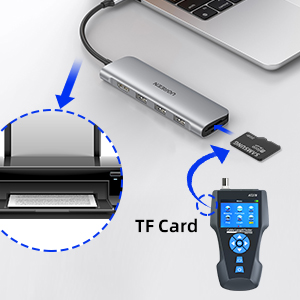
- Data Export: Supports data export via TF card.

Image 2.1: Overview of the AT278's primary functions including cable continuity, fault testing, length measurement, PoE testing, and scanning.
3. Product Overview
The KOLSOL AT278 consists of a main tester unit, a remote identifier, and a tone probe. The main unit features an LCD screen for displaying test results and navigation buttons. Various ports are available for different cable types.


The main unit includes:
- LCD Screen: Displays menu, test results, and settings.
- Navigation Buttons: For menu selection and operation.
- RJ45/RJ11/BNC Ports: For connecting various cable types.
- PoE & PING Port: Dedicated port for PoE and PING tests.
- TF Card Slot: For data storage and export.
- CHG Port: USB charging port.
The tone probe (receiver) features:
- Power Button: To turn the probe on/off.
- Floodlight: For working in low-light conditions.
- NCV (Non-Contact Voltage) Detect Pen: For detecting live wires.
- Scanning Indicator: Visual feedback during tracing.
- Volume Control: Adjusts the tone tracing volume.
4. Setup
- Charging the Device: Connect the main unit and the tone probe to a power source using the provided USB cable. Ensure both devices are fully charged before first use.
- Power On: Press and hold the power button on both the main unit and the tone probe to turn them on.
- Language Selection: Navigate to the settings menu on the main unit to select your preferred language if available. Note: Some display elements may remain in English.
- Insert TF Card (Optional): If you plan to export data, insert a TF card into the designated slot on the main unit.
5. Operating Instructions
5.1 Cable Continuity and Mapping Test (RJ45/RJ11/BNC)
- Connect one end of the cable to the appropriate port (RJ45, RJ11, or BNC) on the main unit.
- Connect the other end of the cable to the remote identifier or the corresponding port on the main unit for loopback testing.
- Select 'Mapping' from the main menu.
- The screen will display the wiring map, indicating continuity, open circuits, short circuits, or split pairs.

5.2 Cable Length Measurement and Fault Location (TDR)
- Connect the cable to be measured to the main unit's RJ45 or BNC port. Ensure the other end of the cable is open (not connected to anything).
- Select 'Length' from the main menu.
- The device will send a step pulse and measure the reflection time to calculate the cable length and distance to any detected faults (open, short).
- The screen will display the length in meters and the distance to any fault.

5.3 Tone Tracing
- Connect the cable to the main unit.
- Select 'Scan' from the main menu to activate the tone generator.
- Use the tone probe (receiver) to trace the cable. The probe will emit an audible tone when it detects the signal from the main unit.
- Adjust the volume on the probe for optimal detection. The device features AC interference rejection for clearer tracing.

5.4 Port Flash Function
- Connect the network cable to the main unit and the other end to a network switch or hub.
- Select 'Port Flash' from the main menu.
- The main unit will send a signal that causes the corresponding port LED on the connected switch/hub to blink, helping to identify the correct port.
5.5 PoE Testing
- Connect the PoE-enabled cable to the PoE/PING port on the main unit.
- Select 'PoE' from the main menu.
- The screen will display which pins are providing power and the detected voltage.
5.6 PING Test
- Connect the network cable to the PoE/PING port on the main unit and to a network device (e.g., router, PC).
- Select 'Ping' from the main menu.
- Enter the IP address of the target device.
- The device will send PING packets and display the response time, packet loss, and other network performance metrics.
Video 5.4: Demonstration of the KOLSOL AT278's various functions, including cable testing, tone tracing, port flashing, PoE detection, and PING testing.
6. Maintenance
- Cleaning: Use a soft, dry cloth to clean the device. Do not use abrasive cleaners or solvents.
- Storage: Store the device in a cool, dry place, away from direct sunlight and extreme temperatures.
- Battery Care: Recharge the battery regularly, even if the device is not in use, to maintain battery health. Avoid fully discharging the battery for extended periods.
- Cable Connections: Ensure all cable connections are secure and free from damage before use.
7. Troubleshooting
| Problem | Possible Cause | Solution |
|---|---|---|
| Device does not power on. | Low battery or faulty power button. | Charge the device fully. If the issue persists, contact support. |
| Inaccurate cable length measurement. | Incorrect cable type selected, cable damage, or improper connection. | Ensure the correct cable type is selected in settings. Check cable for damage. Ensure a proper connection and that the far end is open. |
| Tone tracing is unclear or noisy. | High AC interference or low volume on probe. | Move away from sources of electrical interference. Adjust the volume on the tone probe. |
| PING test fails. | Incorrect IP address, network connectivity issue, or firewall blocking. | Verify the IP address. Check network cable connection. Ensure the target device is online and not blocked by a firewall. |
| Display language is not as expected. | Language setting is incorrect or device has limited language support. | Check the language settings in the device menu. Note that some devices may have limited multi-language support, with core functions remaining in English. |
8. Specifications
| Feature | Detail |
|---|---|
| Brand | KOLSOL |
| Model | AT278 |
| Power Source | Battery Powered |
| Color | Black, Blue, and Grey |
| Item Weight | 800 Grams |
| Measurement Type | Cable Tester |
| UPC | 889327032921 |
| Country of Origin | China |
9. Warranty and Support
KOLSOL products are designed for reliability and performance. For warranty information, technical support, or service inquiries, please refer to the contact information provided with your product packaging or visit the official KOLSOL website. Please retain your proof of purchase for warranty claims.