
1. Introduction
Thank you for choosing the Weten B300 Rechargeable Personal Alarm Keychain. This device is designed to enhance your personal safety by emitting a loud siren and flashing LED light in emergency situations. Please read this manual carefully to ensure proper use and maintenance of your alarm.
2. Product Features
- 130dB Siren: Emits a powerful sound to deter threats and attract attention.
- Dual Activation: Activate by pulling the pin or double-clicking the SOS button.
- LED Light: Features a bright LED light with steady and strobe modes for visibility.
- USB Rechargeable: Built-in Lithium-Ion battery, charges in approximately 90 minutes.
- Long Standby Time: Up to 1 year on standby, or 90 minutes of continuous siren/flashlight use.
- Compact Design: Lightweight (1.12 ounces) and portable (2.8 x 1.4 x 0.7 inches), easily attaches to keys, bags, or backpacks.
- TSA-Approved: Suitable for air travel.

Image: The Weten B300 personal security alarm key chain, highlighting its rechargeable nature.
3. Setup
Initial Charging
Before first use, fully charge your Weten B300 Personal Alarm. The device comes with a Micro-USB charging cable. Locate the charging port on the side of the device, typically covered by a small rubber flap. Connect the Micro-USB end of the cable to the alarm and the USB-A end to a compatible power source (e.g., computer USB port, USB wall adapter).
- A red indicator light will illuminate during charging.
- The indicator light will turn off or change color (depending on the model) once fully charged.
- Charging typically takes approximately 90 minutes.

Image: The Weten B300 Personal Alarm connected to its Micro-USB charging cable.
4. Operating Instructions
Activating the Alarm
There are two methods to activate the 130dB siren and flashing LED light:
- Pull Pin Activation: Pull the metal pin located at the top of the device. The siren will sound immediately, and the LED light will flash.
- SOS Button Activation: Rapidly double-click the SOS button on the front of the device. The siren will sound, and the LED light will flash.
Deactivating the Alarm
To stop the alarm:
- For Pull Pin Activation: Reinsert the metal pin firmly back into the device.
- For SOS Button Activation: Press and hold the SOS button for approximately 3 seconds.
Using the LED Light
The LED light can be used independently as a flashlight or a strobe light:
- Steady Light: Press the dedicated light button (usually on the side or a separate button from SOS) once for a steady light.
- Strobe Light: Press the light button a second time for a flashing strobe light.
- Turn Off: Press the light button a third time to turn off the LED light.
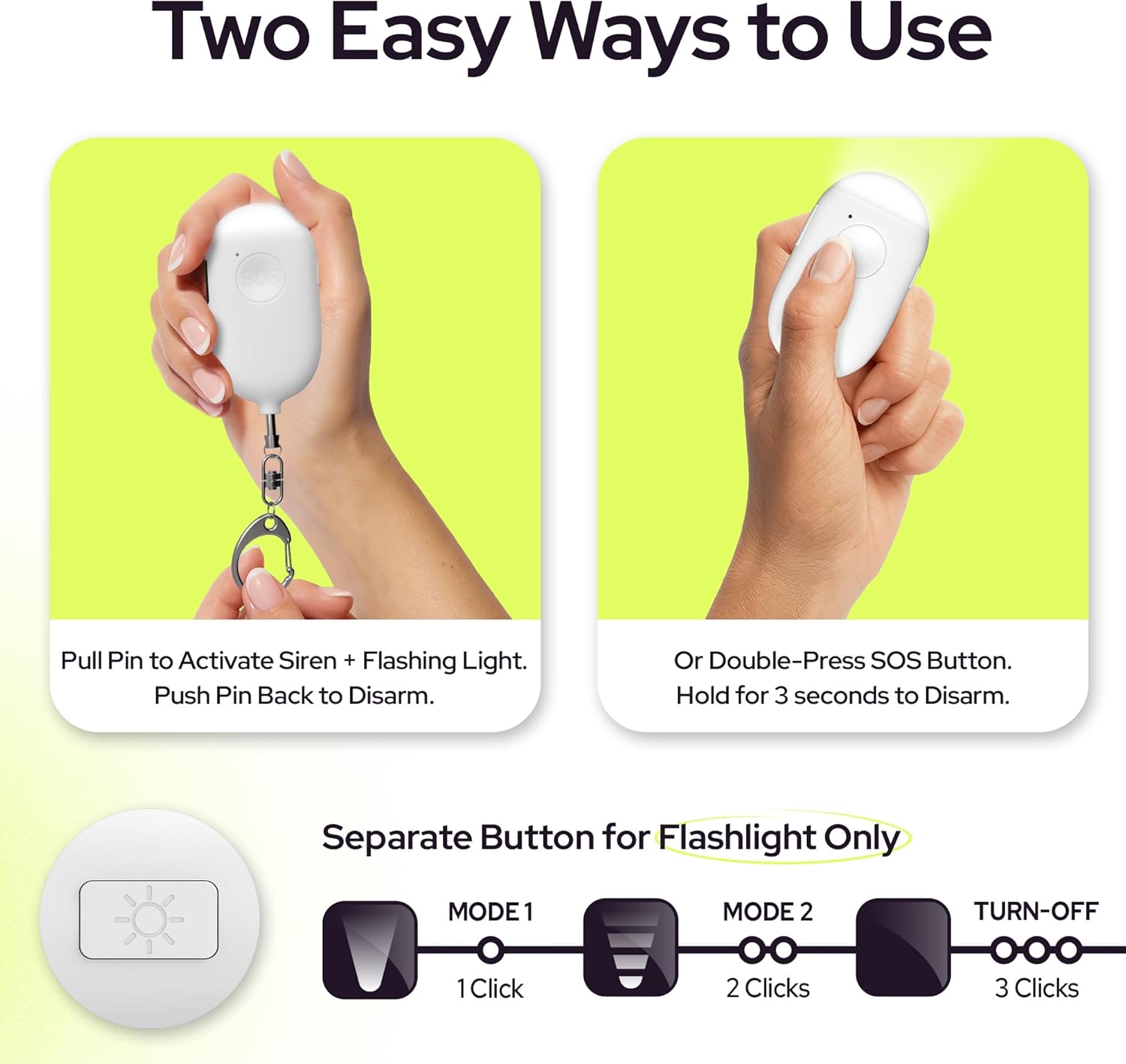
Image: Visual guide demonstrating pull pin activation, SOS button activation, and flashlight modes.
Video: Demonstration of the WETEN B300 Series alarm activation and light functions.
5. Maintenance
- Regular Charging: To ensure optimal performance, charge the alarm regularly, especially if it has been in standby for an extended period or after prolonged use.
- Cleaning: Wipe the device with a soft, dry cloth. Avoid using harsh chemicals or abrasive materials.
- Storage: Store the alarm in a cool, dry place away from direct sunlight and extreme temperatures.
- Avoid Water Immersion: While durable, avoid submerging the device in water to prevent damage.
6. Troubleshooting
- Alarm Not Activating: Ensure the device is charged. If using the pull pin, confirm it is fully removed. If using the SOS button, ensure it is double-clicked rapidly.
- Light Not Working: Check battery level. Press the light button multiple times to cycle through modes.
- Charging Issues: Ensure the charging cable is securely connected to both the device and the power source. Try a different USB port or cable if necessary.
If issues persist, please contact WETEN customer support for further assistance.
7. Specifications
| Model Number | B300 |
| Noise Level | 130 Decibels |
| Power Source | Rechargeable Lithium-Ion Battery |
| Charging Time | Approx. 90 minutes |
| Battery Life (Siren/Light) | Up to 90 minutes continuous use |
| Standby Time | Up to 1 year |
| Product Dimensions | 2.8 x 1.4 x 0.7 inches |
| Item Weight | 1.12 ounces |
| Control Method | Touch |
8. Warranty and Support
Your Weten B300 Personal Alarm Keychain is designed for reliability. For any product-related inquiries, technical support, or warranty information, please refer to the contact details provided with your purchase or visit the official WETEN website. Please note that a 30-day return policy is typically offered for this product.