
ANNKE B08DXH8KNX
ANNKE Surveillance Camera System User Manual
Model: B08DXH8KNX
8CH 1080P Lite H.264+ DVR with 8×1080P Indoor/Outdoor Weatherproof Security CCTV Cameras, 1TB Hard Drive
Introduction
This manual provides detailed instructions for the installation, operation, and maintenance of your ANNKE Surveillance Camera System. Please read this manual thoroughly before using the product to ensure proper setup and optimal performance. Keep this manual for future reference.
What's in the Box?
Carefully unpack the contents and verify that all items are present and in good condition. If any items are missing or damaged, please contact ANNKE customer support.

Image: A visual representation of all components included in the ANNKE Surveillance Camera System package. This includes the central DVR unit, eight security cameras, a 1TB surveillance hard drive, eight 60ft BNC cables, three power supplies, two 1-to-4 splitter cables, one network cable, one HDMI cable, one USB mouse, eight screws, one wall sticker, and the user manual.
- 1 x 8-Channel DVR (Digital Video Recorder)
- 8 x 1080P Wired Security Cameras
- 1 x 1TB Pre-installed Hard Drive
- 8 x 60ft BNC Video Cables
- 3 x Power Adapters
- 2 x 1-to-4 Power Splitter Cables
- 1 x USB Mouse
- 1 x HDMI Cable
- 1 x Network Cable
- Mounting Screw Kits
- User Manual
Product Overview
The ANNKE Surveillance Camera System is designed for comprehensive security monitoring, featuring a versatile DVR and robust cameras.

Image: The main components of the ANNKE security system, showing the central DVR unit, eight bullet-style security cameras, and a 1TB hard drive, illustrating the complete surveillance package.
Digital Video Recorder (DVR)
The 8-channel DVR supports various camera types (TVI, AHD, CVI, CVBS, IP) and records in 1080P at 30fps or 5MP at 20fps. It utilizes H.265+ video compression for efficient storage and bandwidth usage, and comes with a pre-installed 1TB hard drive, expandable up to 10TB.

Image: A visual representation of the ANNKE 5-in-1 8-channel DVR, highlighting its compatibility with multiple camera technologies including AHD, TVI, CVI, IP, and CVBS, demonstrating its versatility.
Security Cameras
The included 1080P cameras are designed for both indoor and outdoor use, featuring IP66 weatherproof rating and durable ABS housing. They provide clear images up to 100ft away, even in low light conditions, thanks to advanced sensors and smart IR technology.

Image: A close-up of an ANNKE security camera mounted outdoors, illustrating its IP66 weatherproof rating and durable ABS housing, capable of withstanding temperatures from -40°F to 140°F.
Setup
1. Connecting the System
- Connect Cameras to DVR: Use the provided BNC cables to connect each camera to the corresponding video input port on the back of the DVR.
- Power Cameras: Use the power adapters and 1-to-4 power splitter cables to provide power to the cameras.
- Connect DVR to Monitor: Use the HDMI cable to connect the DVR to a monitor or TV for local viewing.
- Connect USB Mouse: Plug the USB mouse into a USB port on the DVR for navigation.
- Connect to Network (Optional): For remote access, connect the DVR to your router using the provided network cable.
- Power On: Connect the DVR's power adapter and plug it into an electrical outlet. The system will power on automatically.
2. Initial Setup Wizard
Upon first power-up, the DVR will guide you through an initial setup wizard. Follow the on-screen prompts to:
- Set language and region.
- Create a strong password for the DVR.
- Configure network settings (DHCP recommended for ease of use).
- Set date and time.
- Format the hard drive (if prompted, this is crucial for recording).
Operating the System
Remote Access & Smart Motion Alerts
The ANNKE system allows for remote monitoring and alerts via the ANNKE app on smartphones/tablets or client software on computers. This feature provides real-time access to your surveillance feed from anywhere with an internet connection.

Image: Depicts the ANNKE Free App interface on a smartphone, alongside icons representing remote access from laptops and desktop computers, emphasizing the system's full certainty and accessibility.
When motion is detected, the system can send real-time app pushes and email alerts with snapshots to your configured devices. You can customize motion detection zones to minimize false alarms.
Video Recording & H.265+ Compression
The DVR records high-definition video from all connected cameras. The advanced H.265+ video compression technology significantly reduces file sizes without compromising video quality, allowing for longer recording times and reduced bandwidth consumption compared to older H.264 standards.

Image: A visual comparison demonstrating the superior compression efficiency of H.265+ over H.264, showing that H.265+ requires significantly less storage space for the same video quality, extending recording duration on a 1TB hard drive.
Day and Night Vision
The cameras are equipped with smart IR technology, providing clear surveillance footage both during the day and at night. The system automatically switches between day (color) and night (black and white infrared) modes based on ambient light conditions.
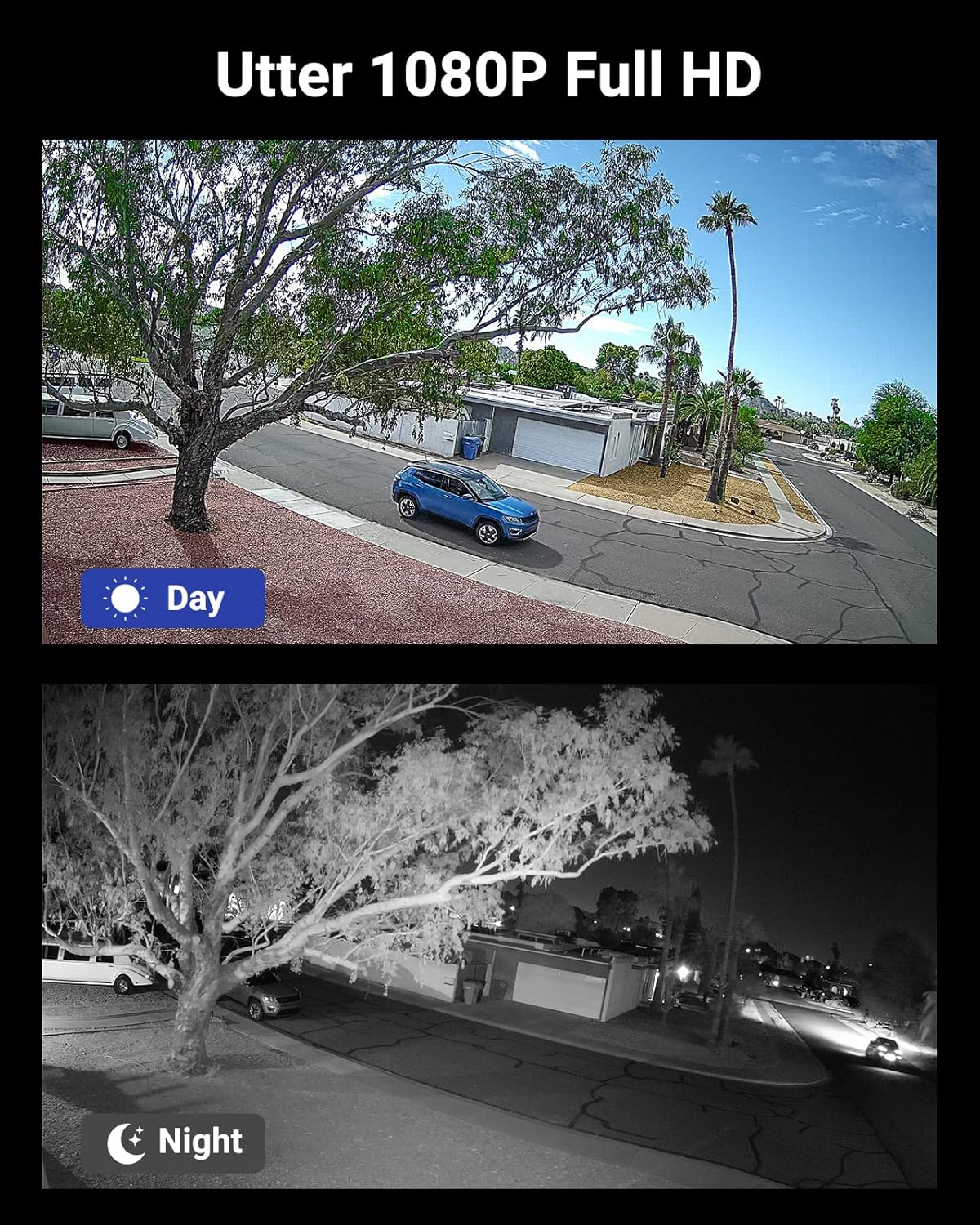
Image: A split image showing the same outdoor scene captured by an ANNKE camera during the day (in color) and at night (in black and white infrared), illustrating the camera's effective day and night vision capabilities.
Maintenance
- Camera Cleaning: Periodically clean the camera lenses with a soft, damp cloth to ensure clear image quality. Avoid harsh chemicals.
- DVR Ventilation: Ensure the DVR is placed in a well-ventilated area to prevent overheating. Do not block ventilation openings.
- Firmware Updates: Check the ANNKE official website regularly for firmware updates. Keeping your DVR firmware up-to-date ensures optimal performance, security, and access to new features.
- Hard Drive Health: The DVR's hard drive is crucial for recording. Monitor its health through the DVR's system settings. Back up important footage regularly.
Troubleshooting
| Problem | Possible Cause | Solution |
|---|---|---|
| No video display on monitor. | Loose cable connection, incorrect input source, DVR not powered on. | Check HDMI/VGA cable connections. Ensure monitor input is set correctly. Verify DVR power. |
| No image from a specific camera. | Camera power issue, BNC cable issue, camera fault. | Check camera power connection. Inspect BNC cable for damage. Try swapping camera with a working one. |
| Cannot access DVR remotely. | Network configuration issue, app/software not configured, internet connectivity. | Ensure DVR is connected to the internet. Check network settings (DHCP/Static IP). Verify app/software settings and port forwarding (if applicable). |
| No recording or short recording time. | Hard drive not formatted, hard drive full, recording schedule incorrect. | Format the hard drive via DVR settings. Check recording schedule and motion detection settings. Consider upgrading HDD capacity if frequently full. |
Specifications
- Model: B08DXH8KNX
- DVR Channels: 8-Channel
- Video Compression: H.265+ / H.264+
- Video Input: TVI, AHD, CVI, CVBS, IP
- Video Resolution: 1080P (30fps), 5MP (20fps)
- Camera Resolution: 1080P
- Night Vision Range: Up to 100ft (30m)
- Hard Drive: 1TB pre-installed (supports up to 10TB)
- Weatherproof Rating: IP66 (Cameras)
- Operating Temperature (Cameras): -40°F to 140°F (-40°C to 60°C)
- Connectivity: Wired (BNC), Ethernet (RJ45)
- Remote Access: ANNKE App (iOS/Android), Client Software (Windows/Mac)
- Power Source: Corded Electric
- Item Weight: Approximately 13.02 pounds (total package)
- Package Dimensions: Approximately 15 x 11 x 9.3 inches
Warranty & Support
ANNKE products come with a manufacturer's warranty. Please refer to the warranty card included in your package or visit the official ANNKE website for detailed warranty terms and conditions.
For technical assistance, troubleshooting, or product inquiries, please contact ANNKE customer support:
- Online Support: Visit the ANNKE support page on their official website.
- Email Support: Refer to your product packaging or the ANNKE website for the support email address.
- Phone Support: Check the ANNKE website for available phone support numbers and hours.
When contacting support, please have your product model (B08DXH8KNX) and purchase information ready.
Ask a question about this manual
Ask about setup, troubleshooting, compatibility, parts, safety, or missing instructions. Manuals+ will review the question and use this page’s manual context to help answer it.