
OSD Audio BK-SAM300
OSD Black 300W Subwoofer Amplifier User Manual
Model: BK-SAM300
1. Introduction
Thank you for choosing the OSD Black 300W Subwoofer Amplifier, Model BK-SAM300. This amplifier is designed to provide powerful and precise low-frequency amplification for passive subwoofers, enhancing your home theater or audio system experience. With its robust Class AB output stage and versatile connectivity options, the BK-SAM300 delivers deep, impactful bass for movies, music, and games.
This manual provides detailed instructions for the proper installation, operation, and maintenance of your subwoofer amplifier. Please read it thoroughly before use and retain it for future reference.
2. Safety Information
WARNING: To reduce the risk of fire or electric shock, do not expose this appliance to rain or moisture.
- Read all instructions before operating the amplifier.
- Keep this manual for future reference.
- Heed all warnings on the amplifier and in this manual.
- Follow all instructions.
- Do not use this apparatus near water.
- Clean only with a dry cloth.
- Do not block any ventilation openings. Install in accordance with the manufacturer's instructions.
- Do not install near any heat sources such as radiators, heat registers, stoves, or other apparatus (including amplifiers) that produce heat.
- Do not defeat the safety purpose of the polarized or grounding-type plug. A polarized plug has two blades with one wider than the other. A grounding-type plug has two blades and a third grounding prong. The wide blade or the third prong are provided for your safety. If the provided plug does not fit into your outlet, consult an electrician for replacement of the obsolete outlet.
- Protect the power cord from being walked on or pinched, particularly at plugs, convenience receptacles, and the point where they exit from the apparatus.
- Only use attachments/accessories specified by the manufacturer.
- Unplug this apparatus during lightning storms or when unused for long periods of time.
- Refer all servicing to qualified service personnel. Servicing is required when the apparatus has been damaged in any way, such as power-supply cord or plug is damaged, liquid has been spilled or objects have fallen into the apparatus, the apparatus has been exposed to rain or moisture, does not operate normally, or has been dropped.
3. Package Contents
Please check the box for the following items:
- OSD Black 300W Subwoofer Amplifier (BK-SAM300)
- Power Cord
- User Manual (this document)
4. Product Overview
4.1 Front Panel Controls
The front panel of the BK-SAM300 features essential controls for power and audio adjustments.

Figure 4.1: Front and Rear View of the BK-SAM300 Amplifier. This image displays both the front panel with its controls and the rear panel with all input/output connections.
- Power Button: Toggles the amplifier's power on or off.
- Phase Control (0° - 180°): Adjusts the phase of the subwoofer output relative to the main speakers. This helps to ensure that the subwoofer's sound waves align correctly with those of the main speakers, preventing cancellation or reinforcement issues at the crossover frequency.
- FREQ (Crossover Frequency) Control: Sets the upper frequency limit for the subwoofer. Frequencies above this setting will be filtered out. Adjustable from approximately 40Hz to 120Hz.
- GAIN (Volume) Control: Adjusts the overall output level of the subwoofer amplifier. Use this to balance the subwoofer's volume with the rest of your audio system.
4.2 Rear Panel Connections and Controls
The rear panel houses all the input and output connections, along with additional settings for advanced configuration.
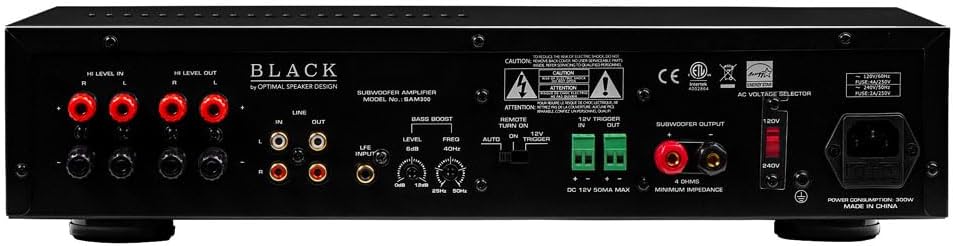
Figure 4.2: Rear Panel of the BK-SAM300 Amplifier. This image provides a detailed view of all input and output terminals, including Hi Level, Line, LFE, Bass Boost, 12V Trigger, and Subwoofer Output.
- HI LEVEL IN (Speaker Level Input): Connects directly to the speaker outputs of your receiver or amplifier. Use this if your receiver does not have a dedicated subwoofer output or LFE output.
- HI LEVEL OUT (Speaker Level Output): Passes the full-range audio signal from the HI LEVEL IN to your main speakers.
- LINE IN (RCA Input): Standard RCA stereo inputs for connecting to the pre-out or line-out of your receiver or audio source.
- LINE OUT (RCA Output): Passes the audio signal from the LINE IN to another amplifier or audio device.
- LFE INPUT (RCA Input): Dedicated input for connecting to the LFE (Low-Frequency Effects) output of an AV receiver. This bypasses the amplifier's internal crossover, relying on the receiver's bass management.
- BASS BOOST (Level & Freq):
- Level (0dB to 12dB): Adjusts the intensity of the bass boost.
- Freq (25Hz to 50Hz): Selects the center frequency at which the bass boost is applied.

Figure 4.3: Detail of Bass Boost Controls. This image highlights the Level and Freq knobs for fine-tuning the bass boost.
- REMOTE TURN ON (Manual, Auto, 12V Trigger): Selects the amplifier's power-on mode.
- Manual: Amplifier is turned on/off manually via the front panel power button.
- Auto: Amplifier automatically turns on when an audio signal is detected and enters standby mode when no signal is present for a period.
- 12V Trigger In/Out: Allows the amplifier to be turned on/off by a 12V DC trigger signal from a compatible receiver or control system.
- SUBWOOFER OUTPUT (Binding Posts): Connects to your passive subwoofer using speaker wire. Ensure correct polarity (+ to + and - to -). The amplifier is stable down to 4 ohms impedance.

Figure 4.4: Detail of Subwoofer Output and 12V Trigger. This image shows the binding posts for subwoofer connection and the 12V trigger terminals.
- AC VOLTAGE SELECTOR (120V/240V): Selects the appropriate input voltage for your region. Ensure this is set correctly before plugging in the amplifier.
- AC Power Inlet: Connects the supplied power cord.
5. Setup
5.1 Placement
Place the amplifier in a location that allows for adequate ventilation. Avoid enclosed spaces or stacking other components directly on top of the amplifier. Keep it away from direct sunlight, heat sources, and moisture. Ensure it is placed on a stable, level surface.
5.2 Connecting the Amplifier
Choose one of the following connection methods based on your audio system's capabilities:
Method A: Using LFE Input (Recommended for AV Receivers with Subwoofer Output)
- Connect an RCA cable from the LFE or Subwoofer Pre-Out jack on your AV receiver to the LFE INPUT jack on the BK-SAM300.
- Connect your passive subwoofer to the SUBWOOFER OUTPUT binding posts on the BK-SAM300 using appropriate gauge speaker wire. Ensure correct polarity (+ to + and - to -).
- Proceed to Section 5.3 for power connection.
Method B: Using Line Level Inputs (for Stereo Receivers or Pre-Outs)
- Connect RCA cables from the Pre-Out or Line-Out jacks of your receiver/pre-amplifier to the LINE IN (Left and Right) jacks on the BK-SAM300.
- Connect your passive subwoofer to the SUBWOOFER OUTPUT binding posts on the BK-SAM300 using appropriate gauge speaker wire. Ensure correct polarity (+ to + and - to -).
- Proceed to Section 5.3 for power connection.
Method C: Using High Level Inputs (for Receivers without Dedicated Subwoofer/Pre-Outs)
- Connect speaker wires from the main speaker outputs of your receiver/amplifier to the HI LEVEL IN (Left and Right) binding posts on the BK-SAM300. Ensure correct polarity.
- (Optional) If you wish to pass the signal through to your main speakers, connect speaker wires from the HI LEVEL OUT binding posts on the BK-SAM300 to your main speakers.
- Connect your passive subwoofer to the SUBWOOFER OUTPUT binding posts on the BK-SAM300 using appropriate gauge speaker wire. Ensure correct polarity (+ to + and - to -).
- Proceed to Section 5.3 for power connection.
5.3 Power Connection
- Before connecting the power cord, ensure the AC VOLTAGE SELECTOR switch on the rear panel is set to the correct voltage for your region (120V or 240V). Incorrect setting can damage the unit.
- Connect the supplied power cord to the AC Power Inlet on the rear panel of the amplifier.
- Plug the other end of the power cord into a suitable wall outlet.
6. Operating Instructions
6.1 Powering On/Off
The BK-SAM300 offers three power-on modes:
- Manual Mode: Set the REMOTE TURN ON switch to "Manual". Press the front panel Power Button to turn the amplifier on or off.
- Auto Mode: Set the REMOTE TURN ON switch to "Auto". The amplifier will automatically turn on when an audio signal is detected at the inputs and will enter standby mode after approximately 15-20 minutes of no audio signal.
- 12V Trigger Mode: Connect a 12V DC trigger cable from your source component (e.g., AV receiver) to the 12V TRIGGER IN terminal. Set the REMOTE TURN ON switch to "12V Trigger". The amplifier will power on/off with the source component.
6.2 Adjusting Controls
Optimal sound quality depends on proper adjustment of the amplifier's controls to match your subwoofer and listening environment.
- GAIN (Volume): Start with the GAIN control at its minimum setting. Play some audio with significant bass content. Slowly increase the GAIN until the subwoofer's output blends seamlessly with your main speakers. Avoid setting the gain too high, as this can lead to distortion.
- FREQ (Crossover Frequency):
- If using the LFE INPUT, this control is bypassed. Set your AV receiver's subwoofer crossover frequency.
- If using LINE IN or HI LEVEL IN, adjust the FREQ control to blend the subwoofer's output with your main speakers. A good starting point is typically 80Hz-100Hz, but this may vary depending on the size and frequency response of your main speakers. Smaller main speakers usually require a higher crossover frequency.
- PHASE (0° - 180°): The phase control helps to ensure that the subwoofer's sound waves are in sync with your main speakers.
- Play music with a consistent bass line.
- While listening from your primary listening position, slowly adjust the PHASE control from 0° to 180°.
- Stop at the position where the bass sounds the loudest and most impactful. If the bass sounds weak or hollow, try adjusting the phase.
- BASS BOOST: Use the BASS BOOST controls (Level and Freq) to fine-tune the low-frequency response.
- Freq: Select the specific low frequency (25Hz to 50Hz) you wish to boost.
- Level: Adjust the amount of boost (0dB to 12dB) at the selected frequency. Use sparingly to avoid muddy or boomy bass.
7. Maintenance
- Cleaning: Disconnect the amplifier from power before cleaning. Use a soft, dry cloth to wipe down the exterior. Do not use liquid cleaners or aerosol sprays.
- Ventilation: Ensure that the ventilation openings are not blocked by dust or debris. Periodically check and clean if necessary to maintain proper airflow.
- Storage: If storing the amplifier for an extended period, disconnect it from power and store it in a cool, dry place, away from direct sunlight and extreme temperatures.
8. Troubleshooting
| Problem | Possible Cause | Solution |
|---|---|---|
| No power / Amplifier does not turn on. |
|
|
| No sound from subwoofer. |
|
|
| Distorted or muddy bass. |
|
|
| Humming or buzzing noise. |
|
|
9. Specifications
| Feature | Detail |
|---|---|
| Model | BK-SAM300 |
| Output Power | 300 Watts (RMS) |
| Impedance Stability | 4-ohm Stable |
| Amplifier Class | Class AB |
| Frequency Response | 20Hz - 160Hz |
| Crossover Frequency | Adjustable 40Hz - 120Hz |
| Phase Control | 0° - 180° Variable |
| Bass Boost | 25Hz - 50Hz, up to 12dB |
| Inputs | Low-level (RCA), High-level (Speaker), LFE (RCA), 12V Trigger |
| Outputs | Subwoofer Output (Binding Posts), High-level Pass-through, 12V Trigger |
| Power Modes | Manual, Auto-Sensing, 12V Trigger |
| Standby Power Consumption | Less than 1 Watt |
| Dimensions (W x H x D) | 17.25 x 3.75 x 13.88 inches (43.8 x 9.5 x 35.2 cm) |
| Weight | 20 pounds (9.07 kg) |
| Chassis Material | Heavy-duty steel with brushed aluminum faceplate |
| Voltage | Switchable 120V/240V |
10. Warranty and Support
OSD Audio products are designed and manufactured to the highest quality standards. For specific warranty information regarding your BK-SAM300 Subwoofer Amplifier, please refer to the warranty card included with your product or visit the official OSD Audio website. Warranty terms typically cover defects in materials and workmanship under normal use.
For technical support, troubleshooting assistance, or service inquiries, please contact OSD Audio customer support through their official website or the contact information provided with your purchase. Please have your model number (BK-SAM300) and purchase date ready when contacting support.
Online Resources: For the latest information, FAQs, and additional support, please visit the OSD Audio website.
Ask a question about this manual
Ask about setup, troubleshooting, compatibility, parts, safety, or missing instructions. Manuals+ will review the question and use this page’s manual context to help answer it.