
Introduction
This manual provides essential instructions for the safe and efficient use of your Marg AC/DC Adapter. This adapter is specifically designed to provide power to the AUVIO Cat.No.16-906 7 Portable ATSC/NTSC LCD TV, ensuring reliable operation and charging.
Important Safety Information
Please read all safety warnings and instructions carefully before using this product. Failure to follow these instructions may result in electric shock, fire, or serious injury.
- Indoor Use Only: This adapter is designed for indoor use in dry locations. Do not expose to rain, moisture, or extreme temperatures.
- Proper Voltage: Ensure the wall outlet voltage matches the adapter's input requirements.
- Avoid Damage: Do not use the adapter if the cord or plug is damaged. Do not bend, twist, or pull the cord excessively.
- Ventilation: Ensure adequate ventilation around the adapter during use. Do not cover it with cloth or other materials.
- Disconnect When Not in Use: Unplug the adapter from the wall outlet and the device when not in use for extended periods.
- Children and Pets: Keep the adapter out of reach of children and pets.
- Compatibility: Use this adapter only with compatible devices as specified (AUVIO Cat.No.16-906 7 Portable ATSC/NTSC LCD TV). Using it with incompatible devices may cause damage.
Setup
Follow these steps to properly set up your Marg AC/DC Adapter:
- Inspect the Adapter: Before connecting, visually inspect the adapter and its cable for any signs of damage. Do not use if damaged.
- Connect to Device: Locate the power input port on your AUVIO Cat.No.16-906 7 Portable ATSC/NTSC LCD TV. Carefully insert the adapter's output connector into the device's power port. Ensure a snug fit.
- Connect to Power Outlet: Plug the adapter's AC plug into a standard wall power outlet.
- Verify Connection: Once connected, the device should power on or begin charging, indicated by its power indicator light.
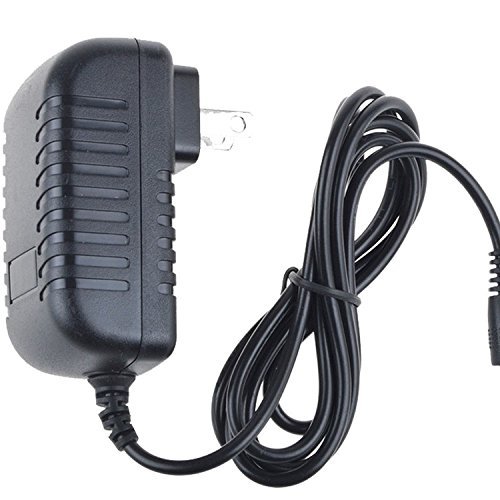
Image: The Marg AC/DC Adapter with its integrated power cord and plug. This shows the compact design of the adapter.
Operating Instructions
Using your Marg AC/DC Adapter is straightforward:
- Powering On: After connecting the adapter to both the TV and a power outlet, turn on your AUVIO TV using its power button.
- Charging: If your AUVIO TV has a rechargeable battery, the adapter will automatically charge it when connected and the TV is off or in standby mode.
- Continuous Use: The adapter provides continuous power for extended viewing sessions.
- Disconnecting: To disconnect, first turn off your AUVIO TV. Then, unplug the adapter from the wall outlet, followed by disconnecting it from the TV.

Image: Side view of the Marg AC/DC Adapter, highlighting the textured casing for better grip and heat dissipation.
Maintenance
Proper maintenance ensures the longevity and safe operation of your adapter:
- Cleaning: Disconnect the adapter from all power sources before cleaning. Use a soft, dry cloth to wipe the exterior. Do not use liquid cleaners or solvents.
- Storage: When not in use, store the adapter in a cool, dry place, away from direct sunlight and extreme temperatures. Avoid tightly winding the cable to prevent damage.
- Cable Care: Regularly check the power cord for any cuts, fraying, or kinks. If any damage is observed, discontinue use immediately.

Image: Angled view of the Marg AC/DC Adapter, showing the robust construction and the connection point for the power cable.
Troubleshooting
If you encounter issues with your adapter, refer to the following common problems and solutions:
| Problem | Possible Cause | Solution |
|---|---|---|
| Device not powering on/charging. |
|
|
| Adapter feels warm during use. |
|
|
If the problem persists after trying these solutions, please contact customer support.
Specifications
| Brand: | Marg |
| Model Compatibility: | AUVIO Cat.No.16-906 7 Portable ATSC/NTSC LCD TV |
| Input: | AC 100-240V, 50/60Hz (Standard Wall Power) |
| Output: | DC (Specific voltage and current for AUVIO Cat.No.16-906 7 TV) |
| Safety Features: | Overcharging Protection, Overheating Protection |
Note: The exact output voltage and current are designed to match the requirements of the specified AUVIO TV model.
Warranty and Support
This Marg AC/DC Adapter comes with a standard manufacturer's warranty. For specific warranty details, please refer to the packaging or contact Marg customer support. If you experience any issues or have questions regarding your adapter, please reach out to our support team through the retailer where the product was purchased or visit the official Marg website for contact information.
For further assistance, you may need to provide your product's ASIN: B08DV9VRF6.