1. Introduction
Thank you for choosing the VATOS 1:12 4WD 2.4GHz High-Speed RC Off-Road Buggy, Model VL-9156. This remote control vehicle is designed for thrilling off-road experiences, featuring a powerful 4WD system, high-speed capabilities up to 46 km/h, and IPX4 water resistance. This manual provides essential information for safe operation, setup, maintenance, and troubleshooting to ensure optimal performance and longevity of your RC buggy.

Image 1.1: The VATOS RC Buggy demonstrating its high-speed capability.
2. Safety Precautions
Read and understand all safety instructions before operating the RC buggy. Failure to follow these instructions may result in injury or damage to the product.
- Adult Supervision: This product is recommended for users aged 14 and above. Adult supervision is advised for younger users.
- Operating Environment: Operate the RC buggy in open areas, away from people, pets, vehicles, and obstacles. Avoid public roads.
- Water Resistance: The buggy has an IPX4 water resistance level, meaning it is protected against splashing water. Avoid submerging the vehicle in water or operating it in heavy rain.
- Moving Parts: Keep fingers, hair, and loose clothing away from moving parts such as wheels and gears to prevent injury.
- Battery Safety: Use only the specified Li-ion battery and charger. Do not overcharge, short-circuit, or puncture batteries. Dispose of batteries properly.
- Heat: The motor and battery may become hot during operation. Allow them to cool before handling or recharging.
3. Package Contents
Carefully unpack all items and verify that you have received the following components:
- VATOS 1:12 Scale RC Off-Road Buggy (Model VL-9156)
- 2.4GHz Remote Controller
- Rechargeable Li-ion Battery (7.4V 1500mAh)
- USB Charging Cable
- Instruction Manual (This document)

Image 3.1: Overview of the VATOS RC Buggy and its included accessories.
4. Components Overview
4.1 RC Buggy
The VATOS RC Buggy features a durable chassis, independent suspension, and high-quality rubber tires for superior off-road performance. It is powered by a high-performance motor and a Li-ion battery.

Image 4.1: Detailed view of the RC Buggy's chassis, highlighting key components and dimensions.
4.2 Remote Controller
The 2.4GHz remote controller provides precise control over the buggy's movements, including forward, backward, left, and right steering. It also features speed and steering trim adjustments.

Image 4.2: The RC Buggy, remote controller, and battery.
5. Setup
5.1 Charging the RC Buggy Battery
- Connect the Li-ion battery to the USB charging cable.
- Plug the USB charging cable into a standard USB power adapter (e.g., phone charger, computer USB port).
- The charging indicator on the USB cable will show the charging status (refer to the charger's specific instructions for light indications).
- Charging typically takes approximately 3-4 hours for a full charge. Do not leave the battery unattended while charging.
5.2 Installing the RC Buggy Battery
- Remove the body shell of the RC buggy by detaching the body clips.
- Open the battery compartment.
- Connect the fully charged Li-ion battery to the vehicle's power connector.
- Place the battery securely within the compartment and close the cover.
- Reattach the body shell using the clips.
5.3 Installing Remote Controller Batteries
- Open the battery compartment on the back of the remote controller.
- Insert 3x AA batteries (not included) into the compartment, ensuring correct polarity (+/-).
- Close the battery compartment cover securely.
6. Operating Instructions
6.1 Power On and Pairing
- Turn on the remote controller first. The indicator light will flash.
- Turn on the RC buggy. The indicator light on the buggy will also flash.
- Once the lights on both the remote and the buggy become solid, the pairing process is complete, and the vehicle is ready for operation.
6.2 Driving Controls
- Throttle Trigger: Pull the trigger to move forward. Push the trigger to brake or reverse.
- Steering Wheel: Turn the wheel left to steer left, and right to steer right.
- Speed Switch: The remote controller may feature a speed switch (often labeled 'High/Low' or similar) to adjust the maximum speed of the buggy.
- Steering Trim: Use the steering trim dial to adjust the steering if the buggy pulls to one side when the steering wheel is centered.
- Throttle Trim: Use the throttle trim dial to adjust the throttle if the buggy moves slightly forward or backward when the trigger is in the neutral position.

Image 6.1: The RC Buggy's performance across diverse terrains.

Image 6.2: The RC Buggy's 4WD system in action on an incline.
7. Maintenance
7.1 Cleaning
- After each use, especially in dirty or dusty conditions, gently clean the buggy with a soft brush or cloth to remove dirt and debris.
- Do not use water directly on electronic components. For light cleaning, a slightly damp cloth can be used on the body.
7.2 Storage
- When not in use, store the RC buggy and remote controller in a cool, dry place, away from direct sunlight and extreme temperatures.
- Remove batteries from both the RC buggy and the remote controller before long-term storage to prevent leakage.
7.3 Battery Care
- Always allow the battery to cool down before recharging.
- Do not fully discharge the Li-ion battery, as this can reduce its lifespan.
- If storing for an extended period, charge the battery to approximately 50% capacity.
8. Troubleshooting
If you encounter issues with your VATOS RC Buggy, refer to the following common problems and solutions:
| Problem | Possible Cause | Solution |
|---|---|---|
| Buggy does not respond to remote. | Low battery in buggy or remote; Not paired; Out of range. | Charge buggy battery; Replace remote batteries; Re-pair the devices; Operate within range. |
| Buggy moves slowly or lacks power. | Low buggy battery; Motor or gears obstructed. | Charge buggy battery; Check for debris in motor/gears and clean. |
| Buggy pulls to one side. | Steering trim needs adjustment; Damaged steering components. | Adjust steering trim on the remote; Inspect steering linkage for damage. |
| Short operating time. | Battery not fully charged; Old or damaged battery. | Ensure battery is fully charged; Consider replacing the battery if it's old or damaged. |
9. Specifications
Detailed technical specifications for the VATOS 1:12 4WD 2.4GHz High-Speed RC Off-Road Buggy (Model VL-9156):
- Model Name: VL-9156
- Brand: VATOS
- Scale: 1:12
- Dimensions (L x W x H): 42 x 30 x 15 cm (approximately 16.5 x 11.8 x 5.9 inches)
- Weight: 2.46 kg (approximately 5.42 lbs)
- Material: Plastic
- Drive System: 4-Wheel Drive (4WD)
- Frequency: 2.4 GHz
- Max Speed: Up to 46 km/h
- Battery Type (Vehicle): Lithium-ion (Li-ion)
- Battery Capacity (Vehicle): 7.4V 1500mAh (typically)
- Battery Type (Remote Control): AA batteries (not included)
- Waterproof Level: IPX4 (splash-proof)
- Special Features: Independent suspension, high-performance motor, high-quality rubber tires, cross-country capabilities.

Image 9.1: The RC Buggy showcasing its speed and scale.
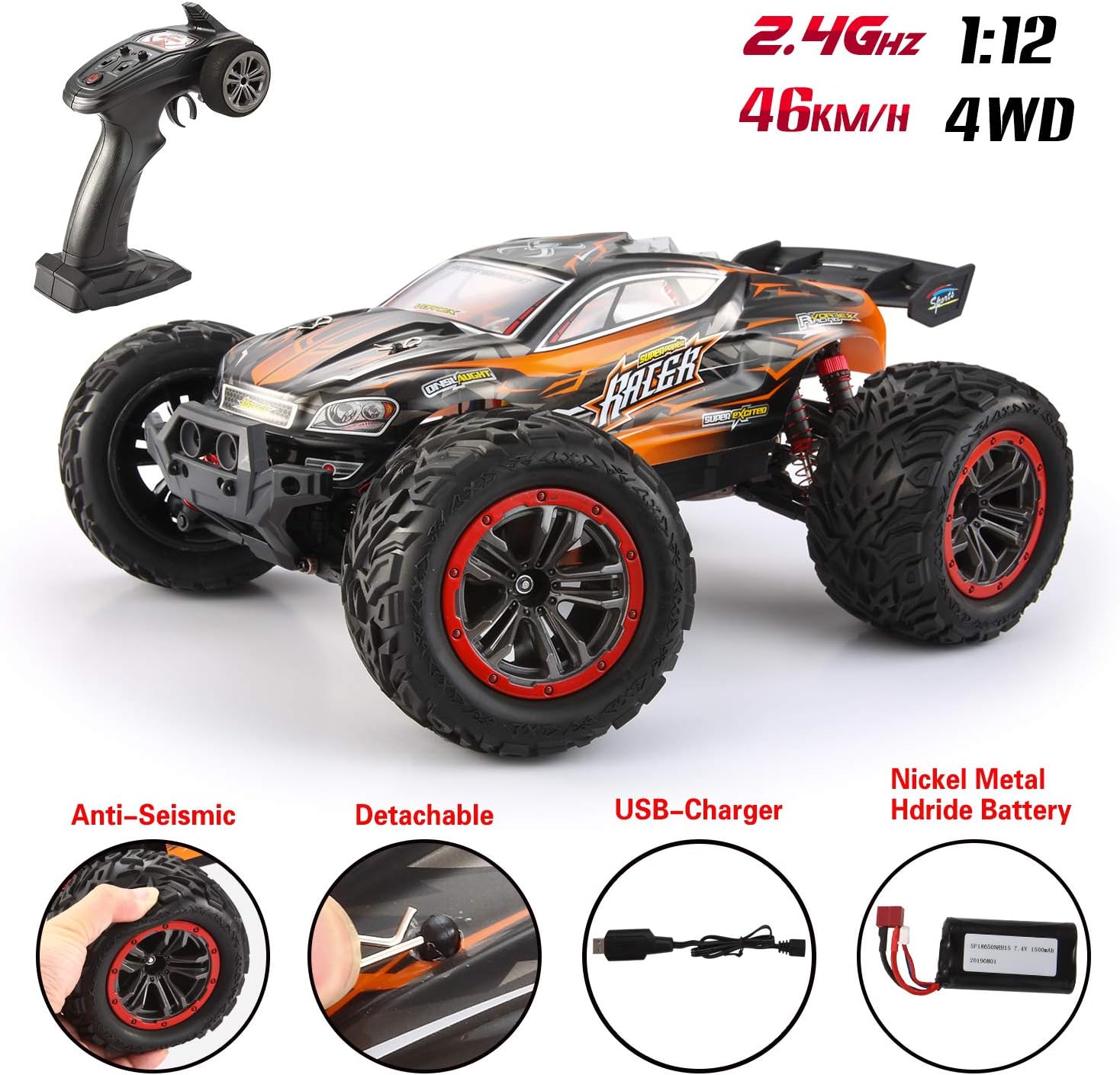
Image 9.2: The RC Buggy's IPX4 water resistance.
10. Warranty and Support
Information regarding product warranty and customer support was not provided in the available data. For warranty details, technical assistance, or spare parts inquiries, please refer to the product packaging or contact VATOS customer service directly through their official website or the retailer where the product was purchased.


