
Dexpt ADP190342L
Dexpt AC Charger User Manual
Model: ADP190342L
1. Product Overview
This manual provides essential information for the safe and efficient use of your Dexpt AC Charger. This charger is designed to provide reliable power to compatible Acer laptops.

Image 1.1: The Dexpt AC Charger, including the main power adapter unit and the detachable power cord.
What's Included:
- 1 x Dexpt AC Power Adapter
- 1 x Power Cord
- 2 x Detachable Connector Tips (5.5 x 1.7mm and 3.0 x 1.1mm)
2. Compatibility
This charger is compatible with various Acer laptop models. Please verify your laptop's power requirements and connector type before use.

Image 2.1: Diagram illustrating how to check laptop compatibility by verifying the charging port and power specifications on the laptop's bottom.
Compatible Acer Laptop Series:
- Acer Aspire 5 Slim N18Q13 (A515-54, A515-54G, A515-54-55AA, A515-54-51DJ, A515-54-37U3, A515-54G-5928, A515-54-30BQ, A515-54-55ZD, A515-54-597W, A515-54-79J5, A515-54G-73WC, A515-54G-54QQ, A515-54G-73Q2, A515-55-588C, A515-46-R14K, A515-43-R5RE, A515-54-59W2)
- Acer Travelmate Series
- Acer Aspire Series
- Acer Chromebook Series
- Acer Swift Series
- Acer Spin Series
- And other compatible models requiring 19V 3.42A (65W) or 19V 2.15A-2.37A (40W-45W) power.
Important: Do not use this charger on notebooks with a rated power exceeding 65W.
Video 2.2: An official product video demonstrating the charger's features, including the two switchable power connectors and compatibility with various Acer laptop series.
3. Setup Instructions
Follow these steps to set up your Dexpt AC Charger:
- Select the Correct Connector Tip: The charger comes with two detachable tips: 5.5 x 1.7mm (yellow tip) and 3.0 x 1.1mm (black tip). Identify the correct tip that fits your laptop's charging port.

Image 3.1: The two attachable connector tips provided with the charger, allowing compatibility with different laptop models.
- Attach the Connector Tip: Firmly push the selected connector tip onto the DC output cable of the power adapter until it is securely in place.
- Connect to Laptop: Insert the attached connector tip into your laptop's charging port.
- Connect to Power Outlet: Plug the AC power cord into the power adapter, then plug the other end of the power cord into a standard 100-240V wall outlet.
Once connected, a blue indicator light on the adapter should illuminate, indicating that the charger is receiving power and your laptop is charging.
4. Operating Instructions
The Dexpt AC Charger is designed for simple plug-and-play operation.
- Ensure all connections are secure before plugging into a power outlet.
- The charger will automatically detect your laptop's power requirements (within its specified range of 40W-65W) and deliver the appropriate power.
- A blue LED indicator on the adapter signifies active charging.
- Disconnect the charger from the power outlet when not in use for extended periods.

Image 4.1: The Dexpt AC Charger connected to a laptop and a wall outlet, demonstrating its high charging efficiency.
5. Safety Guidelines
Your Dexpt AC Charger is UL Listed, meaning it has successfully met stringent safety requirements. To ensure continued safe operation, please observe the following:

Image 5.1: Diagram highlighting UL Certification as the National Gold Standard for Product Quality and Safety, ensuring the product meets stringent safety tests.
- Use only with compatible devices as specified in the "Compatibility" section.
- Do not expose the charger to water, moisture, or extreme temperatures.
- Avoid dropping or subjecting the charger to severe impacts.
- Do not attempt to disassemble or modify the charger.
- Keep out of reach of children.
- Ensure proper ventilation around the adapter during use to prevent overheating.
- If the charger or cable appears damaged, discontinue use immediately.
6. Care and Maintenance
Proper care will extend the life of your charger:
- Clean the charger with a soft, dry cloth. Do not use liquid cleaners or aerosols.
- Store the charger in a cool, dry place when not in use.
- Avoid tightly winding the cables, which can cause damage over time.
- Do not place heavy objects on the cables.
7. Troubleshooting
If you encounter issues with your charger, refer to the following common solutions:
| Problem | Possible Cause | Solution |
|---|---|---|
| Charger not powering laptop / No LED indicator | Loose connection, incompatible tip, faulty outlet, damaged charger. |
|
| Laptop not charging or charging slowly | Incorrect power output, background processes, laptop battery issue. |
|
| Charger feels hot during use | Normal operation, poor ventilation, excessive load. |
|
If the issue persists after trying these steps, please contact Dexpt customer support.
8. Technical Specifications
| Feature | Detail |
|---|---|
| Model Number | ADP190342L |
| Input Voltage | 100-240V ~ 50-60Hz |
| Output Power | 19V 3.42A (65W Max) or 19V 2.15A-2.37A (40W-45W) |
| Connector Tips | 5.5 x 1.7mm (Yellow Tip), 3.0 x 1.1mm (Black Tip) |
| Product Dimensions | 4.21 x 1.85 x 0.31 inches (Adapter only) |
| Item Weight | 10.8 ounces |
| Safety Certification | UL Listed |
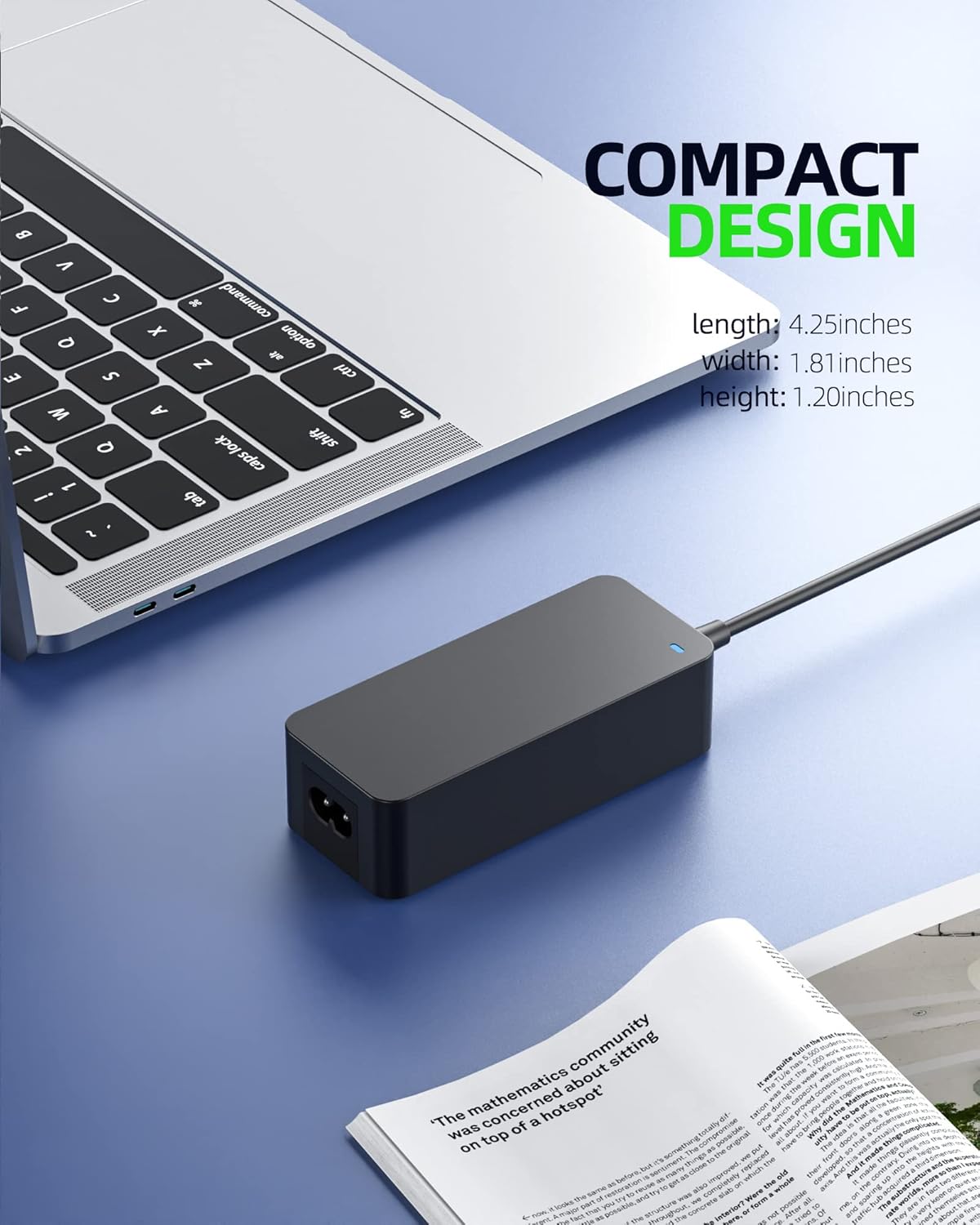
Image 8.1: The compact design of the Dexpt AC Charger, highlighting its dimensions for portability.
9. Warranty and Support
Dexpt is committed to providing high-quality products and excellent customer service.

Image 9.1: Overview of Dexpt's customer support policies, including replacement, refund, and technical support.
Warranty Information:
- 30-Day Replacement Guarantee: Within 30 days of purchase, we offer a no-questions-asked replacement guarantee.
- 360-Day Quality Guarantee: The product is covered by a 360-day quality guarantee provided by the manufacturer.
Customer Support:
For any inquiries, technical assistance, or warranty claims, please contact our support team:
- Online Support: 24-hour online support is available. Please refer to the contact information provided with your purchase or on the official Dexpt website.
- Email: [Insert Dexpt Support Email Here, if available]
- Website: Visit the Dexpt Store on Amazon
Ask a question about this manual
Ask about setup, troubleshooting, compatibility, parts, safety, or missing instructions. Manuals+ will review the question and use this page’s manual context to help answer it.