
Introduction
Thank you for choosing the Globo 41386-16SH Smart Home Dimmable LED Ceiling Light. This modern ceiling light features an integrated LED system, offering dimmable functionality, color-changing options (RGB), and smart home compatibility via remote control and the Tuya Smart app. It is designed to provide versatile and efficient lighting for your home. Please read this manual carefully before installation and use to ensure safe and optimal operation.
Safety Instructions
- Always disconnect the power supply at the main circuit breaker before installation, maintenance, or cleaning.
- Installation should be performed by a qualified electrician in accordance with local electrical codes and regulations.
- Ensure the mounting surface can support the weight of the fixture.
- Do not connect the fixture to a dimmer switch other than the one provided or controlled by the Smart Home system, as this may damage the integrated LED.
- Avoid looking directly into the LED light source when it is illuminated.
- Keep the product away from water and high humidity.
- This product is for indoor use only.
Package Contents
Please check that all components are present and undamaged:
- Globo 41386-16SH LED Ceiling Light (with integrated LED module)
- Remote Control (batteries included)
- Mounting Bracket
- Mounting Hardware (screws, wall anchors)
- User Manual (this document)
Setup and Installation
Important: Ensure the power supply is disconnected at the main circuit breaker before beginning installation.
- Prepare the Installation Area: Turn off the power to the circuit at the fuse box or circuit breaker. Use a voltage tester to confirm the power is off.
- Attach Mounting Bracket: Secure the mounting bracket to the ceiling junction box using the provided screws. Ensure the bracket is firmly attached and level.
- Electrical Connections: Carefully connect the electrical wires from the ceiling to the corresponding wires on the light fixture. Typically, this involves connecting live (L), neutral (N), and ground (E) wires. Use appropriate wire connectors and ensure all connections are secure.
- Mount the Fixture: Align the ceiling light with the mounting bracket and secure it in place using the provided screws or locking mechanism. Ensure the fixture is flush against the ceiling and stable.
- Restore Power: Once the fixture is securely installed and all connections are checked, restore power at the main circuit breaker.
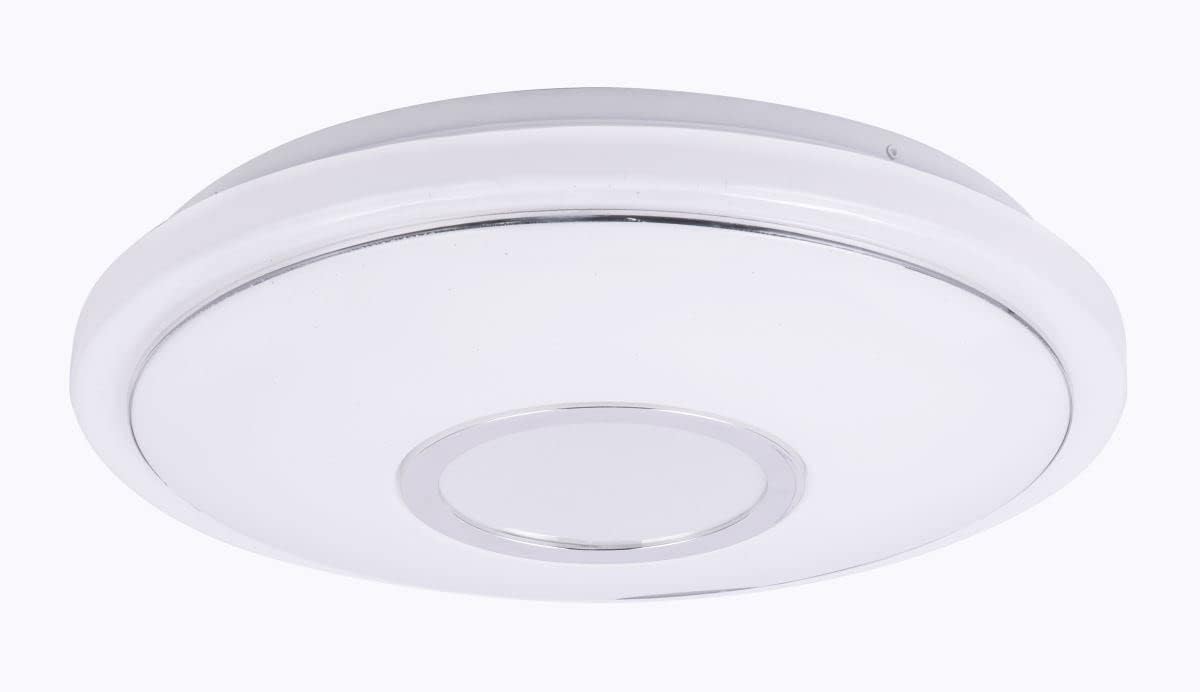
Figure 1: The Globo 41386-16SH LED Ceiling Light, showcasing its modern, round design with a white metal and opal acrylic finish, and a sparkling chrome ring accent.

Figure 2: The Globo 41386-16SH LED Ceiling Light installed on a ceiling, demonstrating its flush-mount appearance and how it integrates into a room's decor.
Operating Instructions
Using the Remote Control
- Power On/Off: Press the ON/OFF button to turn the light on or off.
- Dimming: Use the + and - buttons to adjust the brightness level.
- Color Temperature Adjustment: Buttons for Warm White, Cool White, and Neutral White may be available to cycle through different white light temperatures.
- RGB Color Change: Press the RGB button or specific color buttons to activate and select various color modes.
- Scene Modes: Some remotes include preset scene buttons (e.g., "Night Light," "Reading," "Party") for quick lighting changes.
Smart Home Integration (Tuya Smart App)
- Download App: Download the "Tuya Smart" app from your smartphone's app store (iOS or Android).
- Register/Login: Create an account or log in to your existing Tuya Smart account.
- Add Device: Follow the in-app instructions to add a new device. This typically involves putting the light into pairing mode (often by cycling power on/off a few times) and ensuring your phone is connected to a 2.4GHz Wi-Fi network.
- Control: Once paired, you can control the light's power, brightness, color temperature, and RGB colors directly from the app.
- Voice Control (Alexa): If desired, link your Tuya Smart account to your Amazon Alexa app to enable voice control for your ceiling light. Refer to the Tuya Smart app's instructions for linking to third-party voice assistants.

Figure 3: A close-up view of the light-emitting surface of the Globo 41386-16SH, highlighting the opal acrylic diffuser and the central chrome ring, which contributes to its sparkling effect.
Maintenance
- Cleaning: Ensure the power is off before cleaning. Wipe the fixture with a soft, dry, or slightly damp cloth. Do not use abrasive cleaners, solvents, or harsh chemicals, as these can damage the finish or electrical components.
- LED Module: The LED light source is integrated and not user-replaceable. Do not attempt to disassemble the LED module.
- Remote Control Batteries: If the remote control stops responding, replace the batteries with new ones of the same type (typically AAA or CR2032, check the remote's battery compartment).
Troubleshooting
| Problem | Possible Cause | Solution |
|---|---|---|
| Light does not turn on. | No power supply; loose wiring; faulty remote control. | Check circuit breaker. Ensure all wire connections are secure. Replace remote control batteries. |
| Remote control not working. | Dead batteries; remote not paired; obstruction. | Replace batteries. Re-pair the remote control (refer to specific pairing instructions, usually power cycling the light). Ensure no obstructions between remote and light. |
| Light flickers or dims unexpectedly. | Unstable power supply; incompatible dimmer (if not using integrated system); loose connection. | Check power supply stability. Ensure no external dimmer is used. Verify wiring connections. |
| Smart Home app cannot connect to the light. | Incorrect Wi-Fi network (not 2.4GHz); light not in pairing mode; network issues. | Ensure your phone is on a 2.4GHz Wi-Fi network. Put the light into pairing mode (usually by cycling power 3-5 times). Check your Wi-Fi router and internet connection. |
Technical Specifications
| Model Number | 41386-16SH |
| Brand | GLOBO |
| Dimensions (L x W x H) | 40 x 40 x 6.5 cm |
| Weight | 710 grams |
| Material | Metal, Opal Acrylic |
| Light Source | Integrated LED |
| Power Consumption | 16W (main light) + 3W (RGB) |
| Luminous Flux | 1040 lm |
| Color Temperature | Dimmable, Color Changing (RGB, Warm White, Cool White) |
| Energy Efficiency Class | G |
| Control Method | Remote Control, Tuya Smart App, Voice Control (Alexa compatible) |
| Installation Type | Ceiling Mount / Surface Mount |
| Indoor/Outdoor Use | Indoor Use Only |
Warranty Information
Specific warranty details for the Globo 41386-16SH are not provided in the product data. Please refer to the warranty card included with your purchase or visit the official GLOBO Lighting website for the most up-to-date warranty terms and conditions applicable to your region. Keep your proof of purchase for any warranty claims.
Customer Support
For technical assistance, troubleshooting, or inquiries regarding your Globo 41386-16SH LED Ceiling Light, please contact GLOBO Lighting customer support. You can typically find contact information on the manufacturer's official website or on the packaging of your product.
GLOBO Lighting Official Website: www.globo-lighting.com
Please have your model number (41386-16SH) and proof of purchase ready when contacting support.


