
Genus AAH2455
Genus 3-Phase Multi-Function LCD Display Meter User Manual
Model: AAH2455 | Brand: Genus
1. Introduction
The Genus Three Phase Trivector Meter is an Electronic Energy Meter designed for accurate metering in 3 Phase 4 Wire & 3 Phase 3 Wire distribution systems. It is suitable for a wide range of applications including residential, industrial, and commercial complexes.

Figure 1: Genus 3-Phase Multi-Function LCD Display Meter with protective cover box.
2. Key Features
- Multi-Function LCD Display: Provides clear readings of various parameters.
- Robust Construction: Features a light-weight, dust-proof body with an elegant poly-carbonate casing and rugged construction, offering high resistance to UV radiation.
- Wide Compatibility: Compatible with all Electricity Boards across India.
- Versatile Application: Ideal for individual residential houses, apartments, commercial premises like shops, offices, and rented properties for both indoor and outdoor usage.
- ISI-Marked: Ensures compliance with quality and safety standards.
3. Technical Specifications
Below are the detailed technical specifications for the Genus 3-Phase Multi-Function LCD Display Meter.

Figure 2: Excerpt from User Manual showing Technical Specifications.
| Parameter | Value |
|---|---|
| Connection Type | 3 Phase-4 Wire / 3 Phase-3 Wire AC Static Energy Meter |
| Voltage Rating | 3x240V (Operating range -40% to +20%) |
| Current Rating | 3X(20-100) Amp |
| Frequency | 50Hz |
| Impulse Rate | 3200 imp/kWh |
| Accuracy Class | Class-1.0 |
| Display Type | LCD with Backlit (Seven Segment Display with Icons) |
| Communication Interface | Optional Optical Port (IEC 62056-11 or IrDA Port or IR Port), RS232/RS485 for AMR/RMR |
| Operating Temperature | As per relevant IS standards |
| Dimensions (Approx.) | 25.3 x 23 x 12.2 cm |
| Item Weight | 1.85 kg |
Test Certificate

Figure 3: Routine Test Report as per IS 13779:2020 for Meter Sr No: AAH2455.
4. Installation
Proper installation is crucial for the accurate and safe operation of the meter. It is recommended that installation be performed by a qualified electrician.
4.1 Physical Dimensions
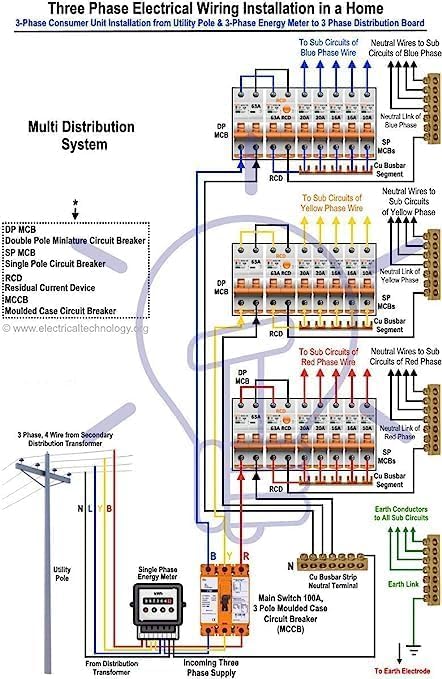
Figure 4: Meter dimensions for installation planning.
4.2 Wiring Connections
Refer to the following diagrams for correct wiring connections for different system types. Ensure all connections are secure and insulated.
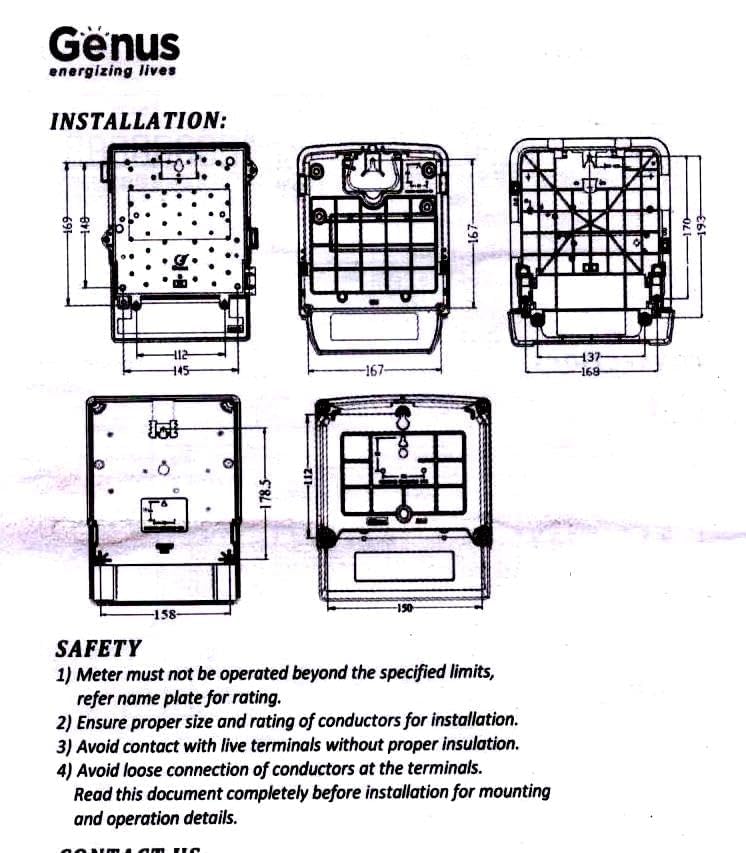
Figure 5: Wiring diagrams for 3-Phase, 4-Wire, and 3-Phase, 3-Wire systems.

Figure 6: Example of a Three Phase Consumer Unit Installation with Energy Meter.
5. Operation and Display Details
The Genus meter features an LCD display that provides various measured parameters. These parameters can be viewed in an auto-mode cycle or by pressing the push button as per user requirements.
5.1 Visual Indications on LCD
The LCD provides visual indications for various states and measurements:
- CAL LED: Active/Reactive/Apparent (Optional)
- RYB Phase Indications: In the form of LED/LCD icons
- Tamper Indication: In the form of LED/LCD icon

Figure 7: Excerpt from User Manual showing Display Details and Icons.
6. Maintenance
The Genus 3-Phase Multi-Function LCD Display Meter is designed for long-term, maintenance-free operation. To ensure optimal performance and longevity:
- Ensure the meter is kept clean and free from dust and moisture.
- Do not attempt to open or repair the meter yourself. This may void the warranty and poses a safety risk.
- Regularly inspect the meter and its connections for any visible damage or loose wiring.
7. Troubleshooting
If the meter is not functioning as expected, consider the following basic troubleshooting steps:
- No Display/Power: Check the main power supply to the meter and ensure all connections are secure.
- Incorrect Readings: Verify that the wiring connections match the diagrams provided in the installation section. Ensure the meter is correctly rated for your system.
- Tamper Indication: If a tamper indicator is active, it suggests an unauthorized attempt to interfere with the meter. Contact your electricity board or a qualified technician immediately.
For persistent issues, it is recommended to contact qualified personnel or customer support. Do not attempt to repair the meter yourself.
8. Safety Guidelines
Adherence to these safety guidelines is paramount for preventing accidents and ensuring the longevity of the meter:
- The meter must not be operated beyond its specified limits. Always refer to the nameplate for rating information.
- Ensure the proper size and rating of conductors are used for installation.
- Avoid contact with live terminals without proper insulation. Always disconnect power before working on the meter or its connections.
- Ensure there are no loose connections of conductors at the terminals. Loose connections can lead to overheating and fire hazards.
- Read this entire document completely before beginning installation, mounting, or operation.
9. Warranty Information
The Genus 3-Phase Multi-Function LCD Display Meter comes with a 1-Year Warranty provided by Genus. This product is designed for a long working life of up to 10 years under normal operating conditions.
Please retain your purchase receipt for warranty claims. The warranty covers manufacturing defects and malfunctions under normal use. It does not cover damage due to improper installation, misuse, unauthorized repairs, or external factors.
10. Contact Information
For technical support, warranty claims, or any other inquiries regarding your Genus 3-Phase Multi-Function LCD Display Meter, please contact Genus customer service.
Please refer to the product packaging or the official Genus website for the most current contact details.
Ask a question about this manual
Ask about setup, troubleshooting, compatibility, parts, safety, or missing instructions. Manuals+ will review the question and use this page’s manual context to help answer it.