1. Introduction
This manual provides essential information for the safe and efficient installation, operation, and maintenance of the TRACO POWER TSP 600-148 DIN Rail Power Supply. Please read this manual thoroughly before installation and keep it for future reference. The TSP 600-148 is a 600W, 48VDC, 12.5A enclosed power supply designed for DIN rail mounting, featuring an adjustable output voltage and a wide input voltage range of 85-132VAC or 187-264VAC.
2. Safety Instructions
WARNING: Risk of electric shock and energy hazard. Improper installation or operation may cause serious injury or death.
- Installation and maintenance must be performed by qualified personnel only.
- Ensure the main power is disconnected before any installation, wiring, or maintenance work.
- Do not open the unit. There are no user-serviceable parts inside.
- Protect the unit from moisture, dust, and direct sunlight.
- Ensure proper ventilation to prevent overheating.
- Connect the protective earth (PE) terminal to the safety ground.
3. Setup and Installation
The TSP 600-148 is designed for mounting on a standard DIN rail (TS35/7.5 or TS35/15).
3.1 Mounting
- Ensure adequate clearance around the unit for proper airflow (typically 10-15 cm above/below and 5 cm on sides).
- Hook the top edge of the power supply onto the DIN rail.
- Push the bottom edge firmly until it snaps into place.
- Verify that the unit is securely fastened to the DIN rail.
3.2 Wiring Connections
Refer to the terminal block markings on the unit for correct connections. Use appropriate wire gauges for the current ratings.
- Input (AC): Connect the AC input lines (L, N) and Protective Earth (PE) to the designated input terminals. The unit supports 85-132VAC or 187-264VAC. Ensure the correct input voltage range is selected if a switch is present (refer to unit labeling).
- Output (DC): Connect the DC load to the output terminals (+V, -V). Observe correct polarity.
- Grounding: Ensure the PE terminal is properly connected to a reliable safety ground.
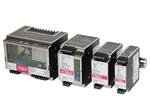
Figure 1: Front view of the TRACO POWER TSP 600-148 DIN Rail Power Supply, showing input and output terminals, and adjustment potentiometer.
4. Operating Instructions
4.1 Initial Power-Up
- Double-check all wiring connections for correctness and security.
- Apply AC input power to the unit.
- Observe the status indicator (e.g., LED) on the unit. A green LED typically indicates normal operation.
4.2 Output Voltage Adjustment
The TSP 600-148 features an adjustable output voltage. A potentiometer is typically located on the front panel for this purpose.
- Using a suitable screwdriver, carefully turn the potentiometer clockwise to increase the output voltage or counter-clockwise to decrease it.
- Monitor the output voltage with a multimeter to ensure it is set to the required level for your application.
- Do not exceed the specified output voltage range to prevent damage to the power supply or connected equipment.
4.3 Load Considerations
Ensure that the total current drawn by the connected load does not exceed the power supply's maximum output current (12.5A for 48VDC). Overloading the power supply can lead to reduced lifespan or failure.
5. Maintenance
The TRACO POWER TSP 600-148 is designed for reliable operation and requires minimal maintenance.
- Cleaning: Periodically inspect the unit for dust accumulation, especially around ventilation openings. Disconnect power and use a soft, dry brush or compressed air to clean. Do not use liquid cleaners.
- Inspection: Regularly check wiring connections for tightness and signs of damage. Ensure the ambient temperature remains within the specified operating range.
- No internal maintenance is required or recommended.
6. Troubleshooting
If the power supply is not functioning as expected, perform the following checks:
| Problem | Possible Cause | Solution |
|---|---|---|
| No output voltage / No LED indicator |
|
|
| Output voltage too low or unstable |
|
|
| Unit is hot |
|
|
7. Specifications
| Parameter | Value |
|---|---|
| Model | TSP 600-148 |
| Power Output | 600W |
| Output Voltage | 48VDC (Adjustable) |
| Output Current | 12.5A |
| Input Voltage Range | 85-132VAC / 187-264VAC |
| Mounting | DIN Rail |
| Enclosure Type | Enclosed |
| Manufacturer | TRACO POWER |
| ASIN | B08DPRLTWL |
| UPC | 091128535208 |
8. Warranty and Support
TRACO POWER products are manufactured to high-quality standards. For warranty information and technical support, please refer to the official TRACO POWER website or contact your local distributor. Keep your purchase receipt for warranty claims.