
Nokia BH-405
Nokia Power Earbuds Lite User Manual
Model: BH-405
Introduction
The Nokia Power Earbuds Lite are designed to provide a seamless audio experience with universal Bluetooth compatibility, robust waterproofing, and extended battery life. This manual provides essential information for setting up, operating, maintaining, and troubleshooting your earbuds.

Image: Nokia Power Earbuds Lite earbuds next to their open charging case, showcasing the Fjord color.
What's in the Box
Ensure all the following components are present in your package:
- Nokia Power Earbuds Lite (Headphones)
- Charging Case
- USB Charging Cable
- Multiple Sizes of Eartips
- Ear Cushions
Setup
1. Charging the Earbuds and Case
Before first use, fully charge your Nokia Power Earbuds Lite and their charging case. Connect the provided USB cable to the charging case and a power source. The LED indicators on the case will show the charging status. Ensure the earbuds are properly seated in the case for them to charge.
2. Pairing with Your Device
- Automatic Power On and Pairing: When you remove the earbuds from the charging case, they will automatically power on and attempt to pair with each other.
- Bluetooth Connection Mode: Once the earbuds have successfully paired with each other, the LED indicator light on the right earbud will flash blue and red alternately. This indicates that the earbuds are ready to connect to your Bluetooth device.
- Connect to Your Device: On your smartphone, tablet, or other Bluetooth-enabled device, navigate to the Bluetooth settings. Turn on Bluetooth and select "Nokia Power Earbuds Lite" from the list of available devices to connect.
- Connection Confirmation: During the connection process, the LED indicator light on the right earbud will continue to flash blue and red alternately. Once successfully connected via Bluetooth, the LED indicator lights on both earbuds will flash blue approximately every 5 seconds.
After the initial pairing, the earbuds will automatically connect with your Bluetooth device whenever they are taken out of the charging case, provided Bluetooth is enabled on your device.
Operating Your Earbuds
Touch Controls
The Nokia Power Earbuds Lite feature intuitive touch controls for managing your audio and calls. Specific functions (play/pause, skip track, answer/end call, activate voice assistant) are performed by tapping or holding the touch-sensitive surface on either earbud. Refer to the quick start guide or product packaging for a detailed list of touch commands.

Image: A person demonstrating the touch control feature on the earbud.
Waterproofing (IPX7)
These earbuds are rated IPX7 waterproof, meaning they can withstand immersion in up to 1 meter of water for up to 30 minutes. This makes them suitable for use during workouts, in light rain, or near water. However, they are not designed for swimming or prolonged submersion. Always ensure the earbuds are dry before placing them back in the charging case.

Image: A person wearing the earbuds with water droplets on their hood, illustrating the IPX7 waterproofing.
Battery Life
The Nokia Power Earbuds Lite offer up to 35 hours of total play time with the included pocket-sized charging case. A single charge of the earbuds provides several hours of listening, and the case holds multiple additional charges.

Image: The compact charging case being placed into a pocket, highlighting its portability.
Maintenance
- Cleaning: Regularly clean the earbuds, especially the eartips and charging contacts, with a soft, dry, lint-free cloth. Do not use harsh chemicals or abrasive materials.
- Storage: When not in use, store the earbuds in their charging case to protect them and keep them charged. Store in a cool, dry place away from direct sunlight and extreme temperatures.
- Water Exposure: Although waterproof, always dry the earbuds thoroughly before placing them back into the charging case to prevent damage to the charging contacts.
Troubleshooting
| Problem | Possible Solution |
|---|---|
| Earbuds not pairing with each other. | Ensure both earbuds are fully charged. Place them back in the charging case, close the lid for a few seconds, then open and remove them again. They should automatically pair. |
| Earbuds not connecting to my device. |
|
| One earbud is not working or charging. |
|
| Earbuds automatically power off. | The earbuds will automatically power off if there is no Bluetooth connection within 5 minutes to conserve battery. Reconnect them to your device. |
Specifications
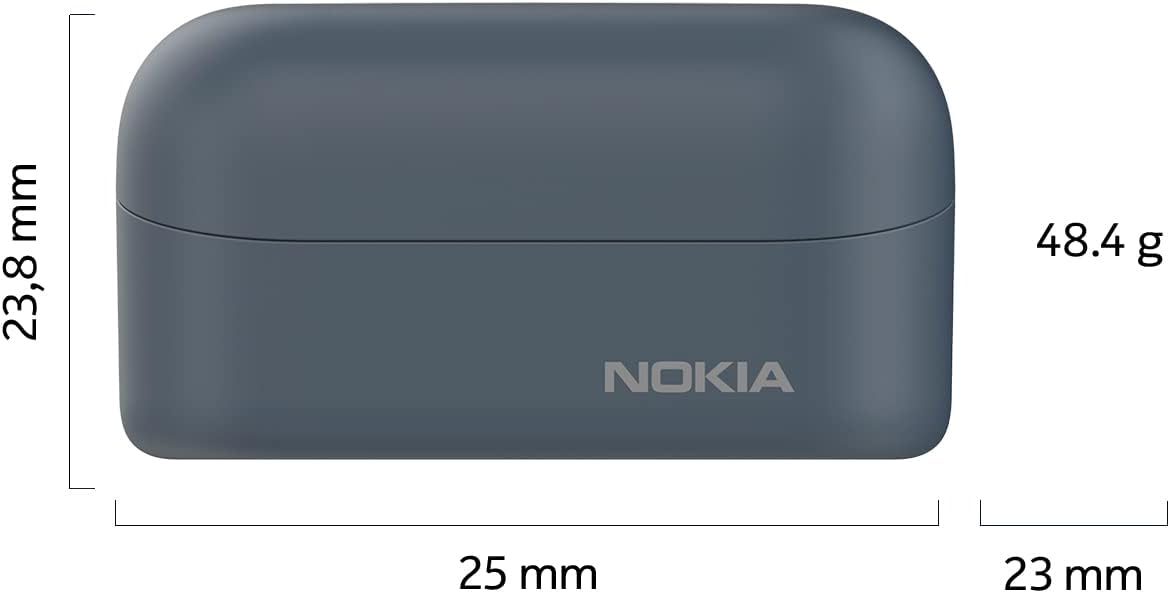
Image: Diagram showing the dimensions of the Nokia Power Earbuds Lite charging case.
| Feature | Detail |
|---|---|
| Brand | Nokia |
| Model Name | Power Earbuds Lite |
| Model Number | BH-405 |
| Connectivity Technology | Bluetooth 5.0 |
| Water Resistance Level | IPX7 (up to 1m for 30 minutes) |
| Battery Life (with case) | Up to 35 Hours |
| Control Method | Touch |
| Ear Placement | In Ear |
| Item Weight | 1.7 Ounces (approx. 48.2g) |
| Product Dimensions | 2.68 x 1.42 x 1.22 inches (approx. 6.8 x 3.6 x 3.1 cm) |
| Included Components | Headphones, Cable, Charging Case, Ear Cushions, Eartip |
Warranty and Support
For warranty information and detailed support, please refer to the official Nokia product documentation or visit the Nokia support website. A comprehensive user guide in PDF format is also available for download:
For further assistance, please contact Nokia customer support.
Ask a question about this manual
Ask about setup, troubleshooting, compatibility, parts, safety, or missing instructions. Manuals+ will review the question and use this page’s manual context to help answer it.