
Sony ILCE7SM3/B
Sony Alpha 7S III Full-frame Mirrorless Camera
Model: ILCE7SM3/B | Brand: Sony
Product Overview
The Sony Alpha 7S III represents a significant advancement in mirrorless camera technology, optimized for exceptional sensitivity, speed, and image quality. It features an innovative 12.1MP backside-illuminated full-frame sensor designed for superior low-light performance, boasting an impressive ISO range up to 409,600 and over 15 stops of dynamic range. The camera also incorporates a new BIONZ XR processing engine, delivering eight times more processing power for high-resolution video recording and efficient operation.
Key features include:
- 12.1MP Exmor R sensor, optimized for 4K, sensitivity and speed.
- New BIONZ XR processing engine delivers 8x more processing power.
- Low noise images with ISO up to 409,600 and 15+ stops dynamic range.
- Up to 4K 120p 10-bit 4:2:2 and full pixel readout in all recording modes.
- Supports XAVC S (AVC), XAVC HS (HEVC) and XAVC S-I (All-I) video formats.
- First time ever in an Alpha camera - S-Cinetone picture profile for cinematic look tone and color in video.
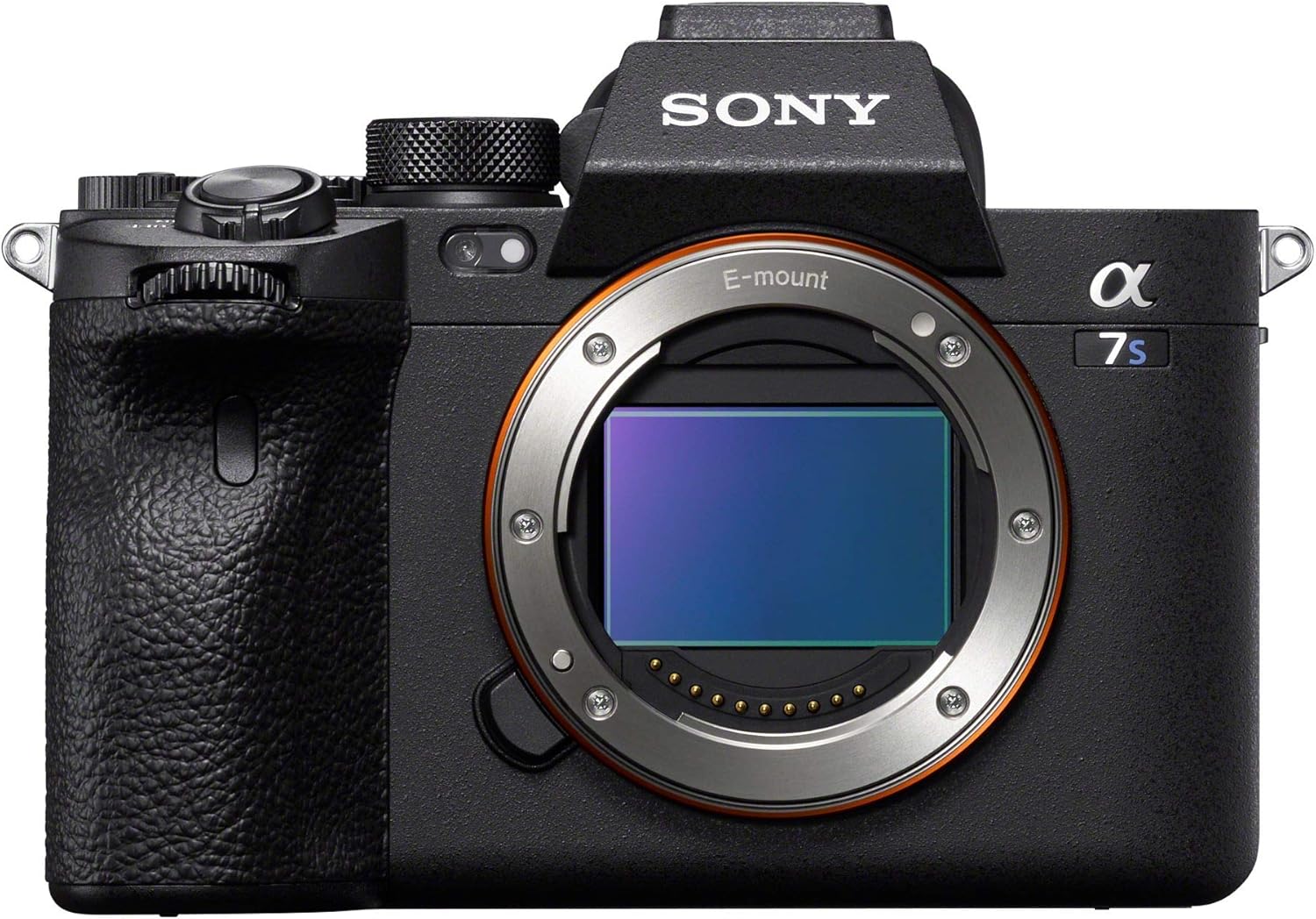
Figure 1: Front view of the Sony Alpha 7S III camera body.
What's in the Box
Your Sony Alpha 7S III package includes the following components:
- Sony Alpha 7S III Camera Body
- Battery (NP-FZ100)
- Battery Charger
- USB-C to USB-A Cable
- HDMI Cable Holder
- Neck Strap (Alpha 7S III branded)
- Instruction Manuals and Documentation
Setup
1. Battery Installation
To install the battery, locate the battery compartment cover on the bottom of the camera. Slide the release latch to open the cover. Insert the NP-FZ100 battery into the compartment, ensuring the correct orientation as indicated by the arrow. Close the cover until it clicks securely into place.
2. Memory Card Installation
The Alpha 7S III supports dual CFexpress Type A / SD (UHS-II) card slots. Open the memory card slot cover on the side of the camera. Insert your compatible memory card(s) into the designated slots until they click. Close the cover firmly.
3. Attaching a Lens
Align the white index mark on the lens barrel with the white index mark on the camera's lens mount. Rotate the lens clockwise until it clicks into place. To remove the lens, press the lens release button on the camera body and rotate the lens counter-clockwise.

Figure 2: The Sony Alpha 7S III with its fully articulating screen extended.
Operating the Camera
Basic Controls and Dials
The camera features intuitive controls for quick adjustments. The top dial allows selection of various shooting modes including Programmed AE, Aperture priority, Shutter-speed priority, Manual, and Slow & Quick Motion. Customizable buttons (C1, C2, C3, C4) provide quick access to frequently used functions.

Figure 3: Top view highlighting the mode dial and customizable buttons.
Autofocus System
The Alpha 7S III boasts a fast hybrid AF system with 759 phase detection AF points, covering a wide area of the sensor. It supports various focus modes including Continuous-Servo AF (AF-C), Manual Focus (MF), and Single-Servo AF (AF-S). Advanced features like face tracking and eye detection ensure sharp focus on subjects, even in challenging conditions.
Video 1: "The Way Forward - Shot on Alpha 7S III" - An official Sony video showcasing the camera's video capabilities, particularly in diverse lighting conditions.
Video Recording Capabilities
This camera excels in video, offering up to 4K UHD 2160p resolution at 120 frames per second (fps) with 10-bit 4:2:2 color depth. It supports XAVC S, XAVC HS, and XAVC S-I formats for versatile workflow options. The S-Cinetone picture profile provides a cinematic look directly from the camera, reducing the need for extensive post-production color grading.
Low-Light Performance
With its 12.1MP Exmor R sensor, the Alpha 7S III is designed for exceptional low-light performance, allowing for clean images and video even at high ISO settings up to 409,600. This makes it ideal for shooting in dimly lit environments such as wedding receptions, concerts, or night scenes without significant noise.
Connectivity
The camera offers comprehensive connectivity options including Wi-Fi and Bluetooth for wireless control and file transfer. It features HDMI output for external monitors, USB-C for fast data transfer and charging, and 3.5mm jacks for external microphone and headphones.

Figure 4: Side view of the camera showing the port covers for connectivity.
Maintenance
Proper maintenance ensures the longevity and optimal performance of your camera.
- Sensor Cleaning: If dust spots appear on your images, use a blower brush to gently remove dust from the sensor. For stubborn spots, professional sensor cleaning is recommended.
- Lens Care: Keep lenses clean using a microfiber cloth and lens cleaning solution. Avoid touching the glass elements directly.
- Battery Care: Store batteries in a cool, dry place. Avoid fully discharging batteries frequently to prolong their lifespan.
- Storage: When not in use, store the camera in a dry, dust-free environment, preferably in a camera bag with desiccant packets to prevent moisture buildup.
Troubleshooting
If you encounter issues with your Sony Alpha 7S III, consider the following basic troubleshooting steps:
- Camera Not Powering On: Ensure the battery is fully charged and correctly inserted. Try using a different charged battery if available.
- Image Quality Issues: Check lens cleanliness, focus settings, ISO, and aperture. Ensure proper lighting conditions.
- Memory Card Errors: Reformat the memory card (this will erase all data). Try a different, compatible memory card.
- Autofocus Problems: Ensure sufficient light for the AF system. Check that the lens is properly attached and the AF mode is suitable for your subject.
- Overheating Warning: If the camera displays an overheating warning during prolonged video recording, allow it to cool down. Reduce recording resolution or frame rate if possible.
For more detailed troubleshooting or persistent issues, refer to the full user manual or contact Sony support.
Specifications
| Feature | Detail |
|---|---|
| Photo Sensor Resolution | 12.1 MP |
| Photo Sensor Size | Full Frame (35mm) |
| Video Resolution | 4K UHD 2160p |
| Expanded ISO Maximum | 409600 |
| Autofocus Points | 759 |
| Image Stabilization | Sensor-shift (5-axis SteadyShot INSIDE) |
| Screen Size | 3 Inches |
| Display Type | Articulating LCD |
| Memory Card Type | Dual Slot: CFexpress Type A / SD (UHS-II) |
| Connectivity | Wi-Fi, Bluetooth, HDMI, USB-C, 3.5mm Audio In/Out |
| Item Weight | 612 Grams |
Warranty & Support
The Sony Alpha 7S III comes with a 1-year limited manufacturer’s warranty.
For comprehensive instructions, detailed features, and advanced settings, please refer to the official user manual:
For additional support, visit the official Sony website or contact their customer service.