Product Overview
This Mini Portable Digital Pocket Scale is designed for high-precision weighing of various small items, including gold, jewelry, food ingredients, herbs, and coffee. With a maximum capacity of 500g and a precision of 0.1g, it provides accurate and instant readings. Its compact and lightweight design makes it ideal for mobile weighing needs.
Key features include a backlit LCD screen for clear visibility in all lighting conditions, a durable stainless steel weighing platform, and a protective hinged cover. The scale supports 6 different weight units for versatile use and includes a tare function for net weight determination, along with an automatic shut-off feature to conserve battery life.

Figure 1: The Golden Beads Mini Digital Pocket Scale, showing its compact design and included AAA batteries.
Setup
What's in the Box
- 1 x Mini Digital Pocket Scale
- 1 x User Manual
- 2 x AAA Batteries (included)
Battery Installation
- Locate the battery compartment on the underside of the scale.
- Open the battery compartment cover.
- Insert 2 AAA batteries, ensuring correct polarity (+/-).
- Close the battery compartment cover securely.
Initial Placement
For accurate readings, place the scale on a hard, flat, and stable surface. Avoid placing it on soft or uneven surfaces, or near sources of vibration, air currents, or extreme temperatures.
Operating Instructions
Power On/Off
- To turn on the scale, press the ON/OFF button. The LCD display will light up.
- To turn off the scale, press and hold the ON/OFF button for a few seconds until the display turns off. The scale also features an automatic shut-off after 60 seconds of inactivity to save battery life.
Weighing Procedure
- Place the scale on a stable, flat surface.
- Press the ON/OFF button to turn on the scale. Wait for the display to show "0.0g".
- Gently place the item to be weighed onto the center of the weighing platform.
- Read the weight displayed on the LCD screen.

Figure 2: The scale in use, accurately weighing a bowl of powder.
Unit Conversion
The scale supports 6 different weight units. To change the unit, press the MODE button repeatedly until the desired unit is displayed. The available units are:
- g (grams)
- oz (ounces)
- gm (grains)
- ct (carats)
- ozt (troy ounces)
- dwt (pennyweights)

Figure 3: The scale's display indicating the various weight units available for selection.
Tare Function (Net Weight)
The tare function allows you to subtract the weight of a container, so you can measure only the weight of its contents.
- Place an empty container on the weighing platform.
- Press the TARE button. The display will reset to "0.0g".
- Add the items you wish to weigh into the container. The display will show only the net weight of the contents.
Calibration
Regular calibration ensures the highest accuracy of your scale. It is recommended to use a precise calibration weight (e.g., 100g) for this process.
- Turn on the scale and wait for the display to show "0.0g".
- Press and hold the MODE button until the LCD displays "CAL".
- Press MODE again. The LCD will flash "CAL" and then display the required calibration weight (e.g., "100.00g").
- Carefully place the specified calibration weight (e.g., 100g) onto the center of the weighing platform.
- The LCD will display "PASS" once calibration is complete.
- Remove the calibration weight. The scale will return to normal weighing mode.
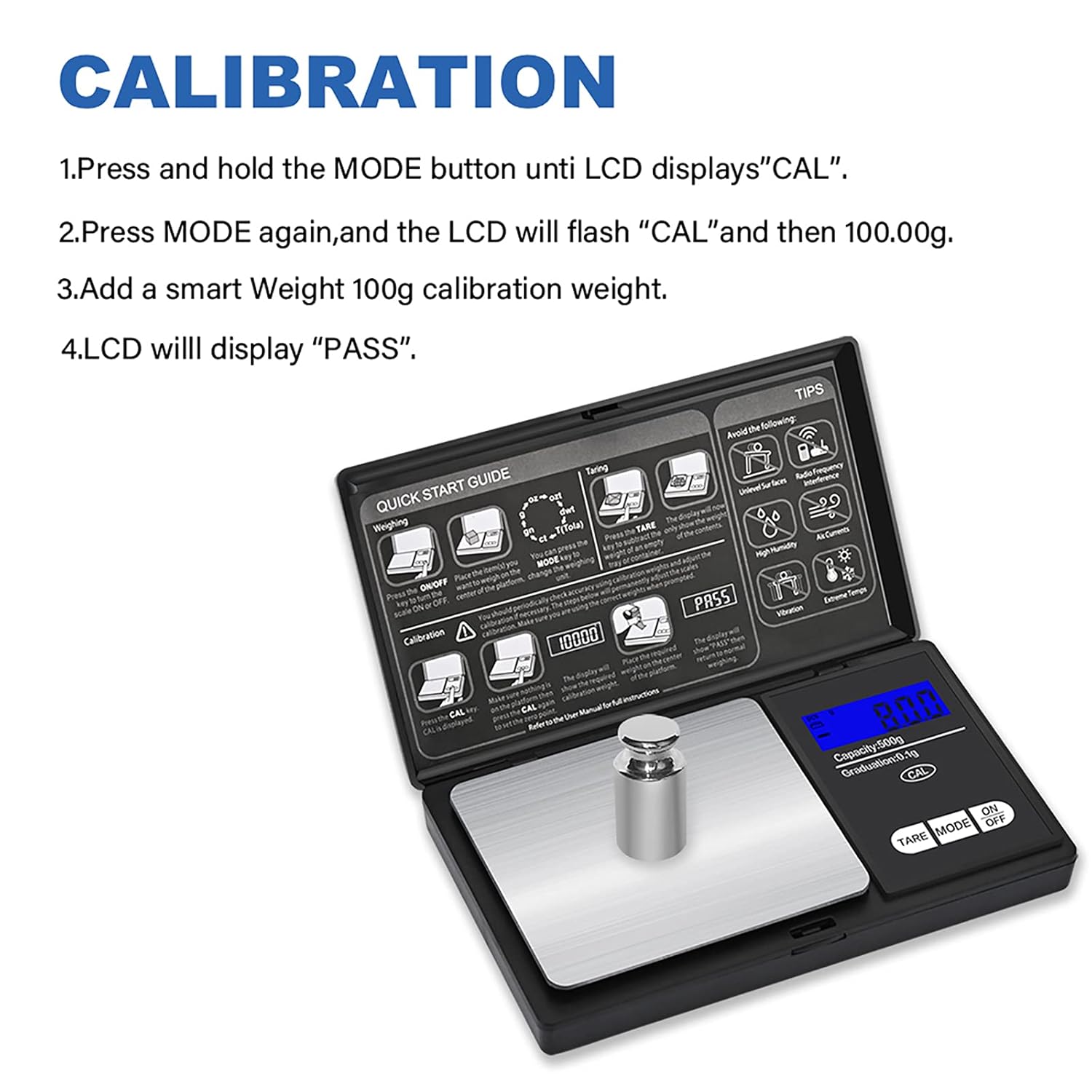
Figure 4: Visual guide for the calibration process, showing the scale with a 100g calibration weight.
Maintenance
Cleaning
- Wipe the scale with a soft, damp cloth. Do not use abrasive cleaners or immerse the scale in water.
- Ensure the scale is dry before storage or next use.
Storage
- Store the scale in a clean, dry place at room temperature.
- Keep the protective hinged cover closed when not in use to protect the weighing platform.
- If storing for an extended period, remove the batteries to prevent leakage.
Troubleshooting
If you encounter issues with your scale, consider the following common problems and solutions:
| Problem | Possible Cause / Solution |
|---|---|
| Inaccurate Readings |
|
| Display Not Lighting Up / No Power |
|
| "LO" or "UNSE" Error Message |
|
| "O_LD" Error Message (Overload) |
|
Figure 5: The quick start guide on the scale's lid, highlighting environmental factors to avoid for optimal performance.
Specifications
| Feature | Detail |
|---|---|
| Brand | Golden Beads |
| Model Number | GB500 |
| Weight Limit | 500 Grams |
| Reading Accuracy | 0.1 Grams |
| Product Dimensions (L x W x H) | 12 x 6.5 x 1.8 cm |
| Item Weight | 98 Grams |
| Material | Stainless Steel |
| Display Type | LCD |
| Power Source | 2 x AAA Batteries (included) |
| Special Feature | Auto Shut Off |
| Recommended Uses | Food, Jewelry, Herbs, Coffee, Gold |
| Country of Origin | China |

Figure 6: The compact size of the scale, shown next to a smartphone for visual comparison of its portability.
Warranty and Support
Information regarding specific warranty terms and the availability of spare parts for this product is not explicitly provided. For any warranty claims, technical support, or inquiries about spare parts, please contact the manufacturer, Golden Beads, or your point of purchase directly.
It is recommended to retain your purchase receipt as proof of purchase for any support inquiries.