
1. Introduction
This manual provides essential information for the safe and effective use of your SoloGood RadioMaster TX16S 5000mAh 2S 7.4V Li-ion battery. Please read this manual thoroughly before use and retain it for future reference. This battery is designed to provide reliable power for compatible RadioMaster remote control transmitters, such as the TX16S and TX12.
2. Product Overview
The SoloGood RadioMaster TX16S 5000mAh 2S 7.4V Li-ion battery is engineered for extended run times and enhanced safety compared to traditional Li-Po batteries. It features an XT30 output plug and a JST-XH balance charging plug, making it compatible with various charging setups and external modules like the TBS Crossfire.

Image 2.1: Front view of the SoloGood RadioMaster TX16S 5000mAh 2S 7.4V Li-ion Battery, showing the branding and specifications.

Image 2.2: The SoloGood RadioMaster TX16S battery, highlighting its XT30 power connector and JST-XH balance charging connector.
3. Safety Instructions
Failure to follow these safety instructions can result in fire, personal injury, and property damage.
- Do not charge battery unattended: Always monitor the battery during charging.
- Charge away from flammable objects: Ensure the charging area is clear of any combustible materials.
- Do not disassemble or modify: Tampering with the battery can lead to dangerous malfunctions.
- Use correct charging devices: Only use chargers specifically designed for 2S Li-ion batteries with XT30 and JST-XH connectors.
- Maximum Charging Current: Do not exceed a charging current of 2.0A.
- Storage: Store the battery in a cool, dry place, away from direct sunlight and extreme temperatures.
- Disposal: Dispose of batteries according to local regulations. Do not dispose of in household waste.
4. Setup
4.1 Initial Inspection
Upon receiving your battery, inspect it for any signs of damage, swelling, or punctures. Do not use the battery if any damage is observed.
4.2 Installation in RadioMaster TX16S Transmitter
- Ensure your RadioMaster TX16S transmitter is powered off.
- Locate the battery compartment on the back of the transmitter.
- Open the battery compartment cover.
- Carefully insert the SoloGood RadioMaster TX16S battery into the compartment. Ensure the XT30 connector aligns with the transmitter's power input and the JST-XH connector is accessible for balance charging if needed.
- Close the battery compartment cover securely.
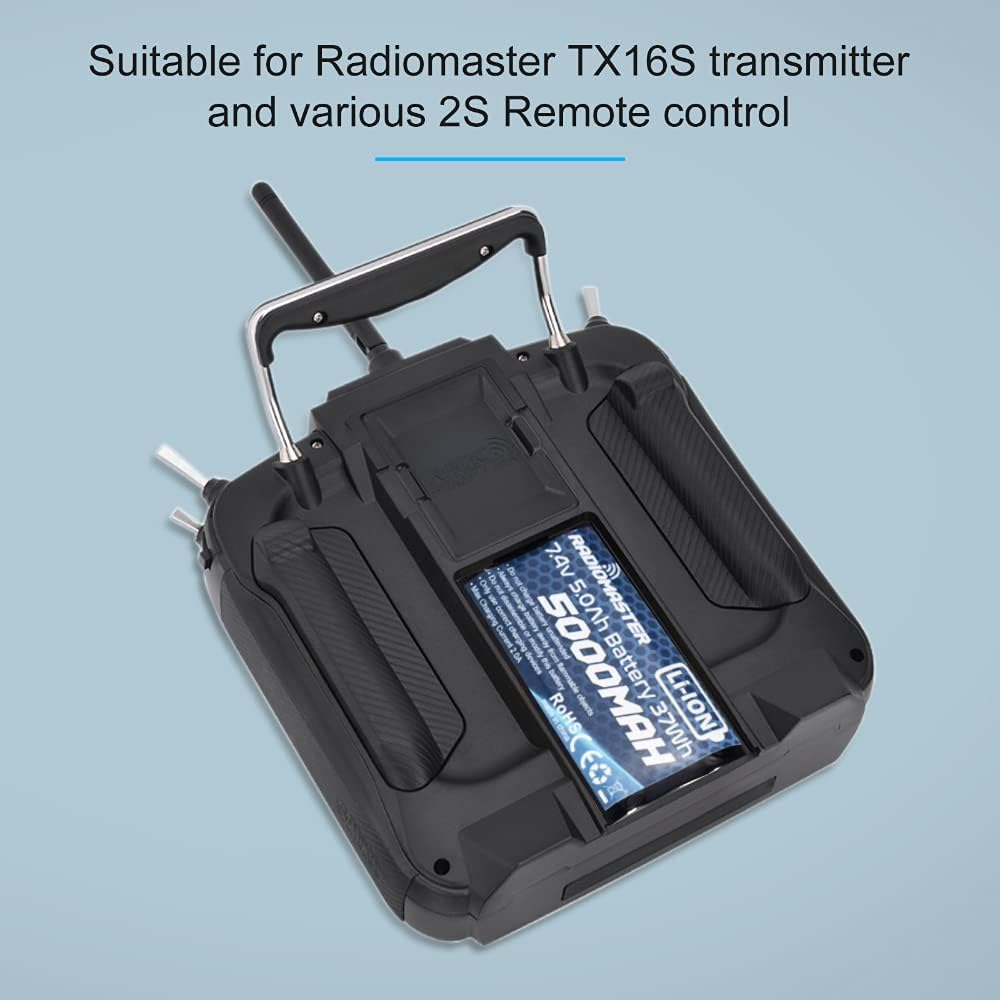
Image 4.1: The SoloGood RadioMaster TX16S battery correctly installed within the battery compartment of a RadioMaster TX16S transmitter.
5. Operating Instructions
5.1 Charging the Battery
The RadioMaster TX16S transmitter supports internal charging of this battery via its USB-C port. For optimal battery health and longevity, it is recommended to periodically balance charge the battery using an external Li-ion balance charger.
- Connect the JST-XH balance plug to a compatible Li-ion balance charger.
- Set the charger to Li-ion mode, 2S (7.4V), and a charging current not exceeding 2.0A.
- Monitor the charging process and disconnect the battery once fully charged.
5.2 Usage
Once installed and charged, the battery provides power to your RadioMaster transmitter. The 5000mAh capacity offers extended operating times. Always monitor your transmitter's battery voltage display during use to avoid over-discharging, which can damage the battery.
6. Maintenance
- Regular Inspection: Periodically check the battery for any physical damage, swelling, or signs of overheating.
- Storage Voltage: For long-term storage, charge or discharge the battery to its storage voltage (typically 3.8V per cell, or 7.6V for a 2S battery).
- Temperature: Avoid exposing the battery to extreme temperatures, both hot and cold, as this can degrade performance and lifespan.
- Cleaning: Keep the battery and its connectors clean and free from dust or debris.
7. Troubleshooting
- Battery Not Charging:
- Ensure the charger is correctly connected and powered.
- Verify the charger settings are appropriate for a 2S Li-ion battery (7.4V, max 2.0A).
- Check for any damage to the battery's charging ports or cables.
- Short Run Time:
- The battery may not be fully charged. Ensure a complete charge cycle.
- Battery degradation can occur over time. Consider replacing the battery if it consistently provides significantly reduced run times.
- Ensure the transmitter's power consumption settings are optimized.
- Battery Does Not Fit:
- Verify the battery dimensions against the transmitter's battery compartment. This battery measures 72mm x 42mm x 22mm.
- Ensure no obstructions are preventing proper seating.
8. Specifications
| Feature | Specification |
|---|---|
| Brand | SoloGood / RadioMaster |
| Battery Type | Li-ion |
| Capacity | 5000mAh |
| Voltage | 7.4V (2S) |
| Watt Hours | 37Wh |
| Connectors | XT30 (power), JST-XH (balance) |
| Dimensions (L x W x H) | 72mm x 42mm x 22mm (2.83 x 1.65 x 0.86 inches) |
| Weight | 150g (5.3 ounces) |
| Max Charge Current | 2.0A |
| Recommended Use | RadioMaster TX16S, TX12, and other compatible 2S remote control transmitters |
9. Warranty and Support
For warranty information and customer support, please refer to the documentation provided with your purchase or contact SoloGood customer service directly. Keep your proof of purchase for any warranty claims.
For additional product information or technical assistance, visit the official SoloGood website or the RadioMaster community forums.