
ZIYOU LANG K55
ZIYOU LANG Wired Gaming Keyboard and Mouse Combo User Manual
Model: K55
1. Product Overview
The ZIYOU LANG K55 Wired Gaming Keyboard and Mouse Combo is designed for PC gamers, offering a compact mechanical keyboard, an ultralight RGB gaming mouse, and a gaming mouse pad. This combo provides responsive performance and customizable lighting effects for an enhanced gaming and computing experience.

Image: The ZIYOU LANG K55 Wired Gaming Keyboard and Mouse Combo, featuring a white 82-key mechanical keyboard with blue backlighting, a macaron green ultralight honeycomb mouse with RGB lighting, and a black and green gaming mouse pad.

Image: A visual representation of the 3-in-1 set, showing the wired gaming keyboard, mouse, and mouse pad integrated into a desktop setup.
2. Setup Guide
The ZIYOU LANG K55 combo is designed for simple plug-and-play operation. No additional drivers are typically required for basic functionality.
2.1 Connecting the Keyboard and Mouse
- Locate an available USB port on your computer (PC or Mac).
- Plug the USB connector of the keyboard into the USB port.
- Plug the USB connector of the mouse into another available USB port.
- The operating system will automatically detect and install the necessary drivers. This process may take a few moments.
- Once installed, the keyboard and mouse will be ready for use.
For optimal performance, ensure the mouse pad is placed on a flat, stable surface.
3. Operating Instructions
3.1 Keyboard Functions
The 82-key compact mechanical keyboard features blue LED backlighting and multimedia shortcut keys.

Image: Diagram highlighting the 82-key layout, blue switch type, fixed blue backlight, anti-ghosting keys, and plug & play functionality of the keyboard.
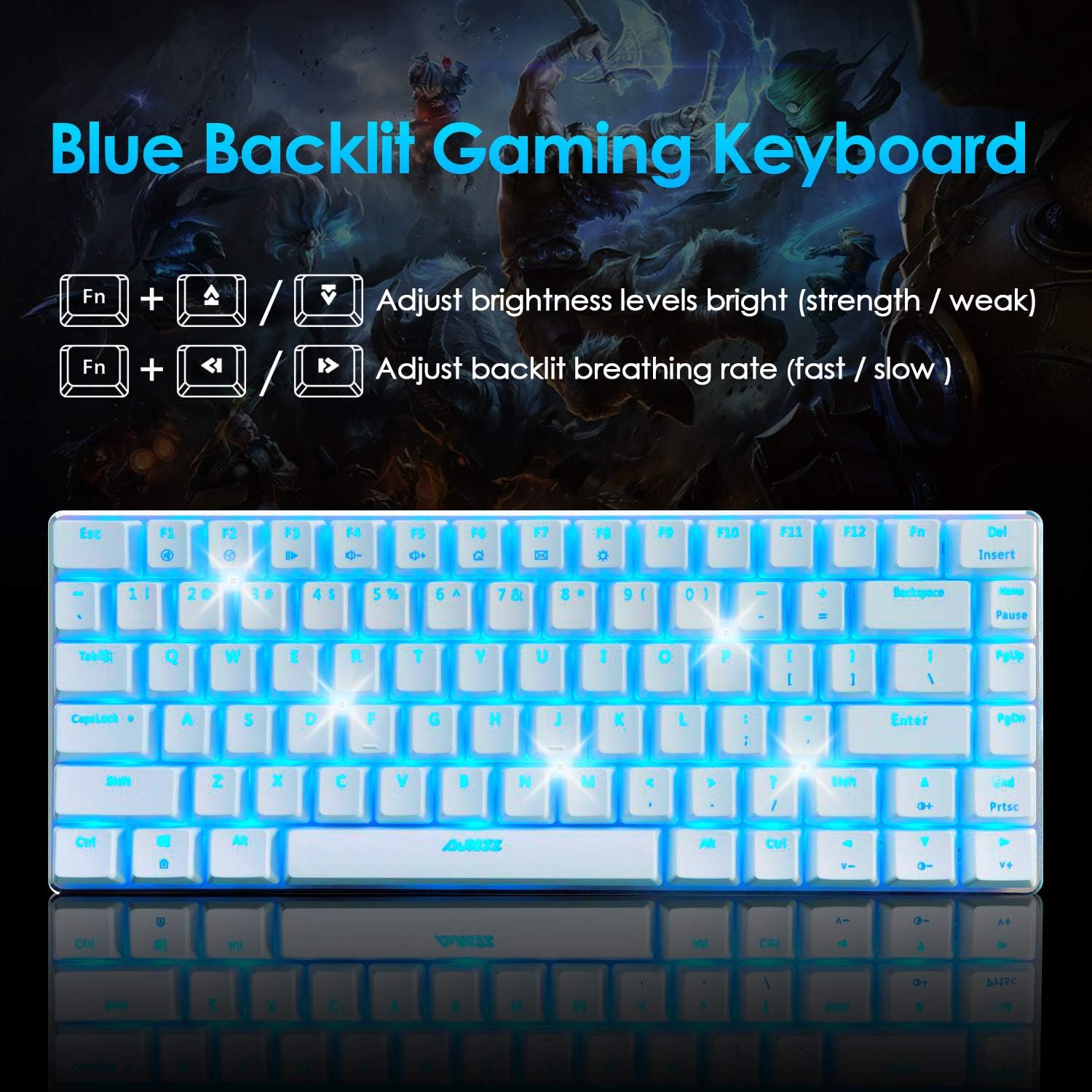
Image: The keyboard with blue backlighting, illustrating the Fn key combinations for adjusting backlight brightness and breathing rate.
- Backlight Control:
- Press FN + F8 to cycle through three backlight states: Standard Light, Breathing Light, and OFF.
- Press FN + ↑ (Up Arrow) to enhance backlight brightness.
- Press FN + ↓ (Down Arrow) to reduce backlight brightness.
- Press FN + ← (Left Arrow) to slow down the breathing light speed.
- Press FN + → (Right Arrow) to speed up the breathing light speed.
- Multimedia Shortcut Keys: The keyboard includes 12 multimedia buttons accessible via the Fn key.

Image: A visual guide to the 12 multimedia shortcut keys (F1-F12) and their corresponding functions when pressed with the Fn key.
- FN + F1: My Computer
- FN + F2: Search
- FN + F3: Calculator
- FN + F4: Media Player
- FN + F5: Previous Track
- FN + F6: Next Track
- FN + F7: Play/Pause
- FN + F8: Stop
- FN + F9: Mute
- FN + F10: Volume Down
- FN + F11: Volume Up
- FN + F12: Email
3.2 Mouse Functions
The ultralight gaming mouse features adjustable DPI and customizable RGB backlighting.

Image: The gaming mouse displaying various RGB backlight modes, including Cycle Flashes, Breathing, Wave, Colorful Streaming, Response, Streamer, RGB Mixed Light, and Gradient Effect.

Image: A close-up of the mouse highlighting the DPI button and illustrating the 6 adjustable DPI levels from 800 to 12000.
- DPI Adjustment: The mouse features a dedicated DPI switch button to cycle through 6 adjustable DPI levels (200-12000 DPI). This allows for on-the-fly sensitivity changes to suit different tasks or games.
- RGB Backlight: The mouse has 26 kinds of customizable RGB backlight effects. These can be adjusted through the mouse driver software (if available, typically downloaded from the manufacturer's website).
- Programmable Buttons: The mouse has 7 editable buttons (including scroll wheel, two side-buttons, and one DPI switch). These can be programmed for specific functions using the mouse driver software.
4. Maintenance and Care
Proper maintenance ensures the longevity and optimal performance of your ZIYOU LANG K55 combo.
- Cleaning the Keyboard:
- Disconnect the keyboard from your computer before cleaning.
- Use a soft, lint-free cloth slightly dampened with water or a mild cleaning solution to wipe the surface.
- For dust and debris between keys, use compressed air or a small brush. A keycap puller (often included) can be used to remove keycaps for deeper cleaning.
- Ensure the keyboard is completely dry before reconnecting.
- Cleaning the Mouse:
- Disconnect the mouse from your computer.
- Wipe the surface with a soft, lint-free cloth. Avoid getting liquid into the honeycomb shell.
- Clean the optical sensor on the bottom with a dry cotton swab if tracking issues occur.
- General Care:
- Avoid exposing the devices to extreme temperatures, humidity, or direct sunlight.
- Do not drop or subject the devices to strong impacts.
- Keep liquids away from the keyboard and mouse to prevent damage.

Image: A close-up view of the keyboard's blue mechanical switches with some keycaps removed, demonstrating the two-color injection molding technology for durable characters.
5. Troubleshooting
If you encounter issues with your ZIYOU LANG K55 combo, refer to the following common solutions:
| Problem | Possible Cause / Solution |
|---|---|
| Keyboard/Mouse not responding |
|
| Backlight not working or flickering |
|
| Mouse tracking issues / erratic movement |
|
| Keys not registering or double-typing |
|
6. Product Specifications
| Feature | Description |
|---|---|
| Brand | ZIYOU LANG |
| Model Number | K55 |
| Connectivity | Wired USB (Gold-plated interface) |
| Keyboard Layout | 82-key Compact Mechanical Keyboard |
| Keyboard Backlight | Blue LED Backlight (Standard, Breathing, OFF modes; adjustable brightness/speed) |
| Keyboard Material | High-grade ABS and Metal materials, laser engraved character keys |
| Keyboard Features | 12 Multimedia Buttons, Non-slip, Splash-proof design, Adjustable foot pads |
| Mouse Design | 65G Ultralight O-shaped Honeycomb Shell, Ultralight Ultrabraided Cable |
| Mouse Weight | 2.29 ounces (65 grams) |
| Mouse DPI | 200-12000 DPI (6 level adjustment, editable), Pixart PAW3325 optical sensor |
| Mouse Buttons | 7 editable buttons (including scroll wheel, two side-buttons, one DPI switch) |
| Mouse Backlight | 26 kinds of color breathing lights (adjustable via driver) |
| Button Life | 50,000,000 clicks (mouse) |
| Compatibility | Windows 2000 / XP / VISTA / 7/8/10 and MAC |
| Package Dimensions | 17.09 x 6.5 x 2.4 inches |
| Item Weight | 2.01 pounds |
7. Warranty and Support
Specific warranty information and direct customer support details are not provided within this manual. Please refer to the product packaging, the retailer's website, or the official ZIYOU LANG website for the most up-to-date warranty terms and contact information for customer service.
For driver downloads or advanced software for mouse customization, please visit the official ZIYOU LANG support page.